
6sense goes beyond IP-to-company resolution: it combines firmographic identification with buying-stage intent signals — telling you not just who is visiting, but where they are in their buying journey. It suits enterprise B2B teams with a mature account-based motion.
In the panel: Settings › Integrations › 6sense.
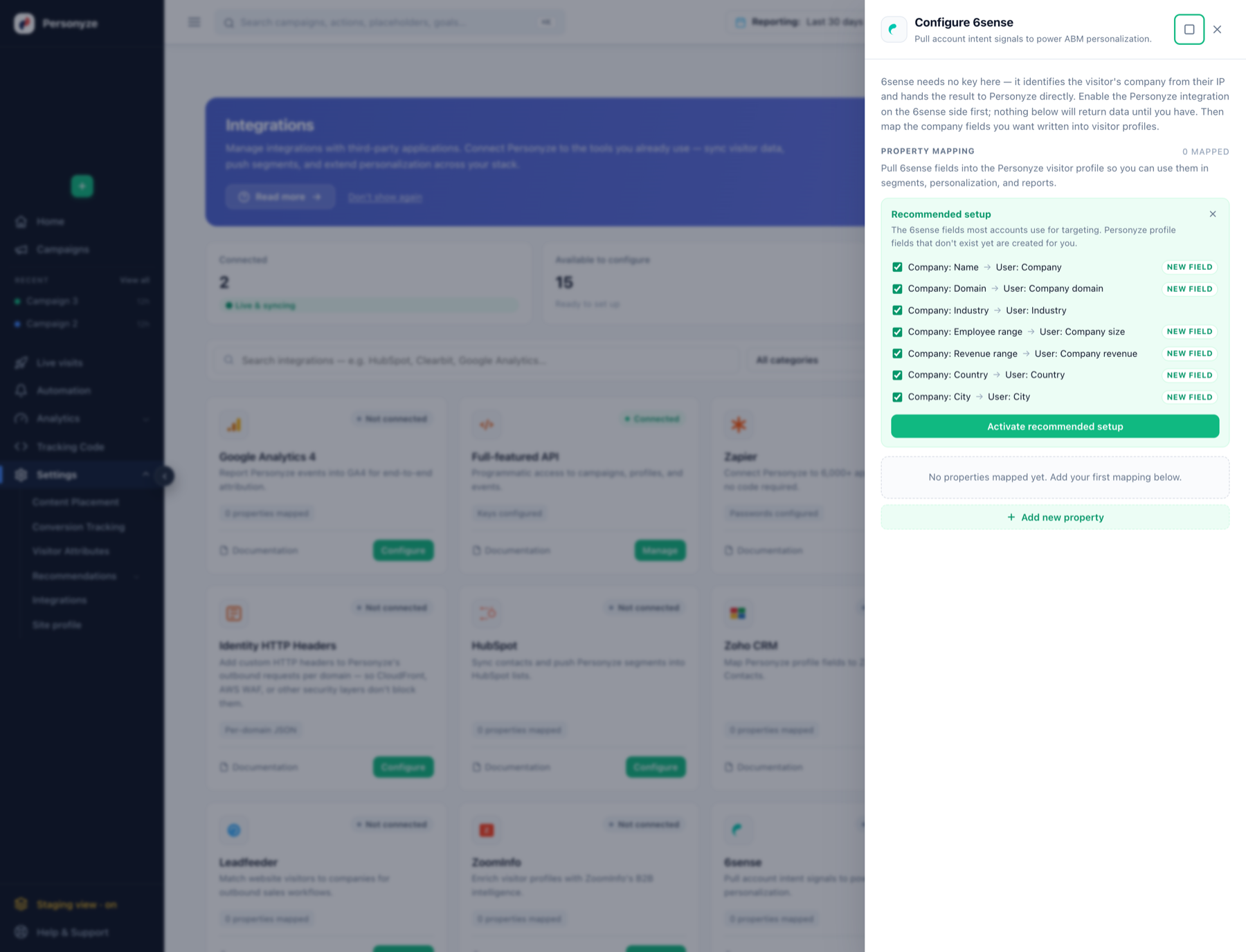
There is no key to enter — and that trips people up
6sense needs no API key in Personyze. It identifies the visitor’s company from their IP and hands the result to Personyze directly. The drawer has no credential field at all, only property mapping.
Which means the setup step people miss is on the other side:
- Enable the Personyze integration in 6sense first. Nothing in Personyze will return data until you have.
- Then open Settings › Integrations › 6sense in Personyze and map the company fields you want written into visitor profiles.
Because there is no key, a misconfigured 6sense side looks identical to a working one from inside Personyze — the drawer simply shows no mapped data. If rules never match, check 6sense before suspecting Personyze.
What 6sense brings in
- Company identification — name, domain, industry, sub-industry
- Size signals — employee count, annual revenue, funding stage
- Geography — HQ country, state, city
- Intent and buying stage — the signal unique to 6sense, and the reason to choose it over a pure reverse-IP provider
Map these in the drawer; Personyze profile fields that do not exist yet are created for you.
Targeting on buying stage
The intent data is what makes 6sense worth the setup. Typical patterns:
- Late-stage accounts — buying stage indicates decision or purchase → show a demo booking prompt rather than top-of-funnel content.
- Early-stage accounts — awareness or consideration → show educational content and case studies.
- Combine with firmographics — enterprise size AND late stage → route to sales rather than self-serve.
Using the data in targeting
On a campaign’s Target step, Add audience rule gives you two routes:
- The Integrations tab — this provider’s own rule entry, with a connection indicator. Every provider is listed whether or not it is connected, so read the marker.
- User CRM/ABM/Profile — any field you mapped, with the full operator set: contains, doesn’t contain, equals, doesn’t equal, is one of (list, file), is not one of, matches regex, starts with, ends with, is empty, is not empty.
Negative operators only match visitors who have a value. Someone with no data for that field will not match “industry doesn’t equal Retail” — use is empty for them.
Using the data in content
Mapped fields become dynamic variables in the WYSIWYG editor, so they can appear in the copy itself. Always set a fallback value — a variable with no default renders blank for anyone missing that field. See inserting dynamic variables.
A/B testing on it
Build the audience with the rule, then switch on Activate A/B testing on the Content step. The first test worth running is personalized versus generic to the same audience — it answers whether the integration earns its keep. See A/B Testing.
Related
- ZoomInfo, Albacross, Clearbit — firmographics without intent data.
- CRM / User-List Targeting