
Albacross identifies the company behind an anonymous visitor by reverse-IP lookup, and hands Personyze firmographics about it — name, domain, industry, headcount, revenue band, location. Nobody has to fill in a form: a visitor arrives, Albacross resolves their IP to an organisation, and that organisation becomes something you can target on.
That makes it an ABM tool. The classic use is showing enterprise messaging to enterprise visitors, or an industry-specific hero to someone from a bank, before they have identified themselves at all.
In the panel: Settings › Integrations › Albacross.
Before you start: use the right key
This is the single most important thing on this page, because getting it wrong fails quietly.
Albacross issues two keys, and only one of them works here.
| Key | Prefix | Works with Personyze? |
|---|---|---|
| Private (secret) key | sk_ |
Yes — this is the one to enter |
| Public key | pk_ |
No |
Personyze calls Albacross’s Reveal API from its own servers. The public pk_ key is only accepted from a whitelisted browser domain, so it is rejected everywhere else — including from us. Find the private key in Albacross › Settings › API Keys.
Two related traps:
- Do not enter an account ID or a tracking-code ID. Neither is an API key, and neither will ever return data.
- The Albacross dashboard prints the key as a ready-made header line —
Api-Key sk_…— and that whole line is usually what gets entered. Personyze now strips theApi-Keyprefix for you, but if you are entering it anywhere else, remove it: the API rejects the prefixed form.
Setting it up
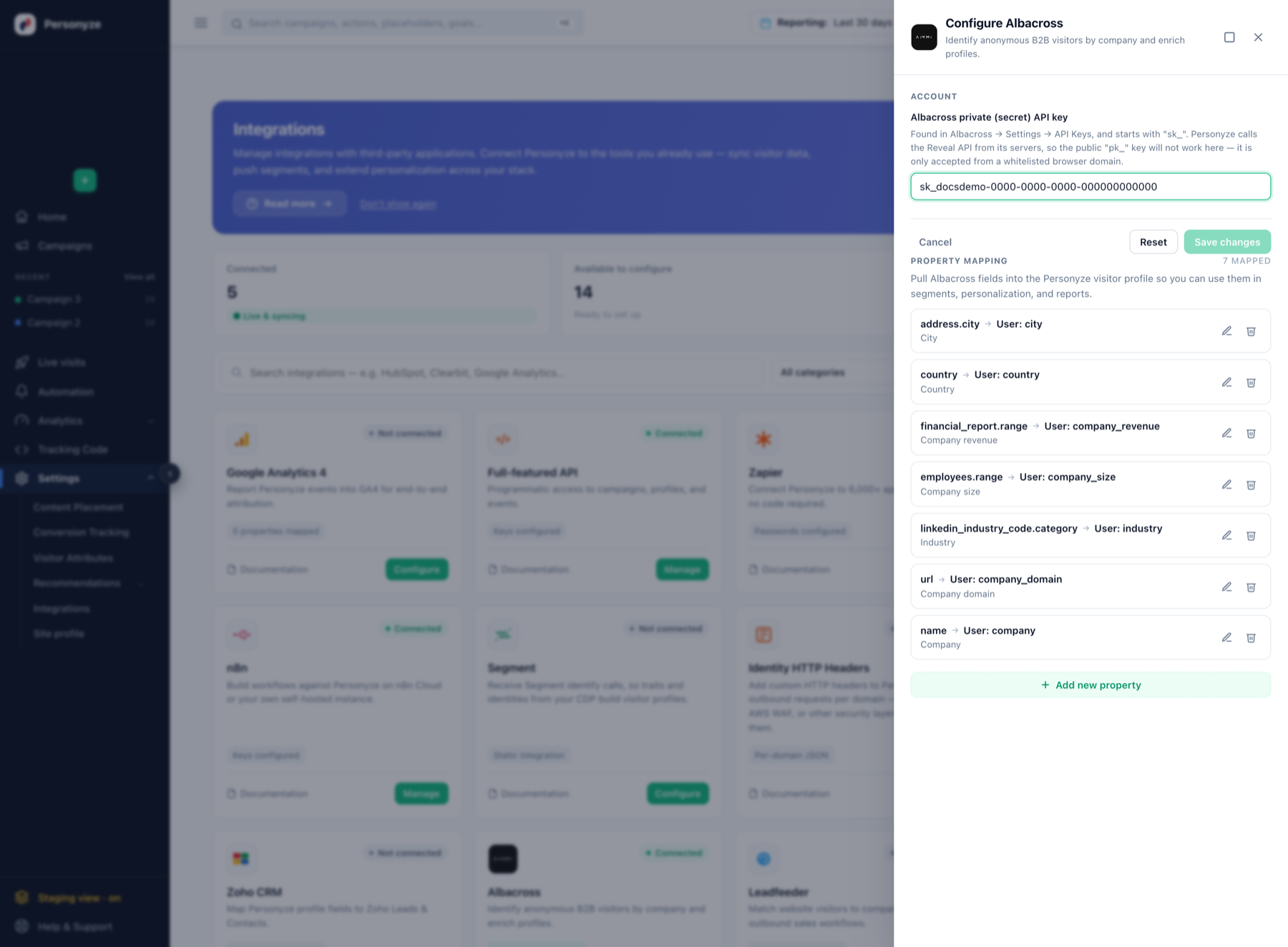
sk_ one. Click to enlarge.- In Albacross, open Settings › API Keys and find the private key. It starts with
sk_. - In Personyze, go to Settings › Integrations and click Configure on the Albacross card.
- Enter the key in Albacross private (secret) API key.
- Save changes.
If the value cannot be a key — too short, wrong shape — Personyze now reports that immediately rather than spending a request on it, and anything key-shaped is sent to Albacross so you get their own wording back on a failure (for example “Access denied — your API key does not have permission” rather than a bare status code).
Mapping the fields
Connecting authorizes the lookup; property mapping decides which Albacross fields land on the Personyze visitor profile and become available to segments, personalization and reports.
Activate recommended setup maps the seven fields most accounts target on. Personyze profile fields that do not exist yet are created for you:
| Albacross field | Personyze profile field |
|---|---|
| Name | User: Company |
| URL | User: Company domain |
| Linkedin industry code: Category | User: Industry |
| Employees: Range (like 51-200) | User: Company size |
| Financial report: Range | User: Company revenue |
| Country | User: Country |
| Address: City | User: City |
Everything Albacross can return
Beyond the recommended set, you can map any of these:
- Identity — Name, URL, Number, Description, Founded year, LinkedIn URL
- Location — Country, Address: Text / City / State / Zip code
- Size — Employees: From, To, and Range (e.g.
51-200) - Revenue — Financial report: From, To, Currency, and Range
- Classification — NACE code (Code, Category), LinkedIn industry code (Code, Category)
For targeting, the Range fields are usually more useful than the raw From/To numbers: “company size is 51-200” is one rule, where a numeric range needs two.
What to expect from the lookup
Reverse-IP identification is probabilistic, and a few properties of it shape how you should build campaigns on top:
- Not every visitor resolves. Home broadband, mobile networks and VPNs frequently return nothing. A no-match is normal, not an error — always design a fallback for visitors with no company data.
- It identifies the organisation, not the person. You learn that someone from a 500-person insurance company is reading the pricing page; you do not learn who they are.
- Reveal is IPv4-only. Visitors arriving over IPv6 cannot be resolved.
- Alexa rank is gone. Alexa shut down in 2022, so that field no longer exists on the Albacross side regardless of what older documentation says.
Using Albacross data in targeting
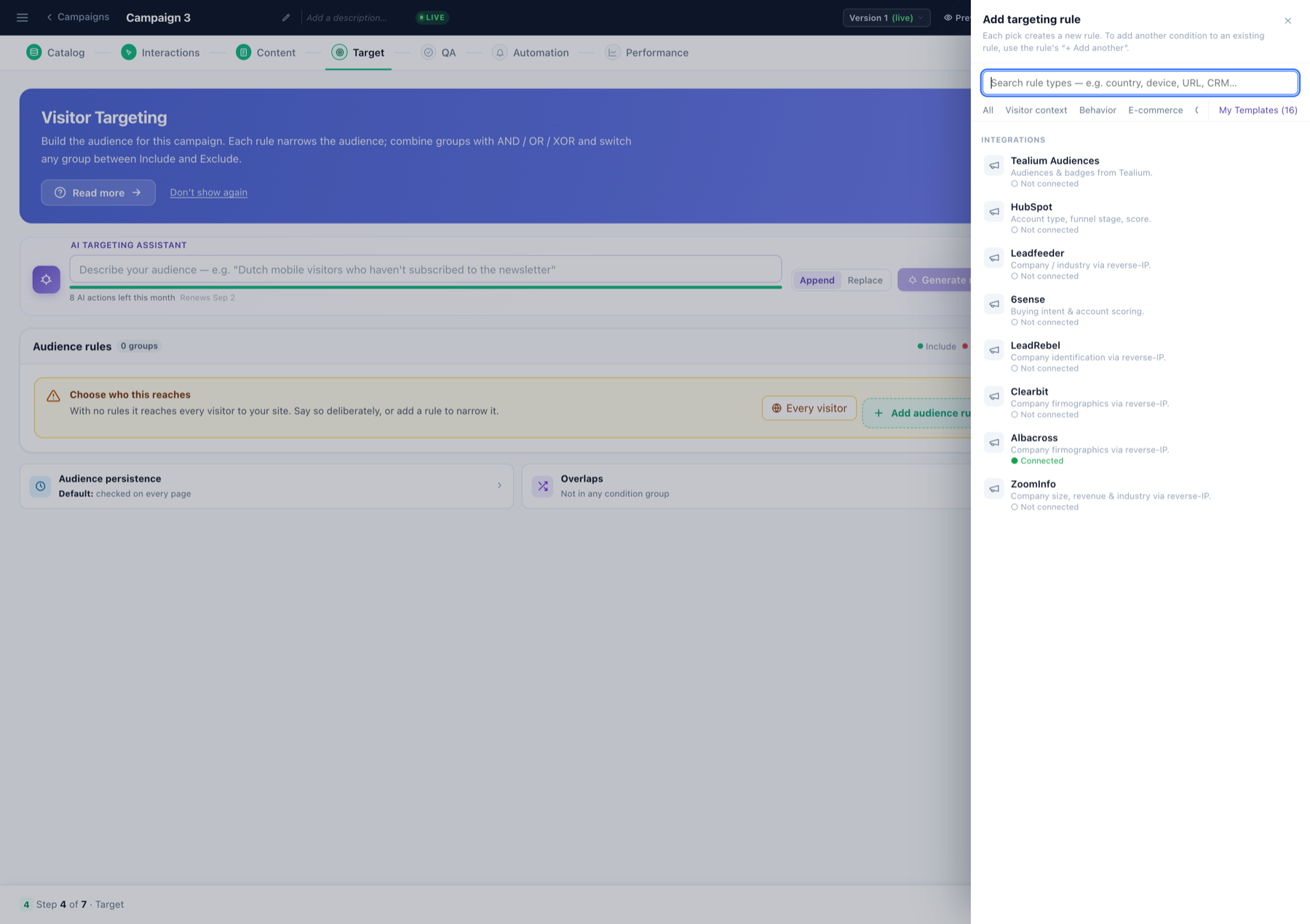
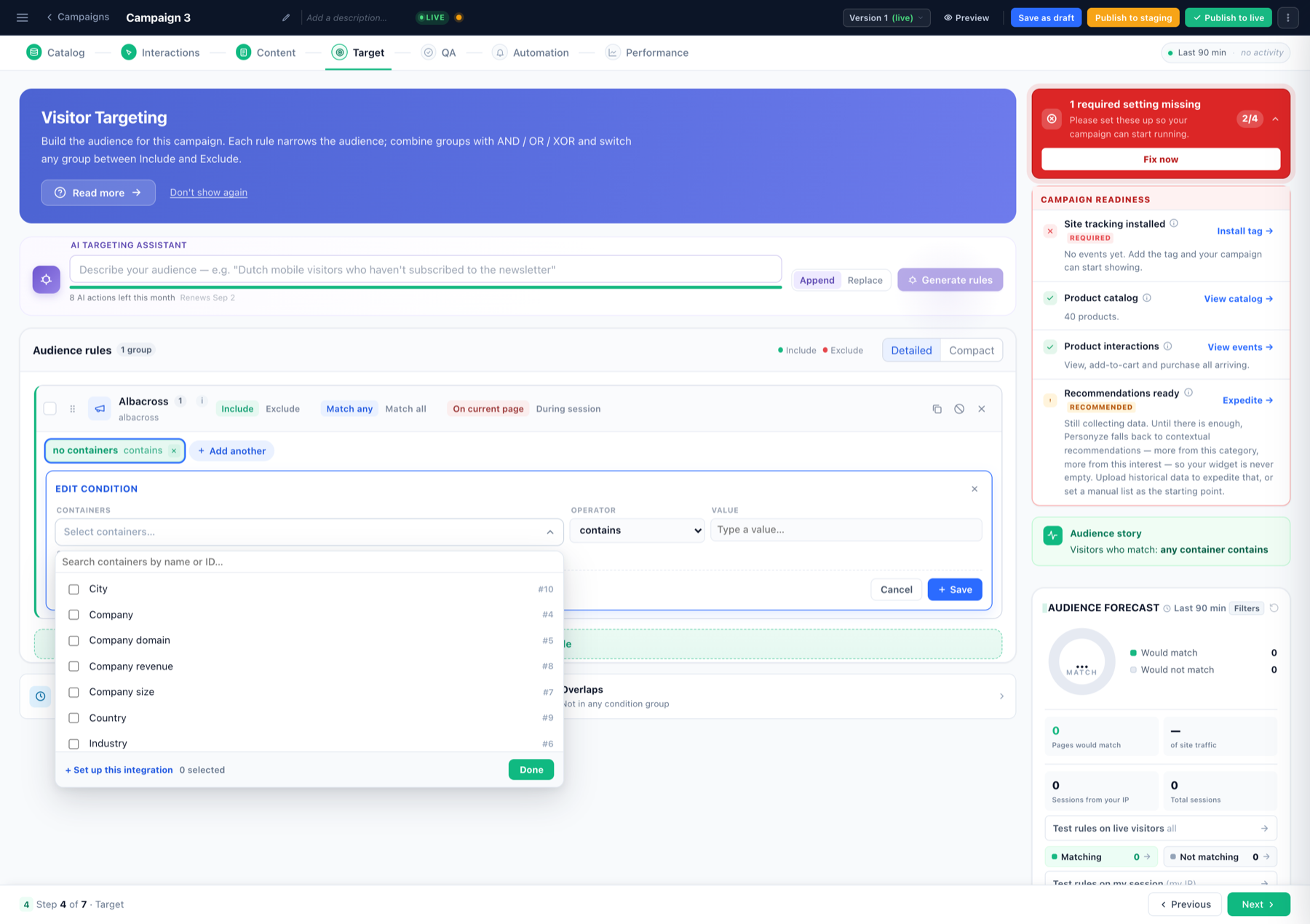
Two places it shows up on a campaign’s Target step:
- Add audience rule › Integrations › Albacross — listed as “company firmographics via reverse-IP”, with a connection indicator. Note that an integration appears in this list whether or not it is connected, so the marker is worth reading.
- Add audience rule › User CRM/ABM/Profile — every field you mapped, with the full operator set (contains, equals, is one of, matches regex, is empty, and so on).
Worked examples:
- Enterprise messaging — Company size is one of (501-1000, 1001-5000, 5001+) → swap the self-serve pricing block for “talk to sales”.
- Industry landing page — Industry contains Financial → show finance-specific proof points.
- Named-account ABM — Company domain is one of (list, file) → upload your target-account list and greet exactly those companies.
- The fallback, which you must build — Company is empty → the generic experience for everyone who did not resolve.
Remember the negative-operator rule: doesn’t equal and is not one of only match visitors who have a value. Someone with no company data will not match “industry doesn’t equal Retail” — use is empty for those.
Using the data inside the content
Mapped Albacross fields are available as dynamic variables in the WYSIWYG editor, so the company can appear in the copy itself:
- “Trusted by teams in [Industry]”
- “See how we work with companies like [Company]”
Fallbacks matter more here than with CRM data, because the match rate is lower by nature. A greeting that reads “See how we work with companies like ” is worse than no personalization. Set a default when you insert the variable — see inserting dynamic variables.
Naming the company outright also has a tone risk: some visitors find it impressive, others find it intrusive. Industry and size usually personalize just as effectively with none of that.
A/B testing on firmographics
Build the audience with an Albacross rule, then click Turn on A/B testing on the Content step. Two tests worth running:
- Does firmographic personalization pay? One arm industry-specific, one arm generic, same audience. This answers whether the integration earns its keep.
- How explicit should it be? One arm naming the company, one arm referring only to industry or size. This is the tone question above, answered with data instead of opinion.
Assignment is per visitor and sticky, so a returning visitor from the same company stays in the same arm. See A/B Testing for choosing a winner criterion.
When nothing seems to happen
- You entered the
pk_key. It cannot work from a server. Use thesk_private key. - You entered an account ID or tracking-code ID. Neither is an API key.
- You entered
Api-Key sk_…. Personyze strips that prefix now, but older saved values may still contain it. - 0 properties mapped. The key alone does nothing — until fields are mapped, no data reaches the profile.
- Rules match nobody. Check the match rate first: if most visitors are on mobile, VPN or IPv6, few will resolve. Test with Company is not empty to see how many resolve at all.
Related
- HubSpot Integration — CRM data for known contacts, complementary to reverse-IP.
- CRM / User-List Targeting
- A/B Testing
On the Personyze site
- Albacross personalization with Personyze — what you can build with Albacross data once it is connected.
- Account-based marketing — the wider ABM playbook this feeds.
- B2B website personalization — personalizing before the form fill.