
leadREBEL is a Swiss-based B2B lead identification tool that resolves visitor IPs to company information. Its EU/Switzerland data residency makes it a good fit for European teams that need strict regional data sovereignty.
The Personyze integration pulls leadREBEL attributes onto each visitor’s profile automatically — so the moment leadREBEL identifies a visitor’s company, that data is available across every Personyze targeting rule, campaign, content variable, and report.
What data leadREBEL brings into Personyze
Common attributes available through the integration include:
- Company identification — company name, domain, industry, sub-industry
- Size signals — employee count, annual revenue, funding stage
- Geography — HQ country, state, city
- Role/department (when available) — visitor’s job function or seniority
- leadREBEL-specific signals — see the leadREBEL property catalog for the full list
You map each leadREBEL attribute to a Personyze visitor variable during setup. Personyze then keeps those variables fresh on every visit.
Why pair leadREBEL with Personyze
leadREBEL on its own tells you who is visiting. Personyze tells you what to do about it. Together they unlock four high-leverage motions:
Setting up the leadREBEL integration
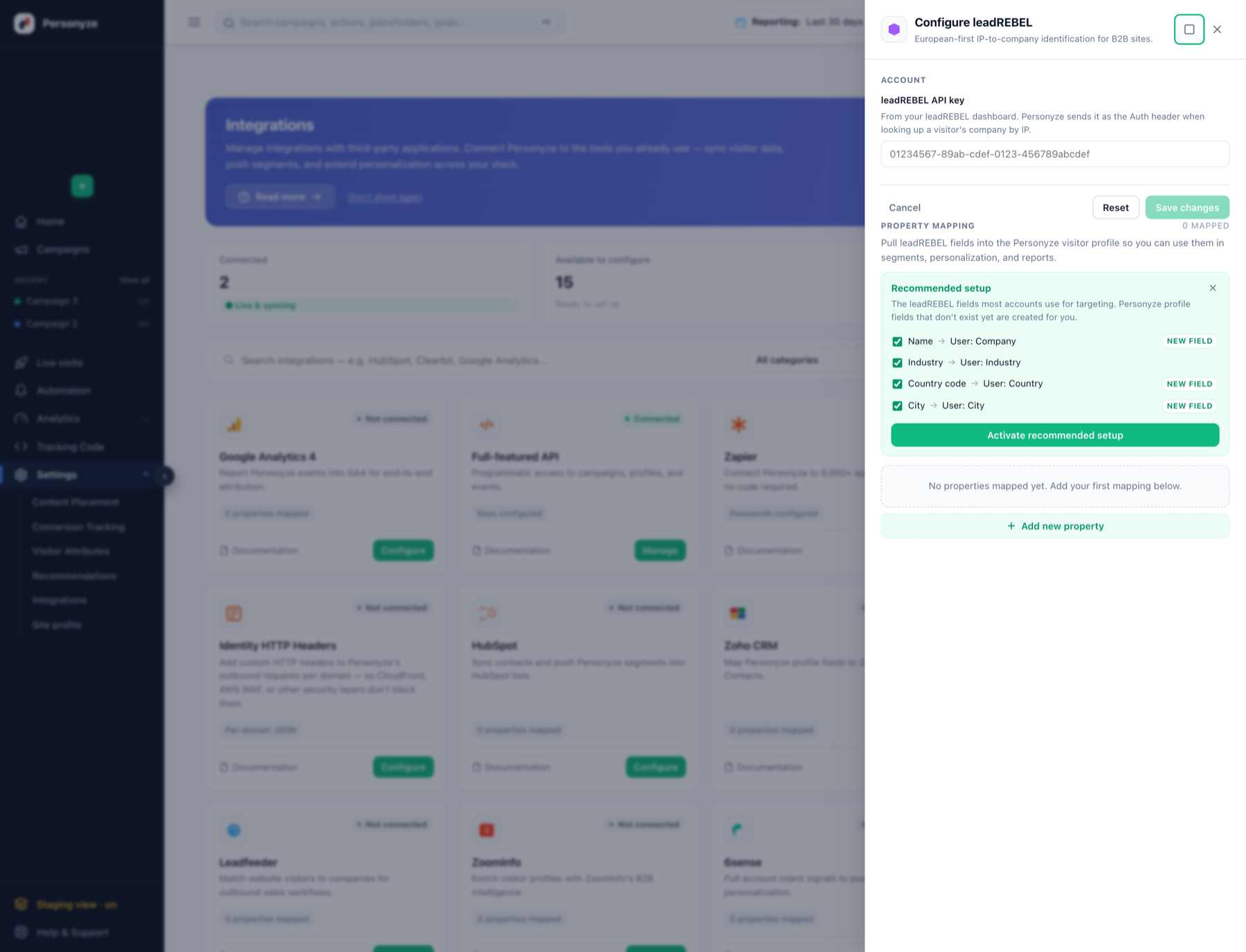
- Get your leadREBEL API key. Find the API key in your leadREBEL dashboard. Personyze sends it as the Auth header when looking up a visitor’s company by IP.
- Open the Personyze drawer. In the panel go to Settings → Integrations, find the leadREBEL tile and click Configure. A drawer opens on the right.
- Save the key. Enter it in the leadREBEL API key field and click Save changes. Personyze validates the key and the tile switches to Connected.
- Map data fields — one click. The drawer opens with a Recommended setup panel pre-selecting the leadREBEL fields most accounts use for targeting. Click Activate recommended setup and Personyze creates any visitor-profile fields that don’t exist yet (marked New field) and wires the mappings:
- Name → User: Company
- Industry → User: Industry
- Country code → User: Country
- City → User: City
- Add anything else. Need a field that isn’t in the recommended list? Click + Add new property, pick the leadREBEL attribute on the left and either an existing Personyze visitor variable or a new one on the right.
- Verify. Mappings activate immediately — open Live visits and new sessions from identified companies will show the leadREBEL attributes on their profile.
Using leadREBEL data across Personyze
Targeting rules
The mapped leadREBEL variables appear under the User Profile Data rule in any wizard. Build audiences like:
- Industry equals “Software” — show a tech-specific landing variant
- Employee count > 1,000 — surface enterprise-tier pricing and case studies
- Annual revenue between $10M–$100M — middle-market specific messaging
- Country in [Germany, France, Netherlands] — region-tailored language and currency
Dynamic content variables
Insert leadREBEL variables directly into headlines, paragraphs, and CTAs using the Personyze WYSIWYG editor‘s Insert Personyze Variables menu. Examples:
- “Welcome,
{Company Name}” in the hero of your homepage - “Trusted by leading
{Industry}teams” in social proof sections - “See how companies like
{Company Name}reduce churn by 30%” in case-study CTAs
If leadREBEL doesn’t have data for a particular visitor, the variable defaults to blank — always test with both an identified visitor and an anonymous one to make sure your fallback copy reads naturally.
Reports and Live Visits
leadREBEL attributes also appear as filter dimensions in your Personyze analytics reports — segment campaign performance by industry, employee size, region, or any mapped attribute. They also surface in Live Visits, where you can watch in real-time which companies are on your site right now and which campaigns are firing for them.
Named-account targeting
For account-based campaigns, you can target specific named companies. Either type them into the targeting rule one at a time, or upload a spreadsheet of company names (lead-scoring tier lists, target account lists, etc.) — Personyze matches against the leadREBEL-resolved company name on each visit.
Best practices
- Map only the attributes you’ll use. Each mapped property adds a small bit of overhead. Start with the 4–6 attributes most relevant to your campaigns and add more as needed.
- Always set fallback content. Not every visitor will be identified by leadREBEL. Make sure your default content (when leadREBEL variables are blank) still reads naturally and converts.
- Test both identified and anonymous flows. Use the QA step to preview as a known-company visitor and as an unknown one. Both should look polished.
- Combine with on-site behavior. leadREBEL tells you about the company; Personyze’s behavioral tracking tells you about the individual. The strongest campaigns combine both — e.g., “enterprise-revenue visitor who’s viewed pricing 3+ times this week.”
- Monitor match rate. leadREBEL’s identification rate isn’t 100% — typical resolution rates are 30-60% of B2B traffic depending on your industry and geography. Check your reports periodically to confirm the match rate matches your expectations.
On the Personyze site
- LeadRebel personalization with Personyze — identify visitors and personalize on firmographics.
- B2B website personalization — personalizing before the form fill.