
The Reviews page is the account’s one library of reviews. Every review, testimonial, case study, press quote and social post lands here, whatever it came from — a connected review platform, an uploaded file, a Review Form on your own site, or typed in by hand. Every review widget on your site shows from this library, so what you publish and tag here is what visitors see.
Watch the 2:29 walkthrough: where reviews come from, showing the right ones on a product page, collecting a new one with a Review Form, and approving it on the Reviews page.
Find it under Settings → Reviews. It has four tabs: Library, Customer logos, Sources and Feedback.
Library
The list of everything, with four counters across the top: Everything, On your site (with the average rating), Waiting for you and Hidden from your site. Click a counter to filter the list to it.
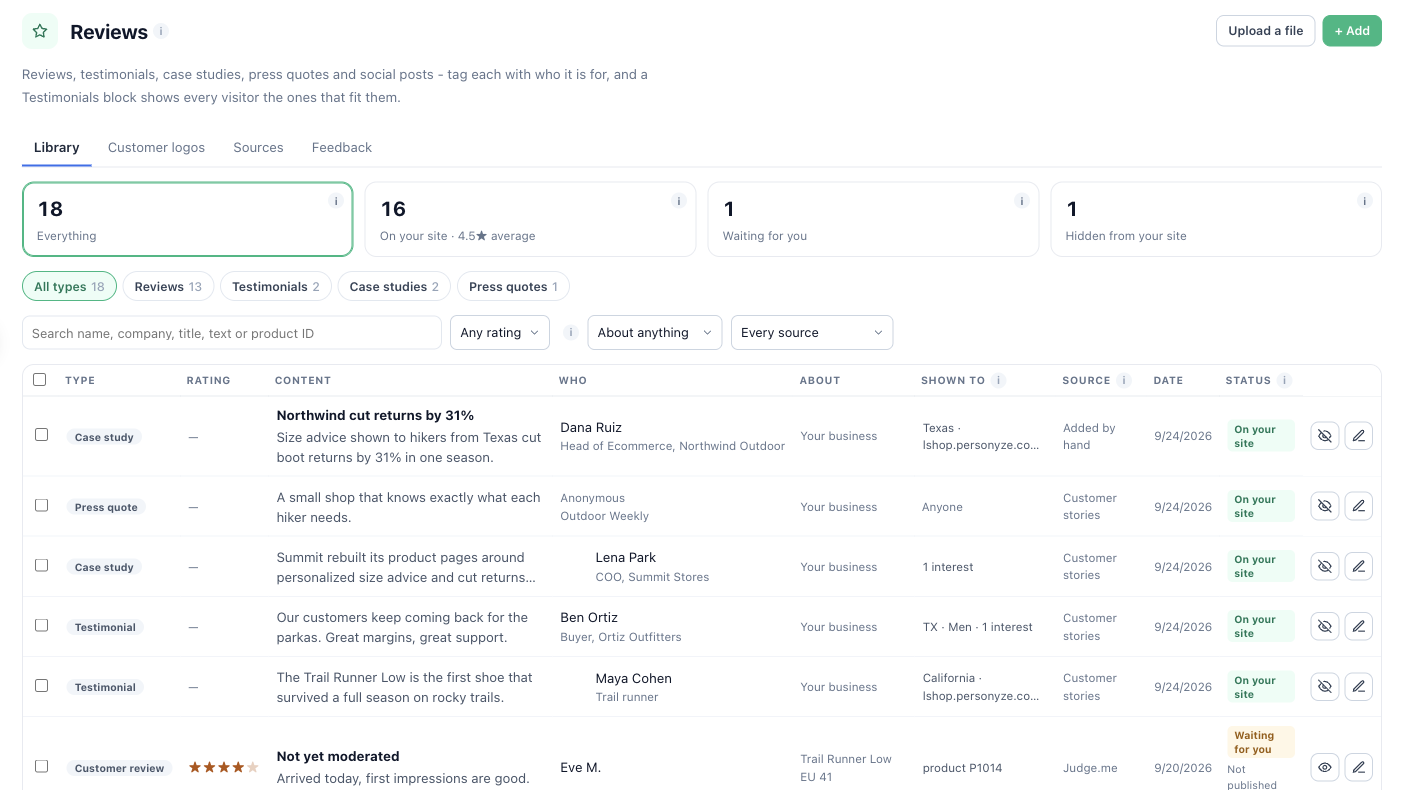
What each status means
- On your site — published. A Show Reviews widget can show it.
- Waiting for you — collected or imported, not published yet. Reviews from your own Review Form wait here by default, and so do new reviews from a platform connection that does not publish at once.
- Hidden from your site — kept, but never shown until you publish it.
- Removed on the platform — gone from the review platform it came from, so it is not shown here either.
Finding reviews
Filter by format (Reviews, Testimonials, Case studies, Press quotes, Social posts), rating, what the review is about (your business, products, pages & articles), source and date, or search by name, company, title, text or product ID. The Shown to column says who each review is tagged for — Anyone when it is not tagged.
Acting on many at once
Tick rows to Publish, Hide or Delete them together, or Set a field on all of them — a country, an industry, what they are about, or one of your own fields.
The review editor
Click the pencil on any row. The editor holds everything about one review, in sections: What it is (format, status, date, Featured, language), What it says (rating, headline, text, would-recommend, helpful votes), Who said it (name, job title, company, location, photo, company logo, verified buyer), Pictures and link, What it is about (your business, a product, or a page), Who it is for, Other details and Your reply, which is shown under the review with the name you give in Reply from.
Who it is for
These tags are what a Show Reviews widget matches each visitor against. A field left empty means anyone. List fields take several values separated by commas — a case study for Indonesia and Vietnam carries both.
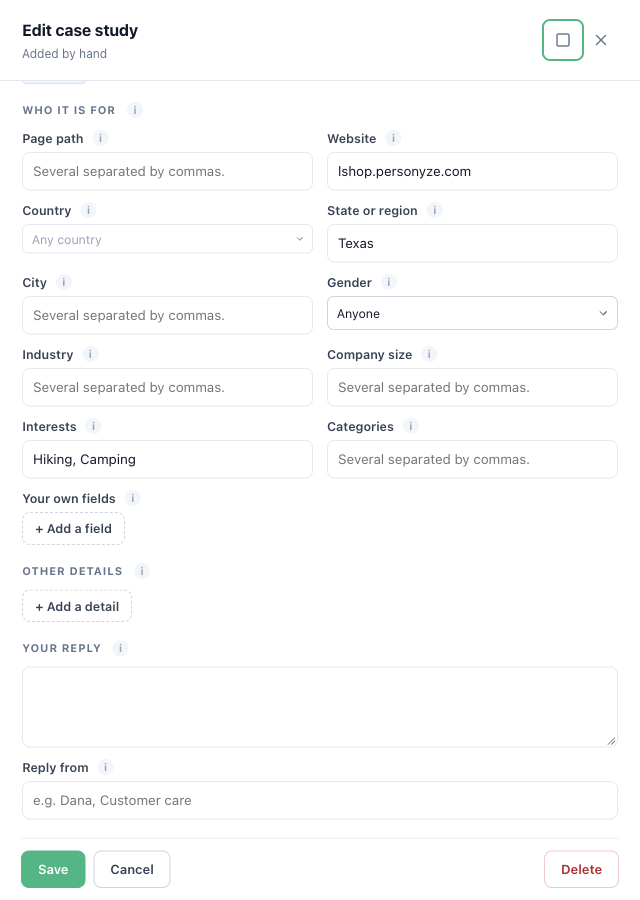
- Country, State or region, City — the visitor’s own come from their IP address.
- Industry, Company size — the visitor’s come from their data: a form, a CRM upload, or a company-enrichment integration.
- Website and Page path. A path ending in
/or*also covers every page under it; a lone/is the home page;/pricingand/pricing/are the same page. A review of a page or article takes its page path from the page link when Page path is empty. - Gender, Interests, Categories, and Your own fields — any visitor attribute and a value.
Customer logos
Your customers’ logos, for a “trusted by” strip. A logo is one more kind of entry in this library, never shown in a review widget or counted in a rating. See Customer Logos.
Sources
Where your reviews come from: every connected review platform with its status (Connected, Importing…, Paused, Sync failed), and every uploaded file and scheduled link with its last read. A platform connection is managed on the Integrations page — Manage connections takes you there; see Connecting review platforms. A file or link offers Edit and Stop reading it; see Importing reviews.
Feedback
Every answer visitors gave to your Feedback questions: the score, the comment, when, what it was about, and which question asked it. Filter by question or campaign and dates, open an answer to read it or delete it. Feedback is private — never shown on your site as a quote. The same list is the first step of every Feedback & NPS campaign, Your feedback.
The Reviews & Testimonials campaign
New campaign → Reviews & Testimonials starts with two steps about this library — Collect reviews (the Sources) and Reviews page (publish and tag) — before the usual Content, Target, QA, Automation and Performance. Both edit the account’s one library, not the campaign: however many campaigns show reviews, they all show from here.
Related
- Importing reviews from a file or a link
- Connecting review platforms
- Show Reviews — showing the right ones to each visitor
- Review Form — collecting new ones on your site
- Troubleshooting