
Part of the AI assistant.
AI Chat → Appearance is what the visitor sees. It has its own screen and its own
save, because it is the one part you will keep adjusting after everything else is settled.
The look
- Colour, corner (any of the four), header, message box and send button.
- Who they appear to be talking to — your logo, one person, a rotating team, or whoever is
signed in right now. Give each person a name and a picture; it appears on the button, on the teaser card and beside
their replies. - What the button shows — a person or an icon, with a choice of icon and a pill or rounded
shape. - How long a conversation is remembered — until the tab closes, or across visits on that
device. - A sound when a reply arrives.
The teaser card
The small card that pops out of the shut button and speaks before the visitor does. You set its headline, its message,
how long after load it appears — and whether it appears at all.
{online} in the headline and it becomes the number of people signed in to answer right now, witha green dot beside it. When that is nobody the card is not shown at all — an
“available” badge over an empty desk is the one thing visitors remember.
Reading answers aloud
Offer to read answers aloud puts a small speaker button on every answer, so a visitor can hear the one
they want. It never starts on its own: somebody who uses the microphone is asked once whether replies should be read
back, and their answer is remembered. It uses the voice already on their device — nothing is sent anywhere and it
costs nothing.
Attachments
Let visitors attach an image is off by default. Switched on, a paperclip appears in the message box
once a conversation has started — there is nothing to attach it to before that. Images only, a few
megabytes each, and the server checks the bytes rather than trusting the file name, so a renamed file is refused.
Operators can attach too.
“Powered by Personyze”
A small link sits under the chat panel and under the ask box. It is part of what a free account gives in exchange, so
Hide “Powered by Personyze” can only be switched on with a paid plan — on a free plan
the control is visible but disabled, and the link stays.
come back to this screen. White-label accounts never see the link at all.
What a campaign can change
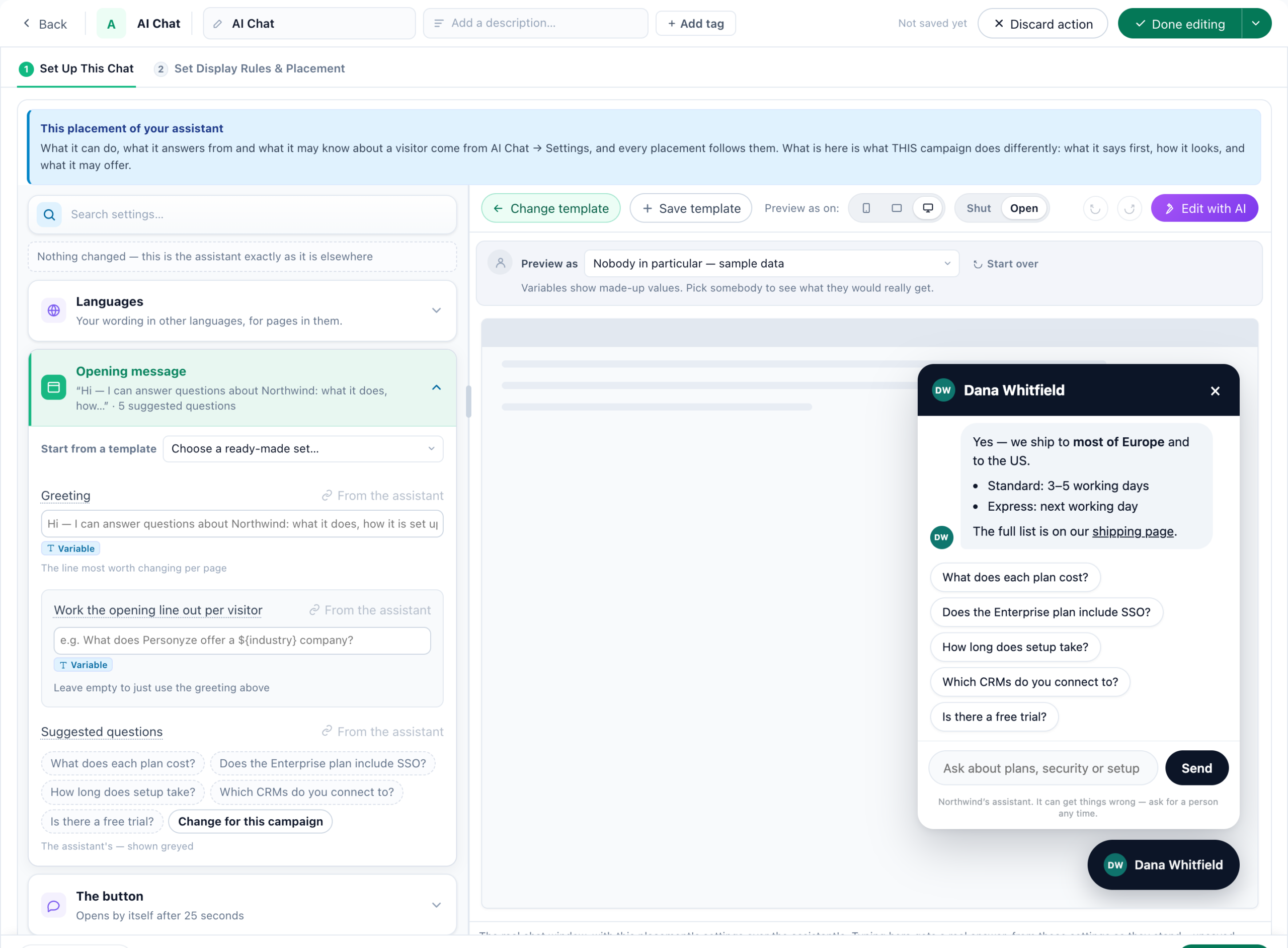
The action opens on Set Up This Chat and Set Display Rules & Placement, with a live preview beside the settings — run it as a chosen visitor to see the variables they would really get, shut or open, at any device width. Edit with AI takes the whole placement as a prompt, and a set of wordings can be saved as a template for the next campaign.
Everything above is the account’s. A placement may override some of it for its own pages — anything left empty follows the assistant, and each field is labelled From the assistant or Changed here.
Where a setting follows the account, a From the assistant box shows the account’s value with Change for every chat, and the last card, From the assistant, gathers everything else every chat shares. An account that has not described its business yet is asked here: Tell it about your business is written once, for every chat on your site, and saved with Save for every chat.
- Opening message — greeting and suggested questions. On a checkout, “Still
deciding?” beats “How can I help?”. - The button — icon or face, an optional label, and whether it opens by itself.
- Colour and wording — it opens on a Looks row: Midnight, Daylight, Ocean, Sunset, Forest, Lavender, Rose, Graphite, Editorial, Mono and Candy. One click sets the colour, the Theme (Always light or Always dark), the Corners and the Font, on these pages only. Change any of them afterwards and the look shows as your own.
- Suggest what to ask next, under Window and home — two or three questions under an answer, written with it: Never, After the first answer or After every answer. Never beside a calendar it has just offered. Left alone, it follows the switch on AI Chat → Appearance.
- What it answers from — the whole knowledge base or one tag, with a choice of what happens when
that tag has no answer. - Search which catalogue — where you import more than one feed, point this placement at one of
them. A shop with a feed per country can have its Spanish pages search Spanish titles. The control only appears when
there is more than one feed to choose between. - Can it hand over to a person?
- Offers and meetings — the account’s offers, with New offer to write one, and Do not offer meetings on these pages. A placement can switch meetings off, never on — see Offering a meeting.
- Extra instructions and It must never.
Languages, the first card of the chat’s designer, gives its 17 texts a version per language — by the page’s address, the browser’s language or a rule of your own — and the chat’s own words (“Send”, the email form) follow that language. See Languages.
account-level rule, and a catalogue choice can only narrow what the account already imports.
The preview answers for real
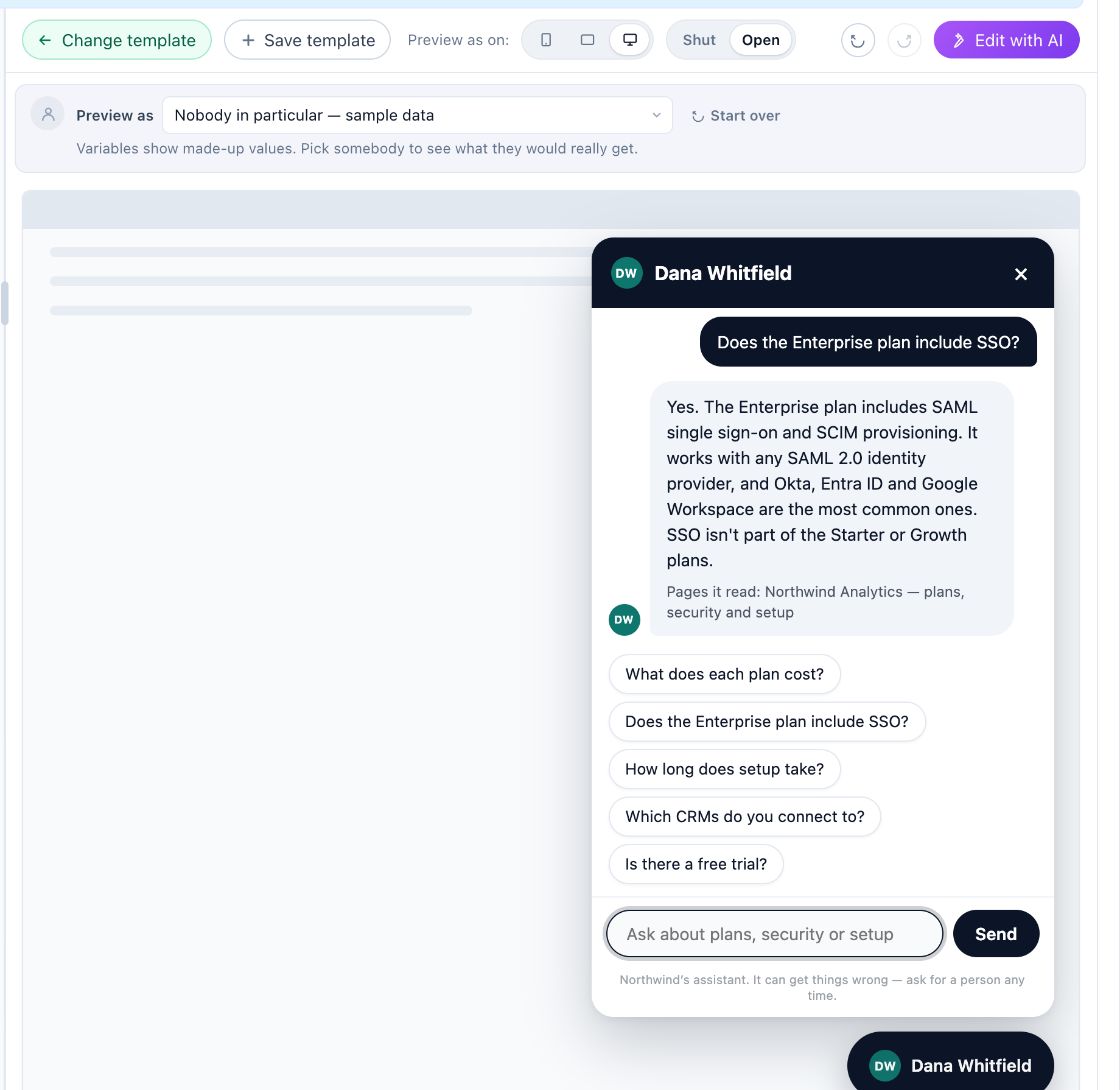
Type a question into the preview’s chat and it answers as it would on your site: from this placement’s settings as they stand, unsaved changes included, with Pages it read: under each answer. A handover is only described (“Passed to a person here – in a test no case is opened.”), and so is a request for an email address.
- It uses AI credit, but nothing is stored as a conversation, and test questions are not counted in reports or against the allowance.
- It needs the AI Chat add-on; a chat that is switched off can still be tried.
An opening line worked out per visitor
Under Opening message, Work the opening line out per visitor lets the chat open by answering a question you chose for the visitor, before they type anything — for example What does Personyze offer a ${industry} company?. A variable in the question makes the answer about them.
- What they see first: The greeting, then this answer, or Only this answer. Tick Show the question too, as if they had asked it to show the question above it.
- One answer is written per distinct question and reused for an hour, which keeps the cost per segment rather than per visitor.
- The shared line is written only from the question and your site — never from another visitor’s profile or page. Anything personal comes in through the question’s own variables, which is also what gives each segment its own line.
- A question with a variable has a fallback for visitors without the value: the greeting on its own, or another question you write. On pages in another language, the Languages card gives each language its own question and, under Asked instead when a value is missing, its own fallback — so a visitor without the value is asked a whole question in their language, never one with a gap. A translated suggested question that loses its value is dropped.
Leave it empty to just use the greeting. How the answer is introduced is an account setting — see Behaviour.