
A Review Form, a Feedback question and a review email can each ask about one thing the visitor bought. One step, Which product and when, decides which product and on which day, for each visitor: ask a week after it arrived, leave out what they sent back, or ask why it came back.
Where the step is
| Where | When it has the step |
|---|---|
| Review Form | When it asks about A product from their history — the card under What should they review?. It comes right after Customize look and feel. |
| Feedback | Always second, after the design. It works while the question is about The product they last bought (the design’s What the Question Is About → About); for a question about your business, a product on the page or the page, it is off and says so. |
| Ask for a review by email | When it asks about A product they bought. It is the email’s first step. |
The step opens on a sentence that says what it will do, e.g. The form asks about the newest product they bought. A design with its own way of picking says so; changing a setting here replaces that with yours.
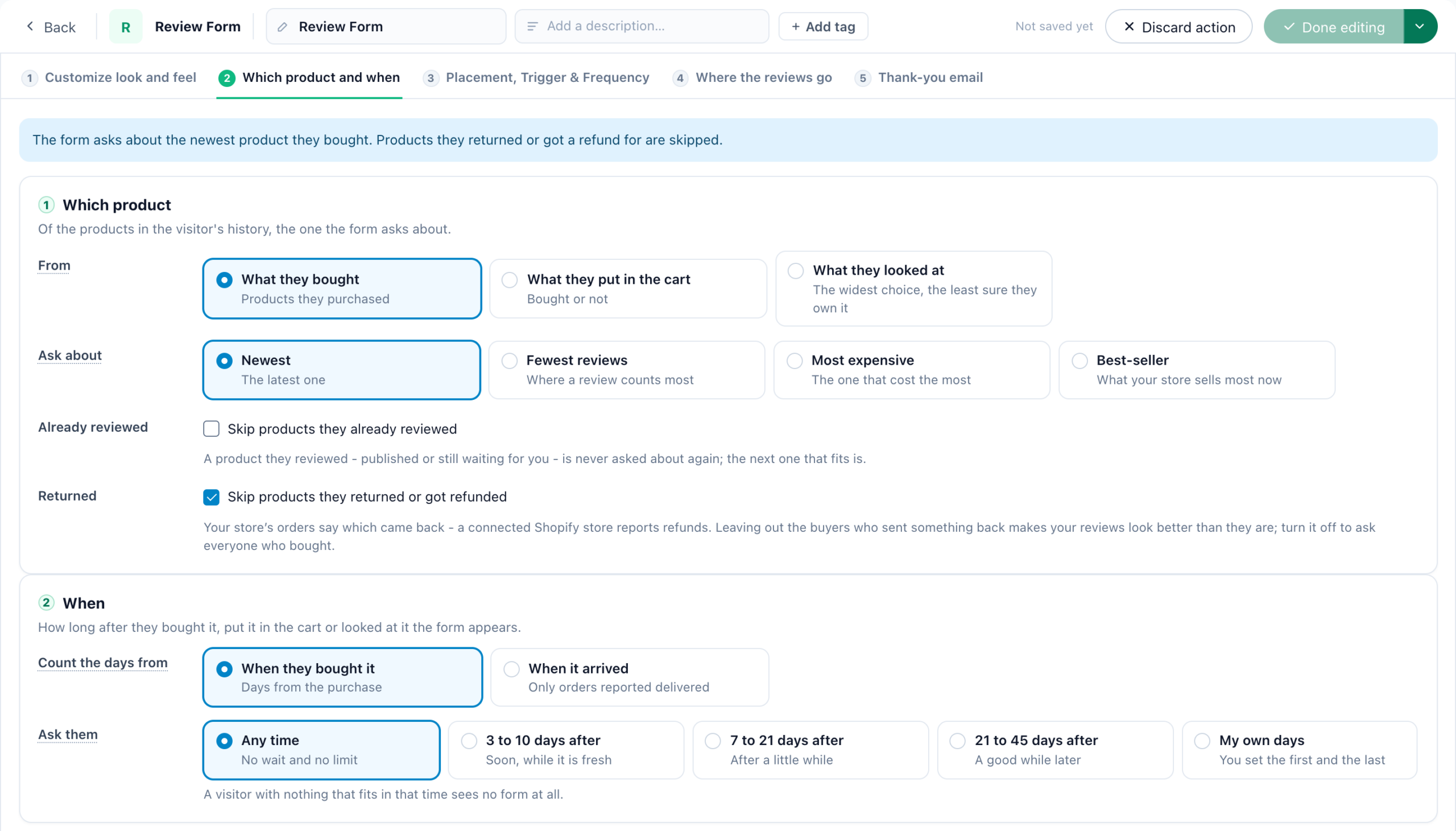
Which product
| Setting | Choices |
|---|---|
| From | What they bought — products they purchased; What they put in the cart — bought or not; What they looked at — the widest choice, and the least sure they own it. |
| Ask about | Newest — the latest one; Fewest reviews — the one with the fewest reviews on your Reviews page, where a review counts most; Most expensive; Best-seller — what your store sells most now. |
| Already reviewed | Skip products they already reviewed — a product they reviewed, published or still waiting for you, is never asked about again; the next one that fits is. |
| Returned (Review Form, what they bought) | Skip products they returned or got refunded — see Returns. |
When
Ask them: Any time — no wait and no limit; 3 to 10 days after — soon, while it is fresh; 7 to 21 days after; 21 to 45 days after — a good while later; or My own days, the first and the last. Only what falls inside those days is asked about: too recent and the form waits, too old and it is left out. A visitor with nothing that fits sees no form at all, and a review email is not sent to them.
For what they bought, Count the days from sets the day the count starts:
| Choice | Asks about |
|---|---|
| When they bought it | Days from the purchase — what the design does by itself. |
| When it arrived | Only products whose order your store reported delivered, counted from that day. An order still on its way gets no form yet. |
| When it was returned (Feedback) | Only products they sent back or got a refund for, counted from that day. |
Returns
On a Review Form about what they bought, Skip products they returned or got refunded leaves out a product that came back and asks about the next one that fits. It is on for a new form. Leaving out the buyers who sent something back makes your reviews look better than they are; turn it off to ask everyone who bought.
A product bought more than once counts as returned only when the latest order of it came back.
Asking why it came back
A return says more as feedback than as a review, so a Feedback question asks about it:
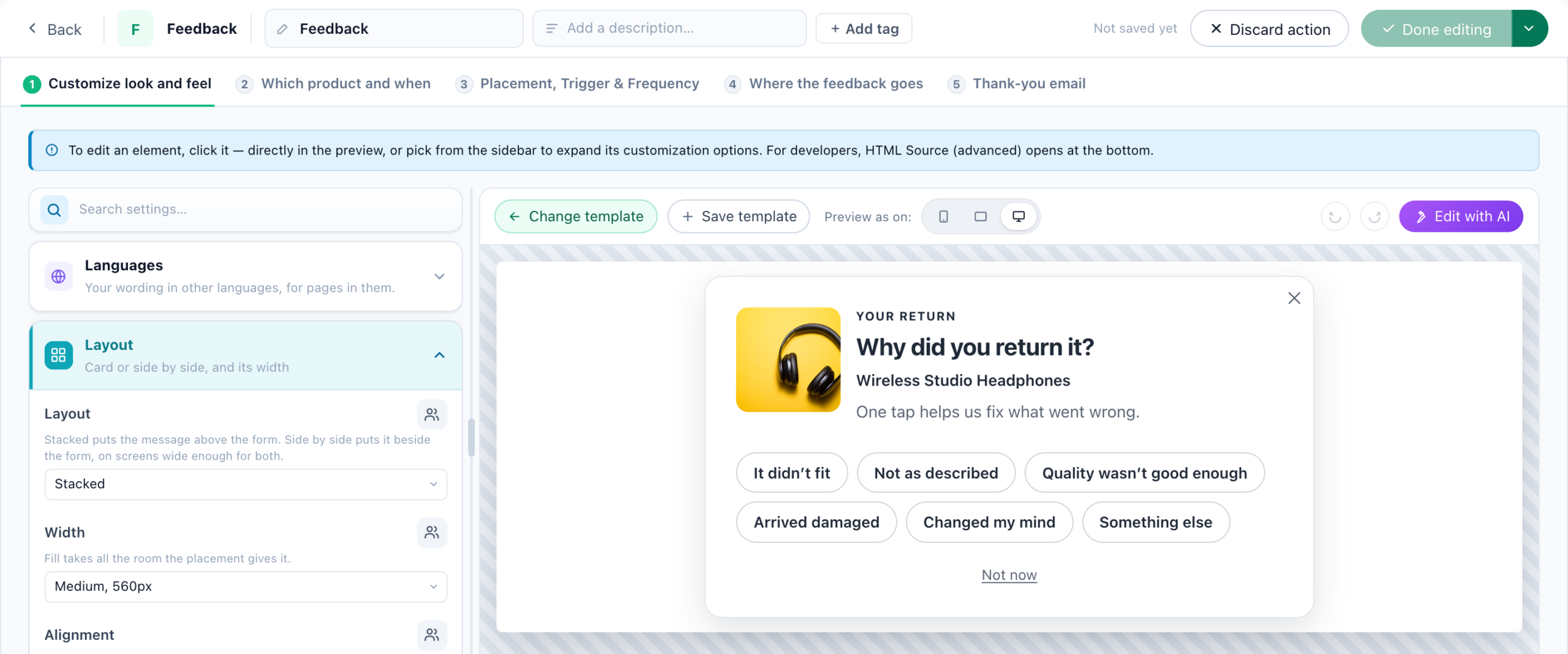
- In a Feedback & NPS campaign, Add action → Feedback & surveys → Feedback, and pick the design Why Did You Return It?.
- Its question is Pick a reason, with six reasons — It didn’t fit, Not as described, Quality wasn’t good enough, Arrived damaged, Changed my mind, Something else — and an optional comment. Change them under Reason 1 to Reason 6; leave one empty to show fewer.
- Its Which product and when counts the days from When it was returned.
Each answer is private feedback with the product it was about, never a review. A reason carries no score; the Feedback report’s Why they said so shows each reason’s share and the products named. See Reason answers.
What your store must report
- Purchases, carts and views — from your site’s tracking, or orders you upload.
- Deliveries and returns — from your store’s orders. A connected Shopify store reports deliveries from its shipments and returns from its refunds — see Shopify integration. With a store that reports none, When it arrived and When it was returned ask nobody, and Skip products they returned or got refunded skips nothing.
Related
- Review Form — what should they review, and its steps
- Feedback & NPS — reason answers
- Ask for a review by email — the same step in an email
- The Reviews page — where the reviews land
- Troubleshooting — a form that asks nobody