
Inspire me reads your website the way a new visitor sees it and writes you a personalization plan. It works out which audiences your site could tell apart, checks every Personyze feature against your pages, and suggests the campaigns worth running. The best ideas are drawn on pictures of your own pages, once for each kind of visitor who would see them. Any idea can then become a campaign in your account.
On personyze.com: Inspire me — get a free AI personalization plan for your site →
It takes a few minutes, and there is nothing to install: it reads your public pages in a real browser. This page is about running a plan and the other places Inspire me works. The plan itself — its ideas and mock-ups, Build this and sharing — is on Inspire me plans.
Where it is
- In the panel: What’s next in the left menu › Inspire me, its first item. Until the account has a plan it reads Get a personalization plan for your site.
- New campaign › Ideas from your own site (Inspire me), under the search box and in the Ask AI answer.
- Campaigns › the A/B tests tab › Inspire me: A/B test ideas for my site. It opens the run form with Fine-tune set to Only A/B testing.
- In a campaign’s template step: the ✦ Inspire me pill — see Inspire me in the template step.
- Without an account: the free scan at www.personyze.com/inspire/ (see The free scan).
Run a plan
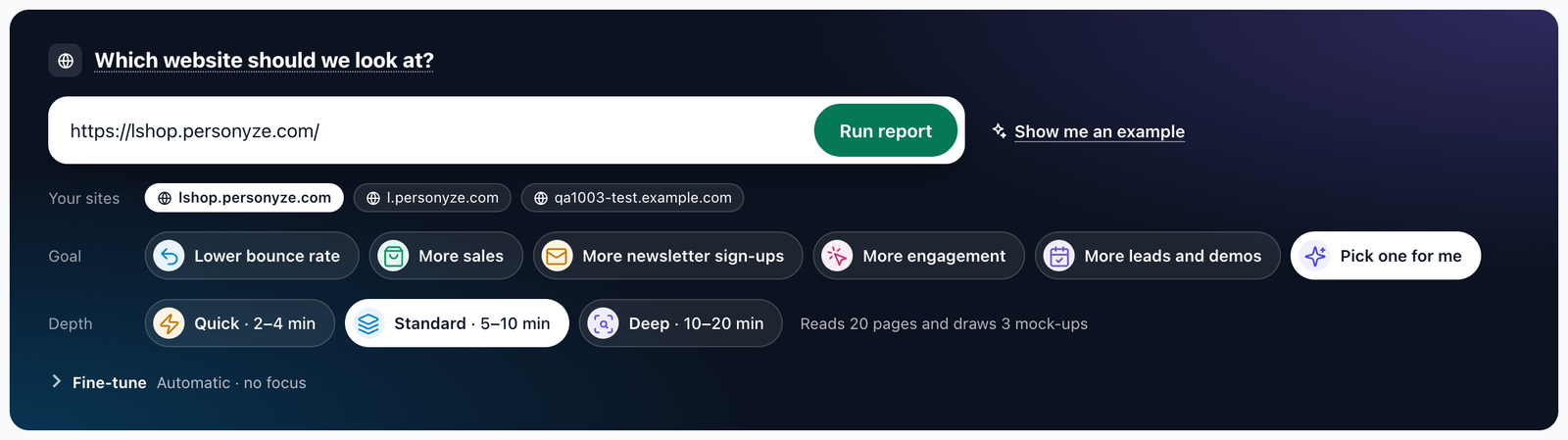
- Which website should we look at? Type an address, or click one of Your sites. Your home page gives a plan for the whole site. Any other page — your pricing, a product page — becomes the plan’s start, and its ideas focus on that page.
- Goal. Lower bounce rate, More sales, More newsletter sign-ups, More engagement, More leads and demos, or Pick one for me, which chooses the goal that fits your site; the plan then says Goal: … — we picked it from the site.
- Depth. How much of the site it reads and how many ideas it draws by itself:
Depth Takes about Reads up to Draws by itself Quick 2–4 minutes 8 pages 2 mock-ups Standard 5–10 minutes 20 pages 3 mock-ups Deep 10–20 minutes 40 pages 4 mock-ups - Fine-tune, if you want it: the kinds of idea, your own request, and the country to read the site from. See Fine-tune.
- Click Run report. You can leave the page: the bell tells you when the plan is ready.
Show me an example, beside Run report, opens one of our example plans. It is marked as an example and can only be looked at.
What it costs. Your account’s first Quick or Standard plan is free; the line after the depth says free – your first plan. Every later plan, and every Deep plan, uses your account’s AI credit, and the line says uses your AI credit. If the credit has run out, the page says so, with Add AI credits.
One plan of an account is made at a time. A plan is written in your panel’s language; your site’s own words are quoted as they are.
Run again, on a plan that failed, fills the form with its site, goal, depth, Fine-tune choices and request. It never starts a run by itself.
Fine-tune
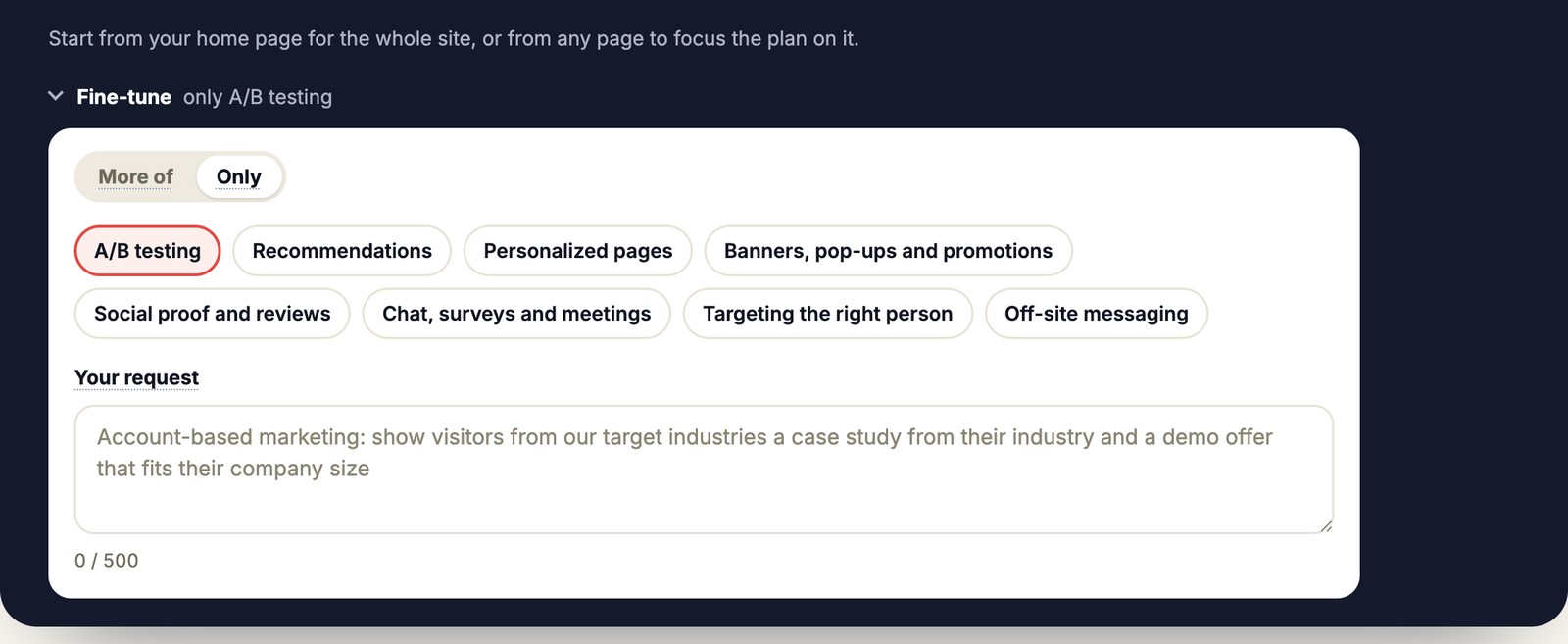
The last part of the run form, closed to begin with. Its line says what is set — Automatic · no focus, or Ireland · more of A/B testing, Recommendations · with your request. Leave it alone and the plan picks freely.
More of, or Only
A switch, More of | Only, over eight groups. Choose any number; hover a group to see what it holds.
| Group | What it holds |
|---|---|
| A/B testing | A version of a page tested against today’s: a headline, an offer, the order of plans. |
| Recommendations | Products or articles picked for each visitor. |
| Personalized pages | Headlines, images and blocks for each audience, or a whole landing page. |
| Banners, pop-ups and promotions | Bars, pop-ups, exit messages, and the offer or coupon for each visitor. |
| Social proof and reviews | Ratings, reviews, testimonials and logos matched to the visitor. |
| Chat, surveys and meetings | An AI chat agent, a product finder, a survey or poll, a form, a meeting booker. |
| Targeting the right person | Their company (account-based marketing), their CRM record, or what they did on your site. |
| Off-site messaging | Web push, email and SMS, after they leave. |
- More of gives you at least 3 ideas of the groups you chose, each a real fit for your site, and the rest for its strongest other opportunities. A group that does not fit your site is said in the plan’s summary, not forced. Choosing A/B testing also puts more A/B tests under More you can do with Personyze. The plan says Fine-tuned for: ….
- Only gives you ideas of the groups you chose and no others: as many as truly fit, up to 6. Where few fit, the plan has fewer, and its summary says why. The plan says Only: ….
- An email idea has no mock-up, since an email is not a page.
- A link can set it:
?only=abon the Inspire me page or on the free scan opens Fine-tune with Only and A/B testing chosen. The A/B tests tab’s button works this way.
Your request
A box for what you have in mind — a campaign, an audience, a page to change — in up to 500 characters, for example Account-based marketing: show visitors from our target industries a case study from their industry.
- At least 2 of the plan’s ideas answer it where it fits your site, and the summary’s first sentence says how. A part that does not fit your site is said in the summary, not forced.
- In the panel the plan shows Your request: “…”. A shared link or a public plan never shows your words.
Read as a visitor from
In the panel only. Stores show prices, shipping and offers by where a visitor is. Automatic reads the site as a visitor of the country its address names (.co.uk, .de), else of your own country; or choose a country. The plan then says Read as a visitor from: Ireland · Prices in EUR, with a note if the site showed another store anyway.
Run again keeps your groups and your request. The free scan has More of / Only and Your request, but not the country.
What it reads
- The page you enter, and the page that matters most for your goal — a product page for more sales, pricing or a demo page for more leads, an article for sign-ups and engagement, a category page for a lower bounce rate. It is marked Key page, and the plan is scored on these two pages.
- Then more of your site, up to the depth’s number of pages. It skips pages a visitor’s plan can’t use: log-in, account, checkout, help, legal pages (privacy policy, terms, in any language) and job pages.
- A store is planned as a store. Its cart page is read once, empty, and listed as Cart page. Most of its ideas go on product, cart and category pages, with recommendations that Build this can make. A plan can suggest popular picks with the visitor’s own brands first: Build this makes a Most popular widget with Match the visitor on Brand, and a first-time visitor still gets the best sellers. Its heading never names one brand.
- Only what a first-time visitor sees, on a computer. It can’t see pages behind a log-in, or personalization that shows only to other visitors.
- Your own data, for your own sites. When the plan is of one of your account’s own sites, it also uses:
- the campaigns already live, so they are not suggested again;
- the audiences Audience Discovery found in your visitors;
- the landing pages losing the most visits;
- the products viewed most but rarely bought.
An account’s other domains count as the same site. A plan of any other site uses none of your data.
- Your site’s headers. A plan made in your account reads and draws with the headers set for your domains in Integrations › Identity HTTP Headers, so a site behind bot protection can let it in. The free scan sends none.
Every claim is checked. After the plan is written, each finding, idea, page note and the summary is checked again against the pages read. Anything the pages don’t support is left out of the plan.
Your plan
A plan opens with three scores and a summary, then its ideas, the best ones drawn on your own pages for the visitors who would see them. Everything about it is on Inspire me plans:
- Reading the plan — the scores, the top 3 moves, effort and typical effect.
- Mock-ups, Draw this idea and the gallery.
- Build this — an idea made into staging campaigns: a product row as one Recommendations widget, an A/B idea as one 50/50 test.
- Sharing a plan — read-only links and their views.
Inspire me in the template step
Where you pick a design, Inspire me suggests ones written for your site, from what your latest plan read of it.
- Where: the template step of the Popup, Banner & HTML Builder, the Canvas Builder, AI Promotion Image and AI Promotion Text, and Recommendations and Content recommendations. There, ✦ Inspire me is a pill beside Start blank and Use existing, with how many suggestions are ready (Inspire me · 3). In a Landing page campaign it is the last pill after A page of your own, Survey page, Review page, Booking page and Recommendations page.
- Suggest one for my site takes about 25 seconds and uses your AI credit. Under Suggested for <your site> come 3 cards: each a gallery design filled with your site’s own words, in its language, with a picture from your site when one fits. A card says who it is for, why, and Template: ….
- Use this opens the normal editor with that template, filled. A promotion’s words are added to your Promotions list as a draft.
- See it on my site draws the design on your real page, in about a minute, on your AI credit.
- Save for later keeps a card; Suggestions | Saved (n) lists your saved cards of that kind, from all your sites.
- Kept for 14 days. Opening the pill again shows the last set at once, free, under Suggested <date>. Suggest new ones asks again, and uses your AI credit.
- The Target step. A campaign created for a suggestion gets its page and audience, and says Set from the suggestion you used: its page and its audience. Undo it, or change any rule below. An existing campaign’s rules are never touched.
- Recommendations cards are ready widgets: Recommends (for example Cross-Sells · for the item on this page, fallback Best Sellers, 8 products in a slider, 4 at a time), Shows on (every product page, the home page, the cart, pages under a path, a page group, or only one page), and each row’s heading, with what a first-time visitor reads instead. With no catalog: Add your catalog.
- Landing page cards have Make it a landing page: drawn in your site’s look and made a Landing page campaign in staging. Finished after you left, it is marked by a dot on the pill and Open it.
- Your own sites only. With more than one, the suggestions follow the campaign’s own site, or you choose it in Suggested for [site ▾].
- Never read? We haven’t read your site yet offers Read my site: a Quick plan, free if it is your first.
The panel assistant can do the same: ask it to suggest a banner for my site. It asks before reading a site, and builds a suggestion in staging only.
The free scan on personyze.com
- Anyone can scan a site at www.personyze.com/inspire/. It reads up to 8 pages, writes the plan and draws its best ideas, in about four minutes. Fine-tune is there too: More of / Only and Your request.
- An idea without a picture has Draw this idea, up to 3 a scan.
- Keep this plan emails its link to you. A work email also gets the full Standard plan.
- Share this plan gives a read-only link to send on — see Sharing a plan.
- Your free plan follows you into your account. If you sign up for Personyze with the address you left, we email you once: Add it to my account. One click puts the plan in your account’s Inspire me page, pictures included. It doesn’t use up your account’s own free plan. Nothing is added without that click, so if someone else typed your address, simply ignore the email.
Who can do what
The account owner, managers and users can run plans, draw, build, share and use suggestions. A reporting login can open the account’s plans but not make or change them, and the template step shows it no Inspire me pill. See Team members.
AI credit
These use your account’s AI credit:
- every plan after the first free one, and every Deep plan;
- mock-ups and landing pages you ask for: Create mock-up, Draw again, Create landing page;
- the assistant step of Build this, and Help me build it. A product or article row built as a Recommendations widget has no assistant step and uses none;
- Suggest one for my site, Suggest new ones and See it on my site in the template step. Reopening kept suggestions and Use this use none.
What a plan costs depends on its depth and the size of your pages. Credit is checked before each step, so a plan stops cleanly if it runs out.
If something goes wrong
- “This site refused our scanner”, or “it may block automated visits”. A firewall or bot filter turned the reader away; the plan says what to allow. Best: a header in Integrations › Identity HTTP Headers that your firewall lets through, then Run again.
- “The site answered 404 to our browser – the page was not found”. Check the address.
- “This took too long”. The site was slow to load in our browser. Try again in a few minutes, or try another page.
- Only one page was scored. The page that matters for the goal couldn’t be found or read, for example on a one-page site. The plan is then scored on the page you entered alone.
- Fewer ideas than usual. A plan made with Only has as many as truly fit; its summary says why.
- A drawing failed. Each message says what to do — see If a drawing fails.
- A plan failed. Its card has Run again, which fills the form with the same choices.
Related
- Inspire me plans — reading a plan, mock-ups, Build this and sharing
- AI in Personyze — the assistants and where to find them
- Personyze AI Agent — the assistant that builds campaigns
- Audience Discovery — the audiences marked Real visitors
- Identity HTTP Headers — letting the reader past bot protection
- Template Gallery — the designs suggestions are made from
- Billing — AI credits