
Most of what people want is not one campaign. “Mail them their cart back, and catch them when they
return” is two campaigns plus the rules that carry a person from the first to the second. A playbook
is an idea like that, built for your site: pick it in New campaign, finish its few steps, and Personyze creates the
campaigns it takes, already wired to each other.
Starting a playbook
Ideas are in New campaign: pick Ideas in Explore all, or open a topic in Grouped
and look under Start from an idea. A card shows the channels it uses, such as On the site →
Email. Its ⓘ lists the steps (Set up in 3 steps) and when it goes live: Nothing goes live until you publish it
· 10% held back to measure it when it keeps a control group. Start opens the playbook. An idea
that needs an add-on you do not have opens the Add-ons page instead.
There is no menu entry of its own. Once created, a playbook is one row in your campaign list, and Open playbook brings it back.
The ideas
The ideas offered depend on your kind of site: one that cannot work there is not shown. (email) is an email
Personyze sends; (your own email) is a block placed in the emails your own platform sends; (push) is a
web push notification. Ideas marked * need the Promotions add-on. The AI chat and finder ideas need AI Search & Chat,
and the meetings idea needs Meetings.
| Goal | Ideas |
|---|---|
| Sell more | Offer a discount to people about to leave; Recover abandoned carts (email); Save the cart before they leave (email); Bring back people who browsed and left (email); Sell again after a purchase (email); Show each product’s reviews on its page; Show testimonials from customers like them; Show logos of customers in their industry; Add cross-sells to your order confirmation email (your own email); Recommend products across your shop; Show returning shoppers what is new since their last visit; Recommend from what they searched for; Show every category page its own promotion*; Offer each shopper the coupon that wins them back*; Keep each visitor’s best promotion at the top of every page*; Email a matching offer to people who browsed and did not buy* (email); Send people who left their cart an offer to finish* (email); Remind people of the code they have not used* (email); Show how popular each product is; Nudge carts over the free-shipping line; Count down to the end of your sale |
| Get leads | Collect leads from the site (email); Grow your newsletter (email); Turn warm leads into meetings (email; with a landing page where you have them); Fill your next webinar; Welcome each target company by name |
| Welcome & help | Welcome first-time visitors; Personalize your home page for new and returning visitors; Answer visitors’ questions with an AI chat; Help first-time shoppers find the right product; Help new readers find what to read; Show returning readers what is new since they were here; Keep readers reading; Ask first-time shoppers what they are here for; Continue your ad’s message on the page it opens |
| Follow up | Win back people who stopped coming (email); Ask how likely they are to recommend you, and act on it (email); Ask buyers for a review (email); Tell readers about new stories on the topics they read (push); Put each reader’s best promotion in your newsletter* (your own email); Win back people who stopped coming with an offer* (email); Email a list you uploaded (email; with a landing page where you have them); Personalize the articles in your newsletter (your own email) |
| Hear from visitors | Ask shoppers who leave what stopped them; Ask visitors who leave what held them back |
| Prove it works | A/B test a change on your site |
Building it
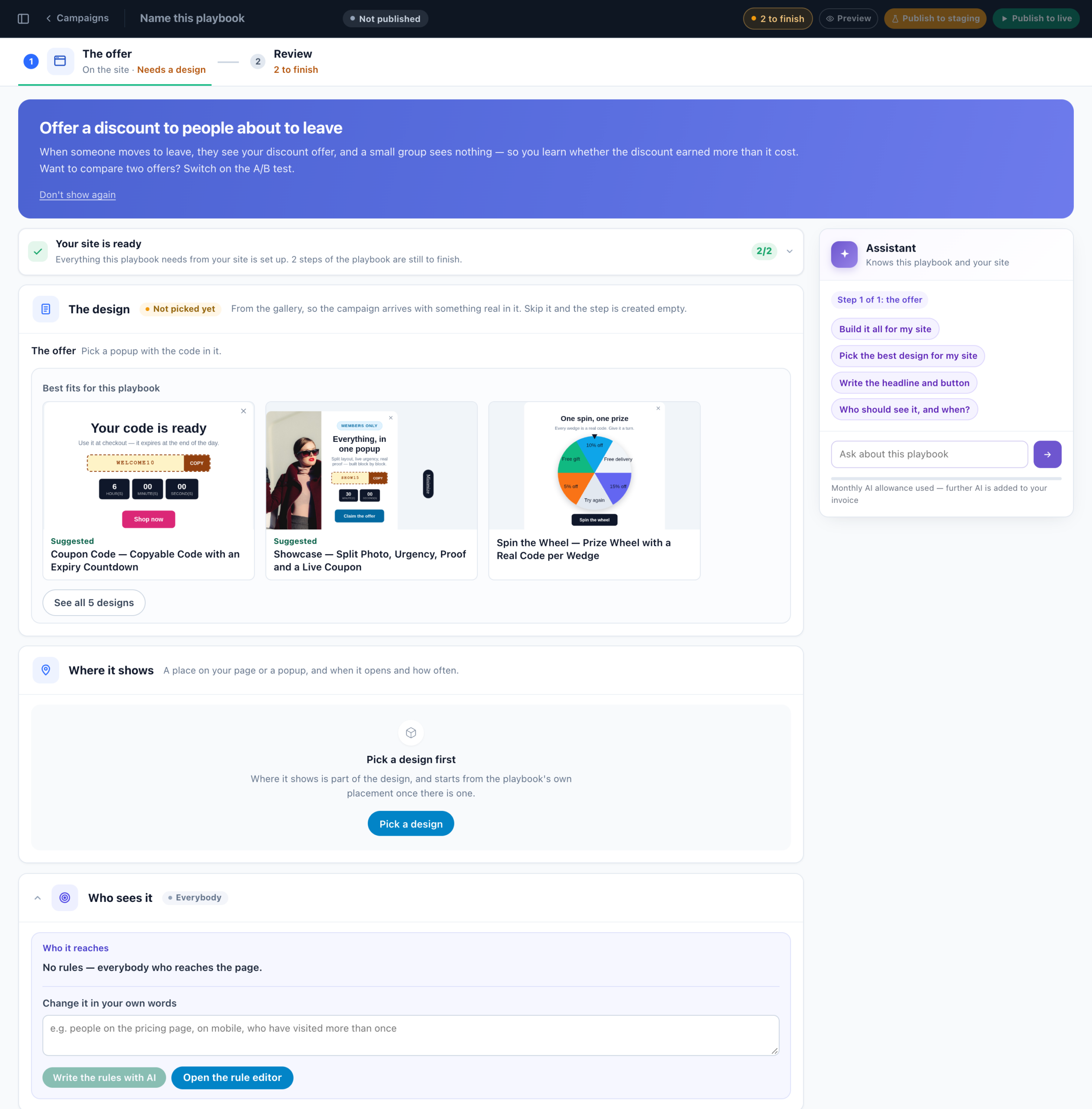
The top bar holds the name (Name this playbook — it needs one before anything can be published), its
state (Not published), how many steps are left to finish, and Preview, Publish
to staging and Publish to live. Under it, one tile per step, then Review. A
tile says what the step still needs: Needs a design, Needs a place on the page, Needs a subject
line, Needs your address to send from, Needs your discount code, or Ready. A card,
Before this works, says what your account still lacks for it, such as the tracking code or a product
catalog. A step that is optional has Skip this step; you can add it to the playbook later.
Each step is a few sections, in this order:
| Section | What you do there |
|---|---|
| The design | Pick a design from the gallery, so the campaign arrives with something real in it. Edit design opens it in its editor. |
| What it recommends | Recommendation steps: the algorithm. Open the full editor for its fallbacks and filters. |
| What it needs from you | The few details only you know: a date, a link, a list, a discount code. |
| Where it shows | A place on your page or a popup, and when and how often it opens: Pick a spot on my site, Let the assistant choose, Use a place you already have or Floating instead. A block for your own email has Where it goes, with its code. A landing page has Its address. |
| A/B test & control group | Versions and the share held back — see below. Emails add Follow-up and send time. |
| Who sees it | The audience rules. Edit them, or describe who should get it in your own words and Write the rules with AI. |
Review lists everything the playbook will create, one card per step, with Finish this
step where something is missing. Its last card, The playbook, gives the name, what it is
measured against (for example the 10% who see nothing) and its tag.
The assistant beside the steps can do it all: Build it all for my site asks a few questions, then picks
the designs, writes the words, publishes to staging and opens the preview.
Publishing it
- Publish to staging creates it on staging, which only your staging audience sees. Emails Personyze
sends go only to your staging address — see Testing & QA. A block
for your own email, or an API feed, is created as a draft: it has no staging. - Preview puts the site steps on staging (emails as drafts) and shows each step as it will look.
- Publish to live first asks, step by step, what goes live: each step Goes live, is
Already live or is Held back with the reason. Nothing is created until you confirm, so
Cancel leaves nothing behind.
Campaigns are created one at a time, because a later step’s rules name an earlier one. If something fails part
way, what was created stays and the screen says how far it got: 2 of 3 went on staging before it stopped:
…. Finish it from the playbook, or delete it from the campaign list.
The check on your pages
After you publish a playbook to staging or live, Personyze opens each on-site step on its page in a real browser, with
the campaign forced on, and reports under On your site, one line per step:
- Shown on the page;
- Not shown on the page, and why — for example no element on the page matches its place;
- Not checked on the page when the checking browser saw no Personyze tag there. A cookie banner that holds the
tag back until a visitor answers does this: open the page yourself to see it.
Details opens the step’s QA step.
Check again runs it once more. Emails and landing pages are not checked. To stop it running after each
publish, untick Check each step on my site after publishing; your browser remembers the choice.
A playbook you made
Open it again from the campaign list. The top bar says where it stands — Live, Partly
live, Staging or Draft — and what is happening now: 4 on the site now
· 12 emails in 24 h, or Quiet right now.
- Each step’s lead figure is on its tile, for the panel’s date range: On the site
· Live · Viewed 1,204, Email · Staging · Sent 312. A step that cannot report a
view says Ran. - Performance: Campaign (the whole playbook), Emails, On the
site and Live visits. A playbook with a live step opens here. - Changes wait as Unsaved changes until you press Publish to staging
or Publish to live. Live steps stay live when you publish to staging. - Preview this step, and Preview the campaign on your page with Hide everything
else, so none of your other campaigns show around it. Open it in the campaign editor for every
setting. - The playbook, after the steps: its link tag and its campaigns, with Check them on my
site.
Pause
Pause stops every campaign of the playbook from showing, on staging and live. It asks first —
Pause the playbook? — and puts each one back to draft. Nothing is deleted: Publish to
staging or Publish to live brings them back.
Prices in your site’s currency
A product recommendation step prints prices the way your site does. Personyze reads the currency from your account’s
price format, or from a product page of your site, and sets it on the design you pick. A design picked before that, or in
another currency, says so under What it recommends: Prices show in $, and your site’s prices
are in €, with Show them in €.
A/B tests and the control group
Every step’s A/B test & control group section offers Test two versions,
Test three versions or Just one version. The other designs then holds
what the first design is tested against: the versions must differ, or the test measures nothing. The Split
slider sets each version’s share and the control group, who see nothing at all. The control group is
the baseline that answers “did running this beat running nothing?”. Without one, the screen says there is no
baseline.
A/B test a change on your site is the idea for exactly this. It has one step, the change, in two
versions with 45% each and 10% held back. Make each version in the WYSIWYG editor on your page itself, in the Canvas
builder, or from a gallery design. Test three versions makes it 30% each, still with 10% held back. See
A/B testing.
Landing pages hold nobody back, and Email a list you uploaded holds nobody back unless you set it to.
Emails: follow-ups and send time
Some email ideas follow up by themselves. Recover abandoned carts sends the cart about an hour after the visit,
a reminder a day later to those who did not open it, and a last one two days after that. Anyone who buys stops getting
them. Others offer switches under Follow-up and send time, all off until you turn them on:
- Resend it two days later to those who did not open it (three days for the list emails);
- Send at each person’s best time (within 24 h).
A test of two whole emails, a control group or two tested forms leaves the follow-ups out, and the switch says
why.
What it makes
Ordinary campaigns, named after the playbook (for example Spring sale — the email), each editable in the
campaign editor like any other. A tag with the playbook’s name groups them, and the campaign list shows
them as one row. Nothing different happens when they serve.
The wiring between steps is the part that is easy to get wrong by hand, and the playbook writes it for you. An email
that leads to a step on your site writes a link tag (utm_campaign) onto its links, and the site step targets
that value. It works across sessions and needs no login. The link tag is under The playbook; change it
there and it changes in both campaigns at once.
To remove a playbook, delete its row in the campaign list: the confirmation names each campaign it deletes. To keep one
campaign and drop the rest, first use Take out of the playbook on it. See The campaign list.
Related
- New campaign — where every idea starts
- The campaign list — playbook rows, delete, take a campaign out
- A/B testing — splits, control groups and reading a verdict
- Testing & QA — staging, previews and the check on your pages
- Emails sent by Personyze — the email half of most playbooks
- Tags — what groups a playbook’s campaigns