
Segment and Personyze exchange data in both directions.
- Segment → Personyze. Segment sends
identifycalls to Personyze. Each call creates or updates a Personyze visitor profile from its traits. Those traits can come from your CRM, your email platform, offline transactions, and Segment Engage computed traits and audiences. You can then use them in targeting rules, dynamic content, recommendations and reports. - Personyze → Segment. Personyze sends campaign events (impressions, clicks, conversions) to Segment. On your website they go through Segment’s analytics.js. From automations they go through Segment’s server API.
You can set up either direction on its own, or both.
Part 1: Send Segment data to Personyze
Step 1: Get a Segment key from Personyze
- In the Personyze panel, open Integrations → Marketplace.
- Find the Segment card and click it.
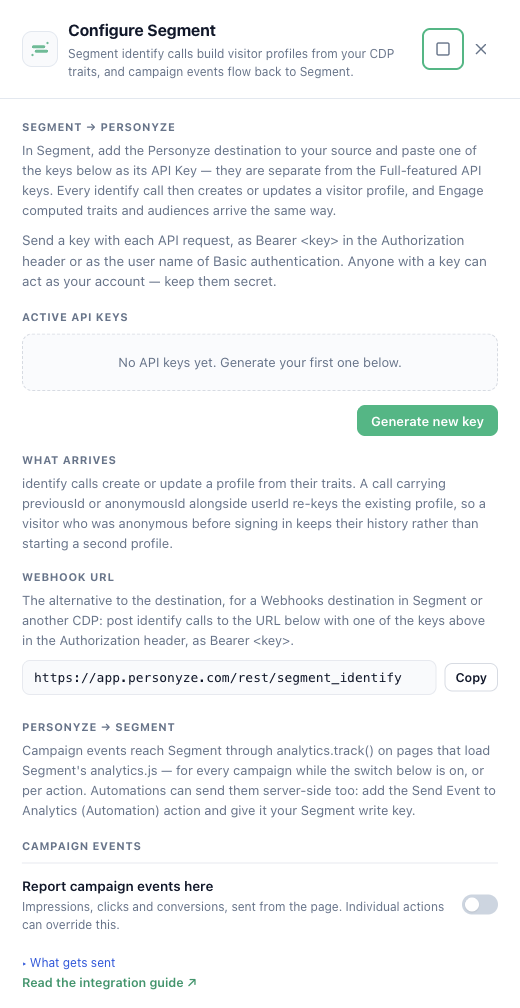
- In the Segment → Personyze section, click Generate new key.
- Keep the key safe — you will enter it in Segment.
These Segment keys are separate from your Full-featured API keys. Revoking one here disconnects Segment only.
Step 2: Add the Personyze destination in Segment
- In Segment, open Connections → Catalog → Destinations.
- Search for Personyze and select it.
- Choose the source that should send data to Personyze. This is usually your website source.
- In the destination settings, enter the key from Step 1 in API Key.
- Save and enable the destination.
From now on, every identify call from that source creates or updates a Personyze visitor profile.
Step 3: Match Segment’s visitor ID to the website visitor (recommended)
This connects the profile that Segment builds to the visitor Personyze sees on your site.
- In Personyze, go to Settings → Visitor attributes.
- Open Cross-device user identifiers.
- Create an Internal ID identifier of type Cookie that reads the
ajs_anonymous_idcookie. - Save it and enable it.
Alternative: post identify calls to the webhook URL
Use this if you cannot use the Personyze destination — for example with a Segment Webhooks destination, or with a different CDP.
| Setting | Value |
|---|---|
| URL | https://app.personyze.com/rest/segment_identify |
| Method | POST |
| Header | Authorization: Bearer <your Segment key from Step 1> |
| Body | The identify call as Segment’s standard JSON. It must have a userId or an anonymousId, and a traits object. |
Example body:
{
  "type": "identify",
  "userId": "u-1029",
  "anonymousId": "5b1c2e9a-7c1f-4f0e-9b1e-2a3c4d5e6f70",
  "traits": {
    "email": "dana@example.com",
    "firstName": "Dana",
    "plan": "pro"
  }
}
Instead of the Bearer header you can also use HTTP Basic authentication, with the key as the user name and an empty password.
identify calls to this URL. Calls without a traits object (track, page) are ignored, but a group call also carries traits — the company’s — and they would be written onto the person’s profile. In a Segment Webhooks (Actions) destination, set the trigger to Event Type is identify.What arrives in Personyze
- An
identifycall creates or updates a profile from its traits. Trait names in camelCase become snake_case (firstNamebecomesfirst_name). Traits that match a Personyze profile field fill that field. Everything else is saved as a custom visitor attribute. - Identity handling. When a call carries
previousIdoranonymousIdtogether withuserId, Personyze re-keys the existing profile to theuserId. A visitor who was anonymous before signing in keeps their history instead of getting a second profile. - Engage. Computed traits and audiences arrive as ordinary
identifytraits (for exampleorder_completed_last_30days: true). Segment notes that the first audience sync can take six hours or more.
Part 2: Send Personyze campaign events to Segment
From your website (analytics.js)
This works on pages where Segment’s analytics.js is installed. Personyze never loads analytics.js for you. On a page without it, nothing is sent and nothing breaks.
Each event is sent with analytics.track() and named after the campaign action. An impression looks like this:
analytics.track('<action name>', {event: 'shown', source: 'personyze'})You can choose which events go to Segment in three ways:
- All campaigns. Open Integrations → Your integrations → Segment. In the Personyze → Segment section, switch on Report campaign events here. Impressions, clicks and conversions from every campaign are sent to Segment.
- One action. In the action’s event settings, tick Segment under Send this event to. Use this to report a particular action’s events to Segment, with its own event name and properties.
- A custom event. Add the Send Event to Analytics action to a campaign and tick Segment. You choose the event name and properties.
From automations (Segment’s server API)
This works without the visitor being on your site — for example, when an offline campaign’s audience matches someone.
- In Segment, find the write key of the source that should receive the events (Connections → Sources → your source → Settings → API Keys).
- In Personyze, add the Send Event to Analytics (Automation) action to the automation.
- Tick Segment and enter the write key in Segment write key.
- Save and publish.
Each matched user is sent to Segment as a track event. Their email address is used as the Segment userId. Users without an email address are skipped.
Using Segment data in Personyze
Targeting
Segment traits appear as profile fields in targeting rules. Add audience rules on demographics, role, funnel stage or any custom trait.
Dynamic content
Insert Segment fields as dynamic variables in campaigns, for example “Welcome back, {first_name}”.
Recommendations
Use profile data as recommendation filters, or let the algorithms use it automatically.
Need help?
Email info@personyze.com.
On the Personyze site
- Segment personalization with Personyze — activating Segment audiences on-site.
- Website personalization — the targeting and content engine behind it.