
Personyze AI is a conversational agent that works inside your account. Describe what you want in plain words and it does the work — it builds and changes campaigns, reads your own data to answer questions, and sets things up for you, rather than telling you where to click. And because it speaks MCP, the same abilities are available from the assistants you already use — Claude, ChatGPT, and anything else that speaks the protocol.
On personyze.com: AI personalization — the AI agent that builds your campaigns →
It builds, not just reports
This is the difference worth leading with. Ask in a sentence and the agent creates the campaign: it writes the targeting from a plain description of who should see it, picks a design from your template gallery, places it on the page, and sets the timing. When you ask for a campaign it scans your website first — reading your brand colors, fonts, button style, and even the tone of your copy — and builds to match, so what comes back looks like your site, not a generic template dropped on top.
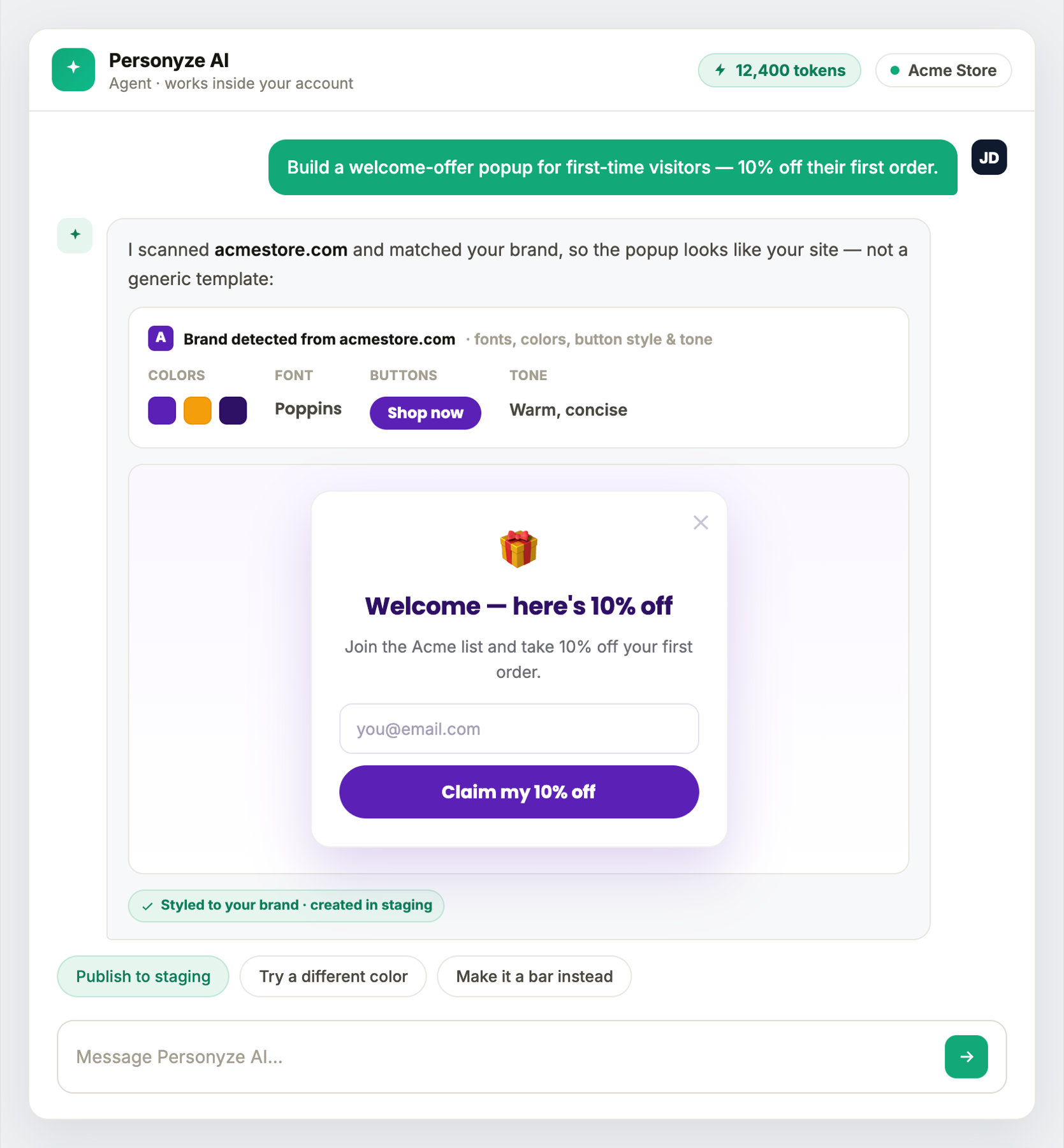
The full set of build actions:
- Create a campaign from a description — “visitors on the pricing page who haven’t bought yet.”
- Edit an existing draft, including rewriting its targeting.
- Duplicate and adapt — find a campaign by a partial memory (“the cruise one Sara built in June”), then the agent walks through what it targets and says now, one item at a time, asking what should change.
- Add designs from the template gallery — 450+ designs, chosen and placed for you, restyled to your brand.
- Rewrite the wording of any action.
- Set up an A/B test — two designs, traffic split 50/50, with the same visitor always seeing the same version.
- Pause or resume individual actions.
- A sensible How often — a new popup that interrupts (a form, a dimmed background, exit intent, a corner, a side or the centre) gets Once per session, and a review request Once per visitor, ever — when the campaign has no cap of its own and the popup is its only action. Otherwise it says why it set none.
- Keep a page’s campaign on that page — a campaign it creates for the page you are viewing keeps a visitor for that page only, rather than following them to every later page.
- Recommendations that show first-time visitors something — when every algorithm of a recommendation widget needs the visitor’s own history, it still saves, but warns that a first-time visitor sees nothing and offers a site-wide fallback such as Most Popular or Trending.
- Match the visitor — it can switch a recommendation widget’s Match the visitor on, read it or take it off (brand, colour, size; topic, author), and warns when a first-time visitor would see nothing — see Match the Visitor.
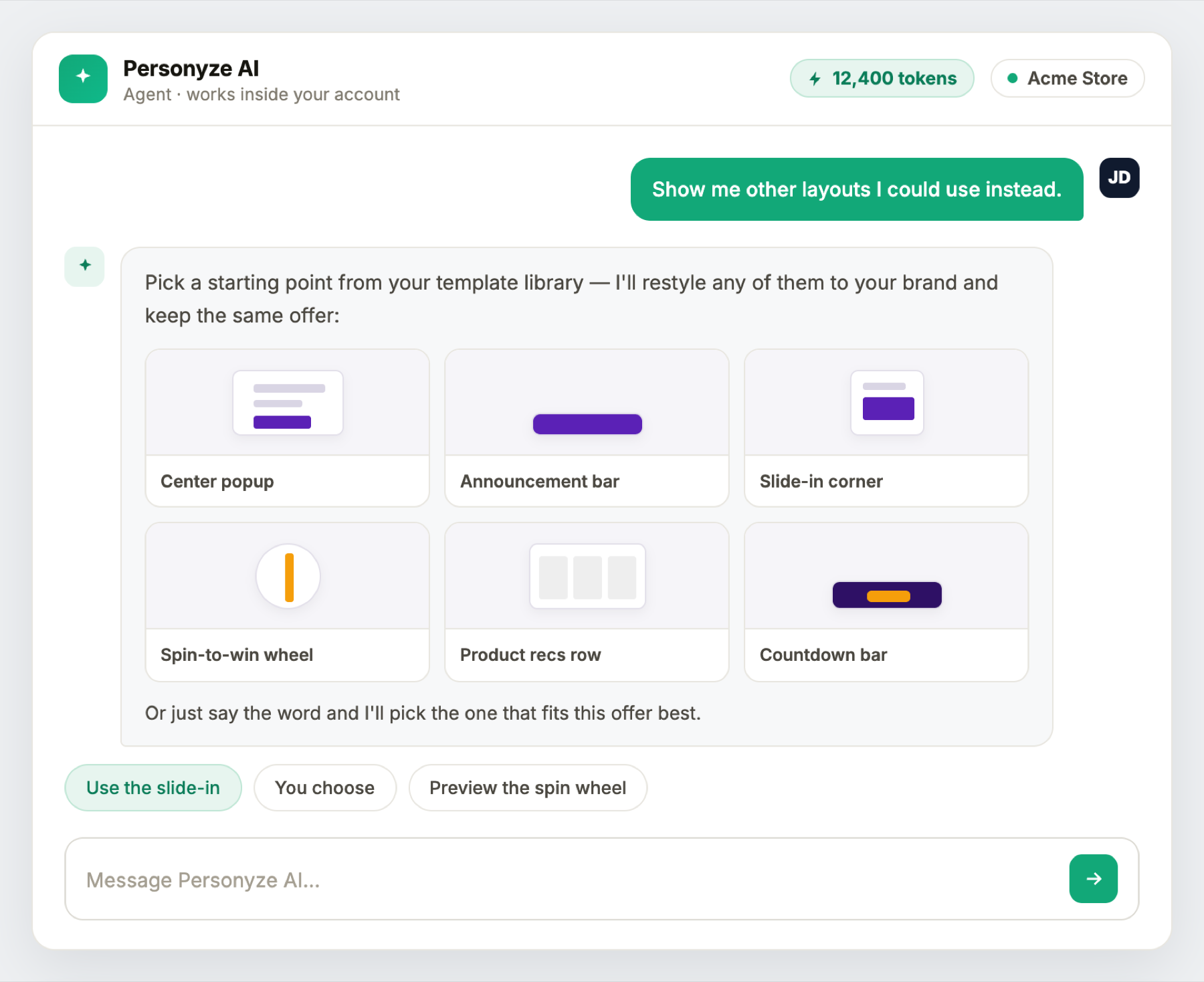
Promotions, surveys, reviews, feedback and the AI finders
The agent works with every kind of campaign, not only popups and banners:
- Promotions — it lists your promotions with how each performs, and adds new ones. A promotion it creates is always a draft, for you to approve under Promotions; it edits only a draft or a paused promotion, and never changes one’s status.
- Surveys, Reviews and Feedback — it creates these campaigns, gives a survey a page of its own to share as a link or a QR code, and reads the results: a survey’s answers, your feedback scores and NPS, and how many reviews you have collected. Survey questions it writes are checked the way the survey builder checks them, and a review form or feedback form it builds saves its answers as reviews or feedback, as one built in the panel does.
- AI Product Finder and AI Content Finder — it reads and changes a finder’s settings, card by card, as the designer does.
- Your integrations and add-ons — it knows what is connected, and a design for an add-on the account does not have says that no visitor will see it.
It also knows that a survey can be a lead form, the Canvas Builder’s AI Promotion and Nearest Store elements, and every kind of automation rule.
Campaign ideas, matched to your site
You don’t have to know what to build. The agent proposes campaigns worth running, each already tied to a real design and buildable in one step:
- Online shops — a welcome offer for first-time visitors · a free-shipping nudge when the basket is close · recommendations for browsers who added nothing.
- B2B — a homepage that leads with the visitor’s own industry · a headline matched to what they searched for · lead capture on pricing and case-study pages.
- Publishers — what to read next at the end of an article · newsletter capture for returning readers.
- Everyone — an A/B test of two versions of the same offer.
Every idea is checked against your account first. A cart-value campaign isn’t offered to a shop that sends no cart data — so nothing suggested is a campaign that would match nobody.
The same ideas can be started by hand from New campaign: see Playbooks.
Targeting it understands from plain English
Describe who should see a campaign and the agent compiles it into real targeting rules. It understands a wide vocabulary:
- Where — pages and page groups, the home page specifically, product and content pages; countries and cities.
- When — date and time, including “only on Saturdays”; the weather at the visitor’s location.
- Who — first-time versus returning visitors, session counts, time on site, pages viewed; search keywords and UTM parameters; device, browser, operating system and screen size.
- What you know about them — audiences and visitor-profile fields, product and article catalogue behaviour, previous interactions with your campaigns, CRM and company-identification data, and Tealium.
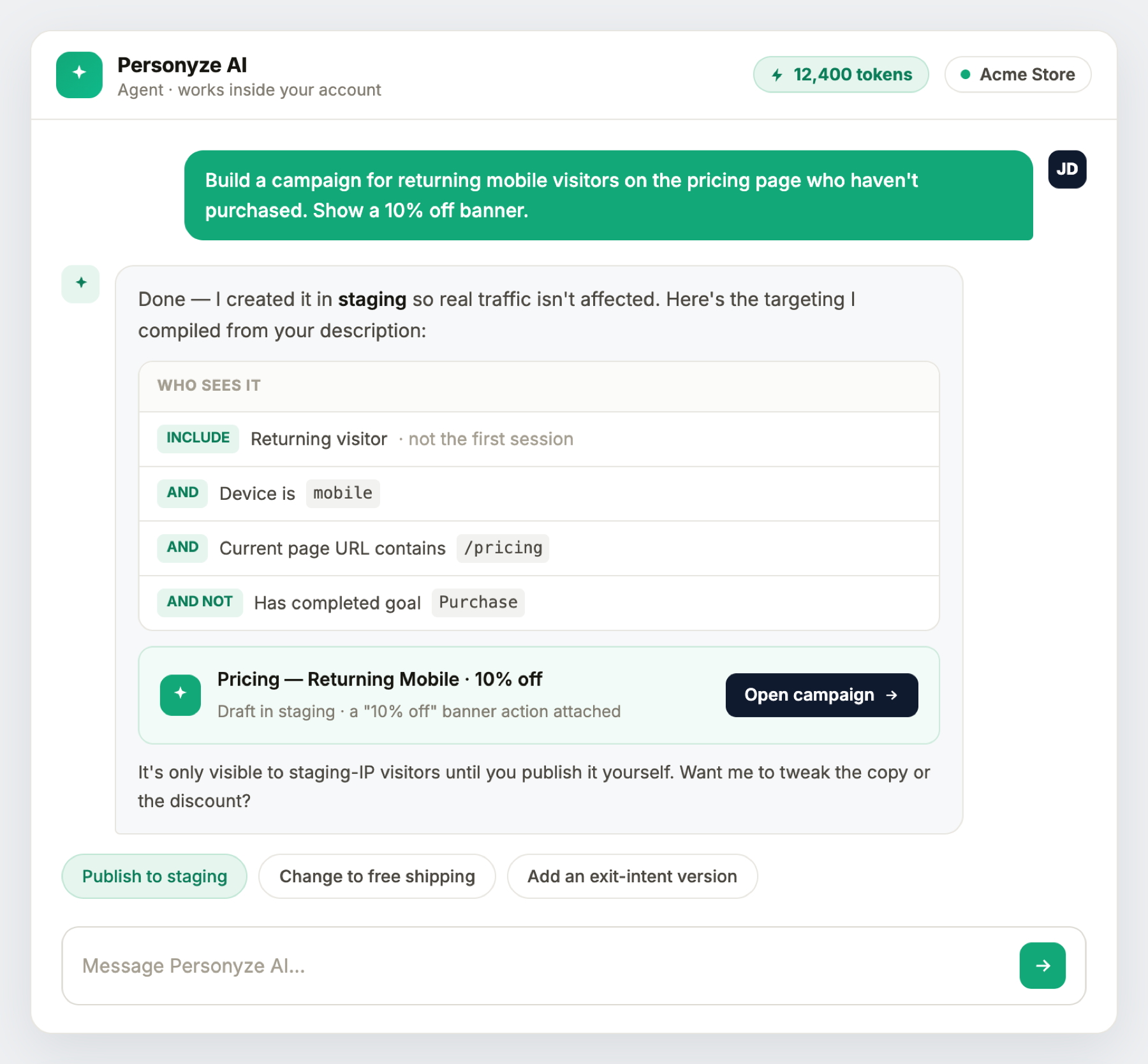
It reads the compiled rules back to you in plain words before anything runs — because a rule that means something slightly different from what you asked looks identical from the outside.
It answers questions about your account
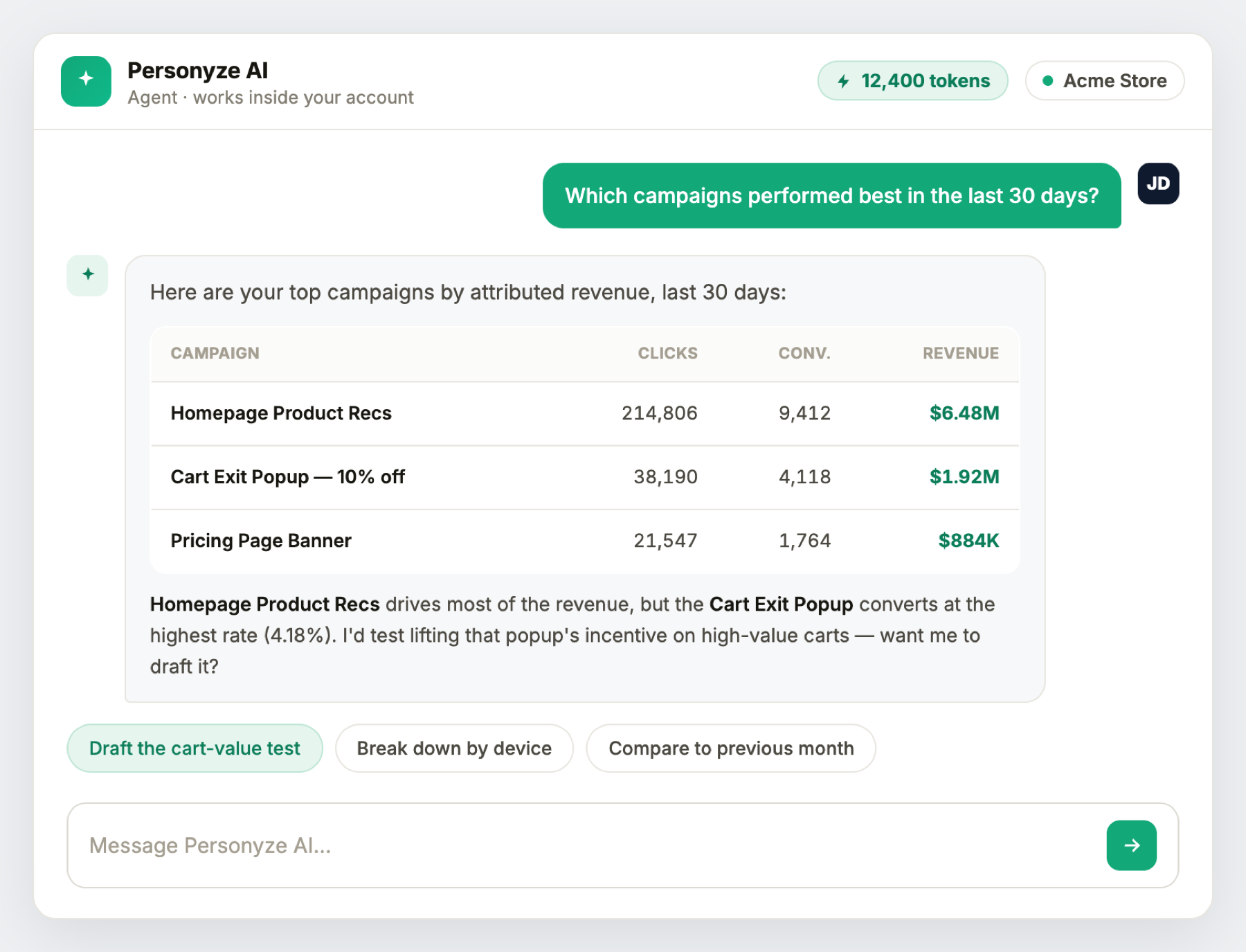
Ask and it reads the same numbers the panel reports, then turns the answer into a next step:
- Which campaigns performed best, and which are doing nothing.
- Traffic — pages, sources, search terms, devices, locations.
- Product performance, including which products get viewed but rarely bought.
- Visitor profiles and audience membership.
- What a given campaign currently targets.
- “Would this campaign actually show anything?” — a readiness check before you publish.
It tells you what to improve
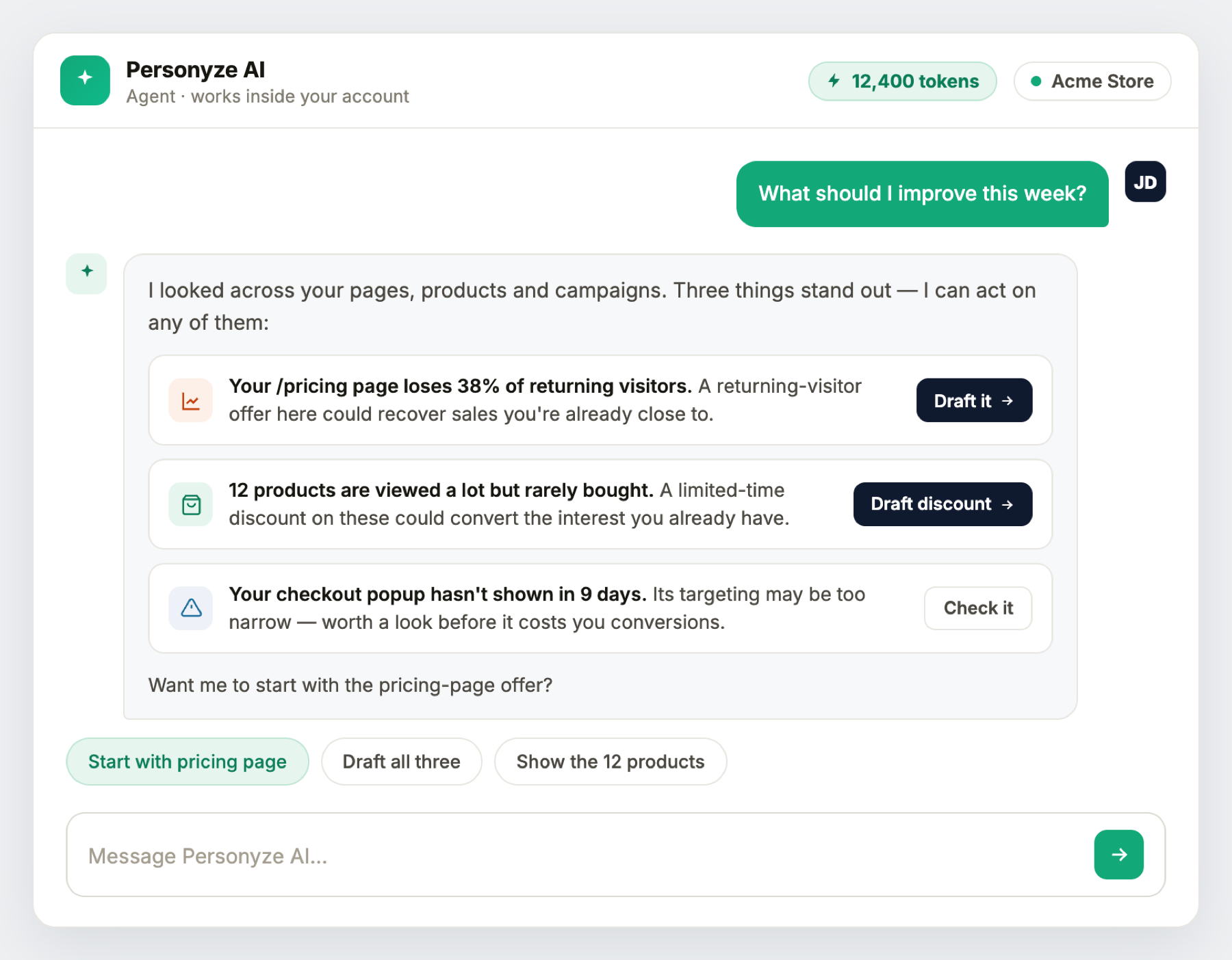
Ask “what should I improve this week?” and the agent looks across your pages, products and campaigns and comes back with specific, ranked opportunities — a page that’s leaking returning visitors, products people view but rarely buy that are worth a discount, a campaign that has quietly stopped showing. Each comes with a one-tap action to draft or fix it.
It sets things up
Beyond campaigns, the agent can configure the account itself:
- Conversion goals — the events your performance and revenue numbers are measured against.
- Placeholders — the page locations campaigns place content into.
- Visitor-profile fields and audiences.
- Tracking code — including a check of whether it’s actually working.
- Which feature areas the panel shows.
- Scheduled reports, delivered on a schedule you describe.
AI elsewhere in Personyze
The agent isn’t only the chat. The same intelligence shows up across the product:
- Action editor — rewrite any content by describing the change. “Match my site” restyles it to your own brand colors and font, taken from a scan of your site; or use your own image from the media library.
- Recommendations page — what this account should do next, derived from its own data, with several items the agent completes for you.
- Write with AI and Create with AI — three options for any text of a design, and pictures made from your products or drawn from a description. See Write and draw with AI.
- Site scan — reads your site for brand colors, fonts, and which third-party tools you already run, so it can point out things worth connecting.
Work from Claude, ChatGPT, or any MCP client
Everything above is also available outside the panel. Personyze exposes its abilities over MCP (the Model Context Protocol), so an external assistant — Claude, ChatGPT, or any MCP-capable client — can build campaigns, read your data, and set things up on your behalf, from wherever you already work. Connect it once; see the Personyze MCP server for setup. For the AI built directly into the campaign editor and targeting, see AI in Personyze.
What it will not do — worth saying plainly
- It never publishes to live visitors. Everything is built in staging mode; going live is always a person’s decision in the panel.
- It works on one account — the one you’re signed into.
- It won’t choose who receives a scheduled report. Recipients are set by a person, deliberately.
- It doesn’t guess. Every number comes from the account’s data, and it says so when it can’t answer rather than filling the gap.
Everything you can ask — a quick tour
- Build & style — “Build a welcome-offer popup for first-time visitors.” · “Make it a bar instead.” · “Match my brand.” · “Set up an A/B test of two versions.”
- Target — “Returning mobile visitors on the pricing page who haven’t bought.” · “Duplicate the cruise campaign Sara built in June for returning visitors.”
- Improve — “What should I improve this week?” · “Which products should I discount?”
- Understand — “Which campaigns performed best?” · “Where am I losing traffic?” · “Would this campaign actually show anything?”
- Set up — “Add a conversion goal for the thank-you page.” · “Is my tracking code working?” · “Send me a weekly traffic report.”
- Learn — “How do I set up conversion tracking?” — answered from this knowledge base, with links.
Pricing — AI tokens
Using the agent spends AI tokens. Your package includes a monthly token allowance, and the balance is shown in the assistant as you work — it updates with each request and resets each billing cycle. Larger packages include a larger allowance; there’s no separate AI subscription to buy. For what’s included with each package, see Personyze plans or ask your account manager.
In short
Personyze AI turns “I wish someone would just set this up” into a sentence — and what it sets up already looks like your brand. It builds and configures in a safe staging space, explains what it did, tells you what to do next, and works from inside the panel or from the assistant you already use — while leaving every decision to go live with you.