
Some offers are good only at some of your stores. Coupon Near You shows each visitor the offer that is valid at the location nearest them — 15% off at Dizengoff 50 · 1.2 km · Open until 21:00. It takes three things: Valid at on each such promotion, the Nearest location’s offer algorithm in the widget, and a Coupon Near You design. The locations are your Locations list.
Valid at
Open the promotion (Promotions → Promotions, click its row), go to Who sees it, and Add rule → Valid at:
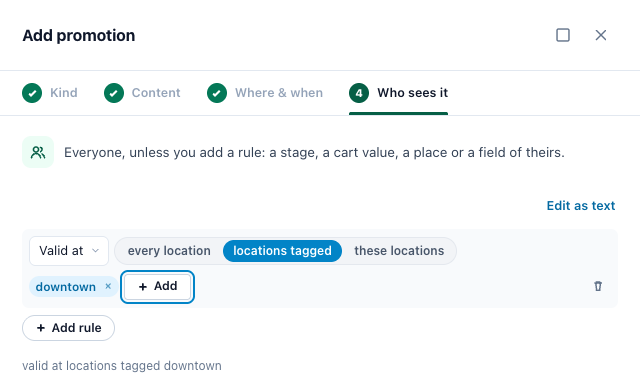
| Choice | The offer is good at |
|---|---|
| every location | All your locations. |
| locations tagged | The locations with any of the tags you pick from your list — downtown, mall. |
| these locations | The locations you pick, searched by name, Store code or city. |
Valid at does not decide who sees the promotion: it says where the offer is good. Only the Nearest location’s offer algorithm reads it.
In a promotions sheet
A Valid at column takes all, tagged downtown, mall, or Store codes such as S12, S14. “Every location but one” is written as the list of the others. A Store code or a tag your Locations list does not have refuses the row, and the upload’s check lists it with the reason. See Uploading a file, a feed or Shopify discounts.
The Nearest location’s offer algorithm
In a promotions widget’s Select Promotion Algorithm step, the Algorithm tile Nearest location’s offer gives each visitor the offer valid at the location nearest them, within 100 km (60 mi): of the promotions with Valid at, the one whose nearest valid location is closest to the visitor comes first. The tile says how many of your promotions of the widget’s kind have Valid at set (Valid at a location · 3 of 12 rows).
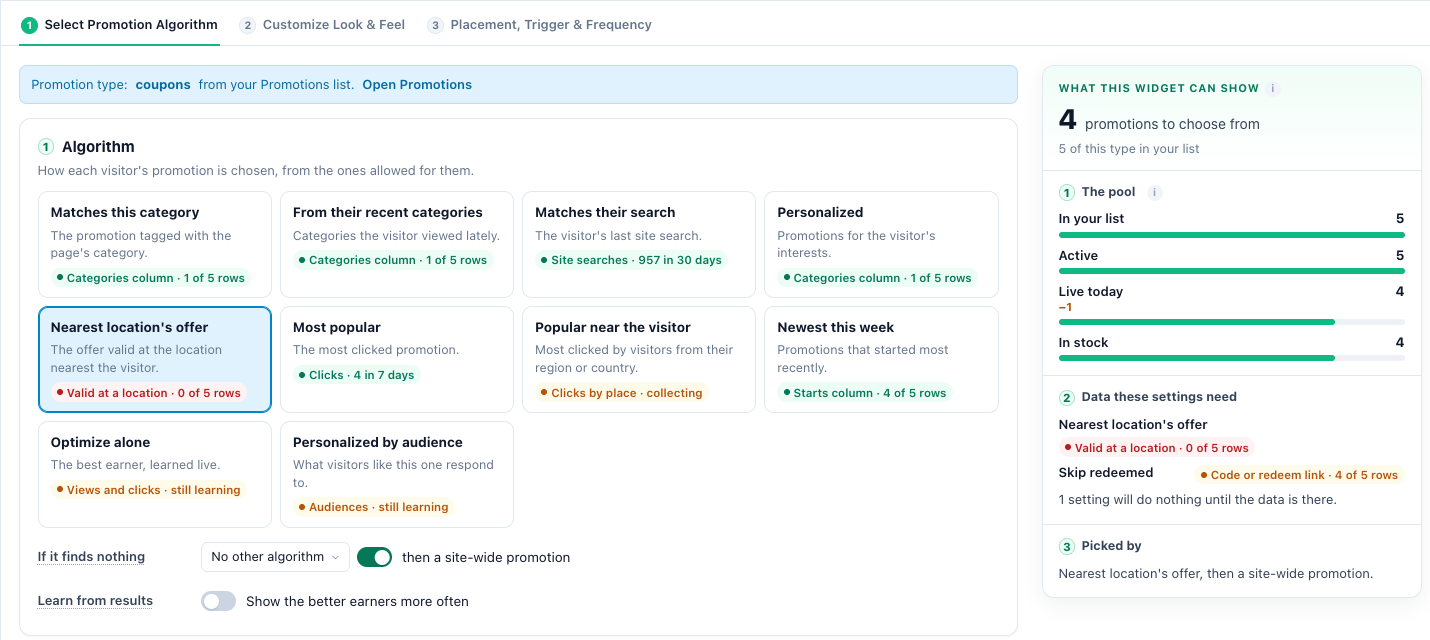
- The visitor’s place comes from their IP address, else their city. A visitor whose position is not known is not left out: they get an offer valid at a location, without a distance.
- A promotion without Valid at, or with no live location within 100 km, is left out by this algorithm. When it finds nothing, If it finds nothing runs your next algorithm, then a site-wide promotion (see How a visitor is matched to a promotion).
- In email and web push, the recipient’s last known place picks the location, and no distance is ever shown.
The designs
| Design | What it shows |
|---|---|
| Coupon Near You (an AI Promotion Coupon design) | The discount, the headline and the code, with the location the offer is valid at nearest the visitor: its name, how far it is, and Open until 21:00 or when it opens next. The promotion’s own button and a Get directions link to the map. |
| Coupon Near You Email Card (a design of the email best-offer block) | The discount, the headline, the location’s name and address, the code and a button. Never a distance or hours: an email is read hours after it is drawn, somewhere else. An offer valid at several locations says Valid at 4 locations. |
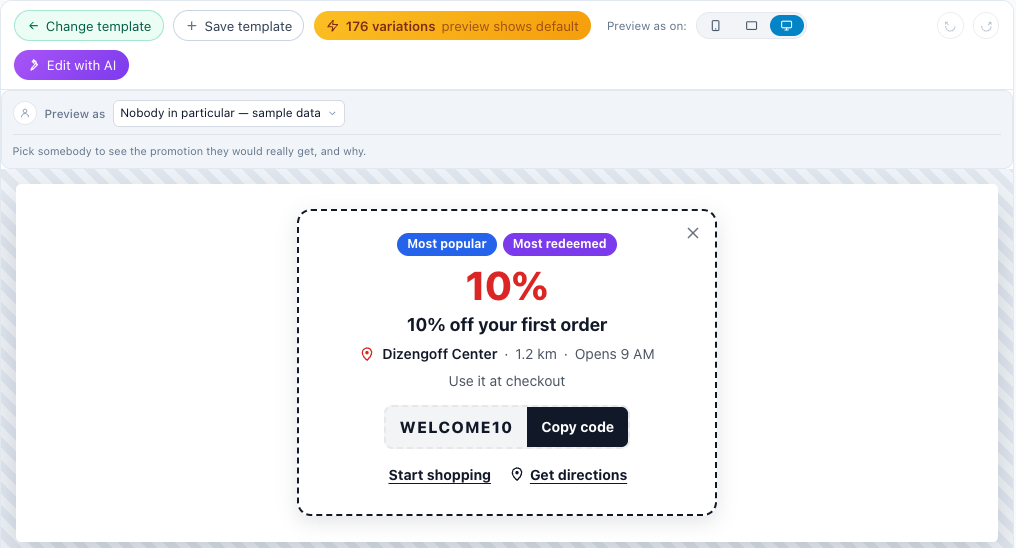
On your site: Add action → Promotions → AI Promotion Coupon in a Promotions campaign, and pick the Coupon Near You design. It runs Nearest location’s offer first; any other algorithm you choose follows it as a fallback. In Customize Look & Feel, the Location section switches each part on or off — Show the Location, Distance, Open Until, Directions Link — and sets their words. A promotion it has no location for shows without the location line.
In email: the Coupon Near You Email Card is a design of the email best-offer block, the External media – Promotions action of a Get Code for Emails: Personalized Banner campaign (see Personalized Banners in 3rd-Party Emails and the Promotions campaign page). Its words before the location and around the number of locations can be changed.
In an email Personyze sends, the Nearest Store Email design of Promotion by email names the location: its name, its address and a Directions link.
Why this coupon
Preview the widget as a real visitor on one of their pages (Preview as, see Preview as a Visitor). Why this coupon then names the location each offer was picked for:
| It says | Meaning |
|---|---|
| Shown — nearest valid location Dizengoff 50, 1.2 km away | The offer they get, the location it was picked for and how far. |
| Shown — valid at Dizengoff 50 (we cannot tell where they are) | Their position is not known, so there is no distance. |
| No location within reach — its nearest, Haifa, is 85 km away | Left out: none of its locations is within 100 km of them. |
| Not valid at any of your locations | Left out: it has no Valid at, or none of its locations is live. |
Related
- Locations — your stores, their hours and tags
- Show Store — the visitor’s nearest store and its hours
- Promotions — One List for Every Offer — Who sees it and the other rules
- Promotions Campaign — the widgets, the algorithms and the dashboards
- Personalized Banners in 3rd-Party Emails
- Preview as a Visitor