
Existing action is a Canvas Builder element that places one of the account’s own actions inside a design: an offer, a product or content recommendation widget, a lead form, a booking widget, reviews, a customer-logo strip, a finder, or another Canvas design. One design can then combine the assistant, a finder and the content you already run, in one layout.
How it behaves
- It runs as itself — its own design, data and A/B test — and counts in its own campaign’s report.
- It must be in a running campaign. Until it arrives, the element takes no space, so a paused action leaves no gap.
Adding it
- In a Canvas design, Add element → the Dynamic group → Existing action.
- In the settings on the right, under Which action, pick the action.
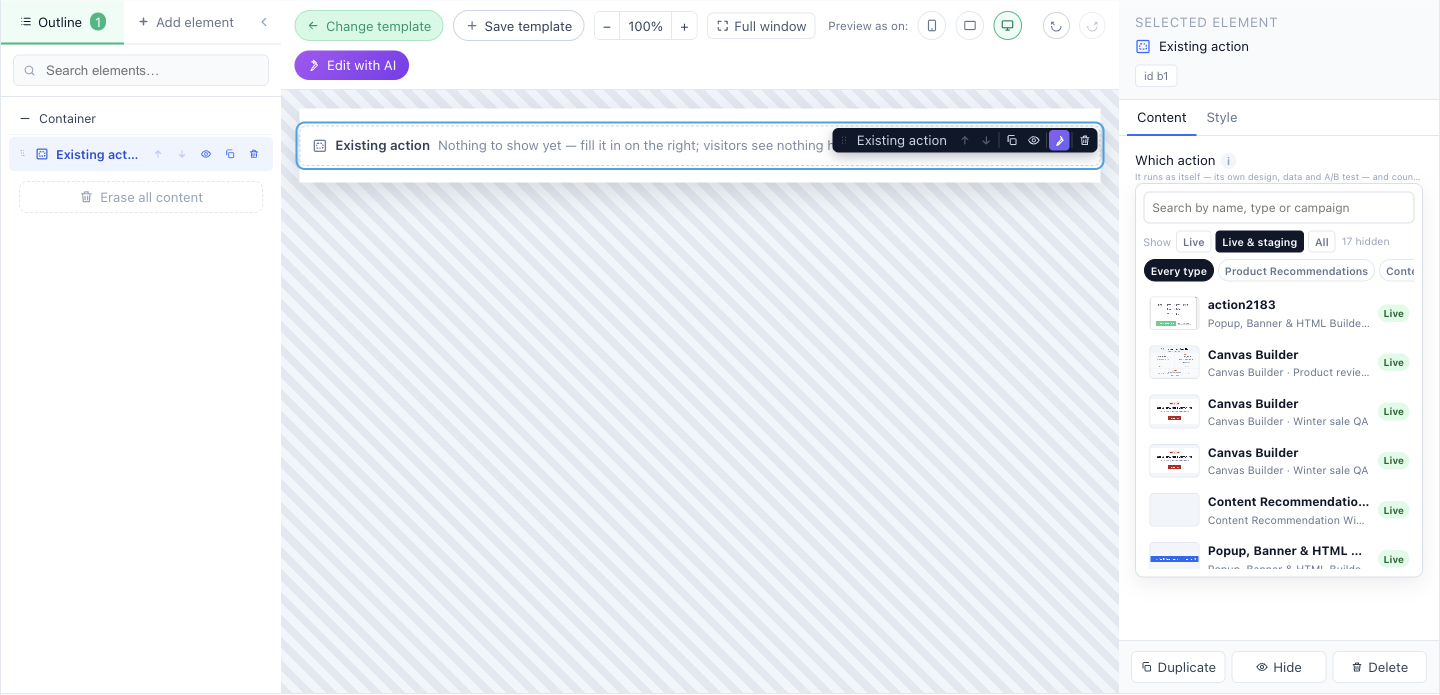
The action picker
- Search by name, type or campaign.
- Show: Live, Live & staging (the default) or All — it says how many it hides.
- Filter by type with the chips, from Every type down.
- Each row shows the action’s screenshot, its campaign, and whether it is Live, Staging or Not live.
Warnings you may see
- Its campaign is published to staging only — only a staging preview shows it. Publish that campaign to show it to everybody.
- None of its campaigns is live — nothing can show it yet.
- This action is set to open as a popup — it opens over the page instead of in this design. Choose one that shows in a placeholder, or make one for this design.
- That action is not in any campaign any more — nothing can show it here.
What it can place
Product and content recommendations, Popup, Banner & HTML Builder designs, Canvas designs, booking, Show Reviews, Review Forms, Customer Logos, lead forms, AI Search and the AI finders.
A ready-made page of your own actions The Personalized page design in the Canvas template gallery starts with a headline and three Existing action elements, two of them side by side — recommendations, an offer, reviews, assembled into one page. It replaces the old Personalized Page action type.
Related
- Canvas Builder — every other element
- AI Product Finder and AI Content Finder
- Where content shows — placeholders and popup positions