
A Review Form, a Feedback question and a Survey each have a Thank-you email step. It is off by default.
Writing it
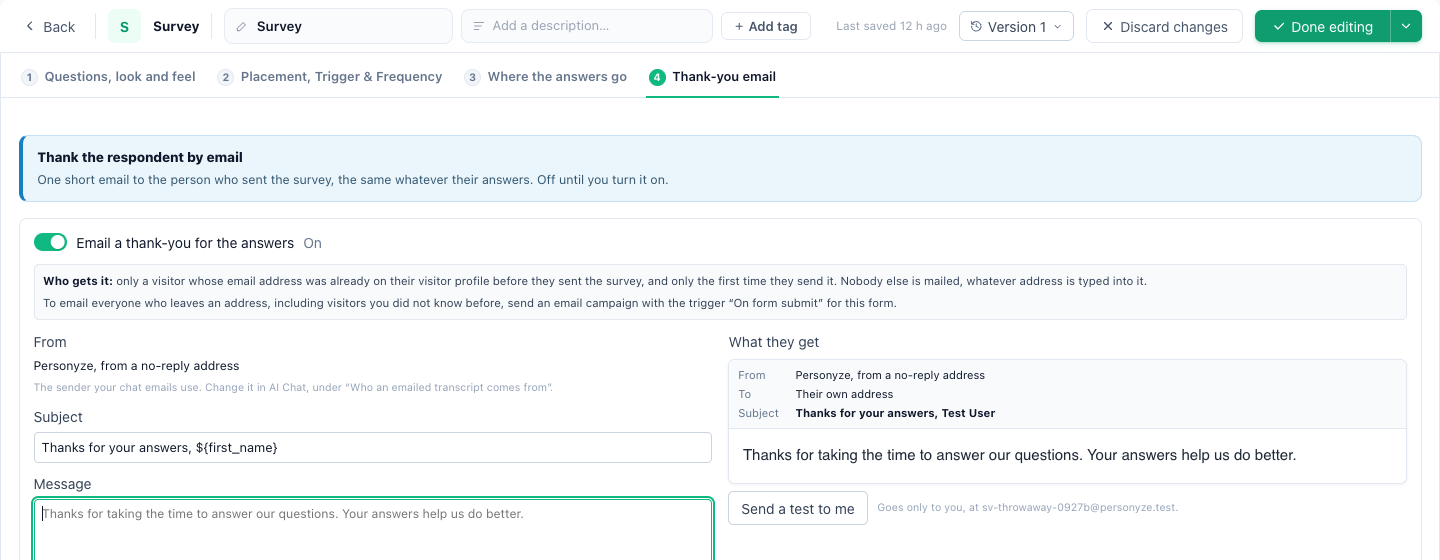
- Turn it on: Email the reviewer a thank-you on a Review Form, Email a thank-you for the feedback on a Feedback question, Email a thank-you for the answers on a Survey.
- The Subject and Message are yours. Left empty, the text in the preview is sent, in English.
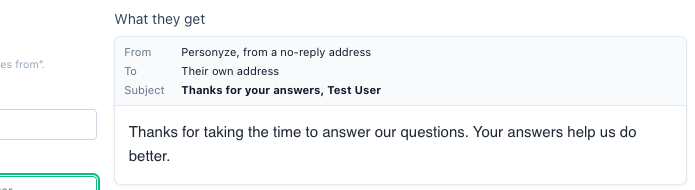
${first_name}is filled from the form or from the visitor’s profile — for a survey, always from the profile. - A preview shows the email as it will arrive. Send a test to me goes only to your own login address.
Sender: who it comes from
Once the email is on, Sender offers the same senders as a Send Email action: the account’s own senders, and Add a new sender to set up another — an address on Personyze’s mail server, your own SMTP (SendGrid, Mailgun, SES, Postmark, Brevo and more), or a webhook.
- Until you pick one, the thank-you goes from the sender your chat emails use, or else from a no-reply address in your brand’s name. The preview’s Sender line shows which.
- A sender on your own domain is what your customers recognise, and what keeps a reply in your inbox.
Who receives it
- Only a visitor whose email address was already known: on their profile before they first wrote to you, or from your site’s login, your CRM or an order. An address typed into one of your forms is never mailed.
- Only once: for their first review, their first feedback answer, or the first time they send a survey. Sending a survey again, or changing the answers later on its own page, mails nothing.
- There are limits per visitor and per account — at most one a day to a visitor.
- The same thanks whatever the rating or answer, and no reward: review platforms and consumer law require that.
To email everyone who leaves an address Use an email campaign with the trigger On form submit for that form.
Related
- Review Form
- Feedback & NPS
- Surveys
- Where survey answers go — emails to you and your team, alerts and leads
- Troubleshooting — no thank-you email arrived