
Left alone, a popup shows on every page load, for ever. That is almost never what anyone wants,
and it is the single fastest way to make a good campaign feel like harassment. Frequency caps are how you say
“enough”.
Watch the 2:01 walkthrough: how the cap counts a whole campaign rather than each action, picking the limit, and how it differs from an action’s own limits.
Video: Display rules: where an action shows, when it opens and how often (2:21) — it plays at the top of Where Content Shows: Placement, Triggers & Frequency.
There are two levels, and they do different jobs:
| Set on | Counts | |
|---|---|---|
| Display rules | One action | That action on its own |
| Campaign cap | The campaign | All its actions together |
Both apply. An action stops when either its own rule or the campaign’s cap says so, so the
stricter of the two is what a visitor experiences.
Capping one action
On the action’s display step. The screen states the default plainly: “With nothing ticked here, this
shows on every page load, for ever. Every rule you tick makes it appear less.”
- Stop showing it after they have seen it enough — after so many impressions it goes quiet for
so many sessions. - Stop showing it after they click it. They did what you asked. Showing it again is the fastest
way to make a win feel like nagging. - Stop showing it after they close it. Counted per visitor. Closing is the clearest signal that
they do not want it. - Only show it in bursts — visible for a stretch, hidden for a stretch, around and around.
- Only show it just after another action ran — within a chosen window of that action firing.
Outside it, this one stays hidden.
Alongside these sit the timing controls — show after a delay, show it for a
fixed time, and whether to show a close × in the corner. A campaign with no close button cannot
learn that somebody wants it gone.
Capping the whole campaign
On the campaign’s Content step, in the Campaign settings card: its Campaign cap row. On most campaign types the card is folded to one line that starts A campaign cap or No campaign cap — Change opens it. An email or push campaign has no campaign cap. This is the one to reach for when a campaign carries several
actions, because it counts them together — three actions each allowed three views is nine
interruptions, unless the campaign says otherwise.
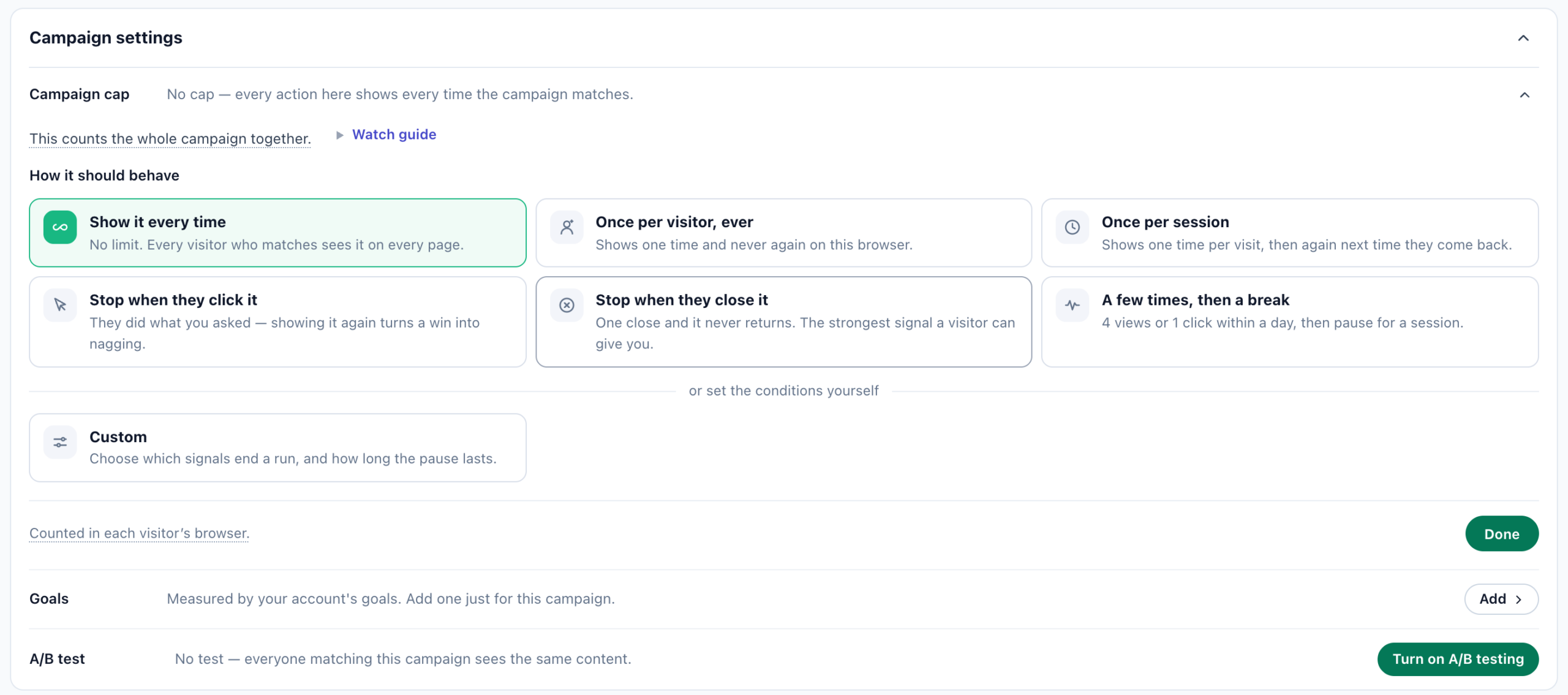
The presets
- Show it every time — no cap. Every visitor who matches sees it on every page.
- Once per session — one time per visit, then again next time they come back.
- Once per visitor, ever — one time and never again on this browser.
- A few times, then a break — the common case: 4 views or 1 click within a day, then pause
for a session. - Custom — set the conditions yourself.
What you are actually setting
A cap is a budget, a window, and a pause:
- The view budget — how many views are allowed. The card draws one dot per allowed view, with
the last one amber: after it, the campaign pauses. - Stop when they click it and stop when they close it — separate counts, each
optional. Whichever limit is reached first ends the run. - Counted within — a session, a day, a week, a month, or all time.
- Then pause for — a number of sessions, a stretch of hours or days, or
never — pause forever.
“One close and it never returns — the strongest signal a visitor can give you.” A visitor who
dismissed your popup and sees it on the next page has learned something about you.
When a view counts
Two choices, and they are not the same:
- When it is actually seen — the visitor really had it on screen.
- When it is delivered — counted whether or not it appeared on screen.
Simpler, and reaches the cap sooner.
Delivered is the safer setting for anything you would rather under-show than over-show. Seen is the honest one for
measuring reach.
Which actions it covers
Every action in this campaign, or only some of them — tick the ones that
count. The choice only appears once a campaign has at least two actions; with one, the cap covers it and there is
nothing to narrow. Rows outside the tick list are marked not counted in the cap, so a permanent element can sit
in the same campaign as a capped popup without eating its budget.
Choosing a cap
| The campaign | A reasonable cap |
|---|---|
| Newsletter or lead popup | Once per visitor, ever — or stop on close, permanently |
| Cart or exit-intent recovery | A few times within a day, then pause a session |
| Announcement bar | Show every time, but stop on close |
| Countdown or sale banner | Show every time — it is the point, and it expires on its own |
| Survey or feedback prompt | Once per visitor, stop on click and on close |
Campaign cap row: a tight cap and a low impression count is the cap working, not the campaign
failing.
Related
- Where content shows — placement, triggers and the rest of the
display step. - Overlaps and conflicts — when two campaigns both
want the same moment. - Popup & banner action — every trigger, including
exit intent on mobile.