
Personyze and Amplitude work in both directions: Personyze reports campaign events to Amplitude, and your Amplitude cohorts come back to Personyze as audience lists you can target.
Part 1: Send Personyze events to Amplitude
Personyze can report an event to Amplitude whenever a visitor matches a campaign — sent from Personyze’s servers over Amplitude’s HTTP V2 API.
Amplitude does have a browser SDK, so it is fair to ask why this is server-side. Sending from our servers means the event arrives whether or not the Amplitude script loaded on that page — the difference between a destination that works and one that works where a script happened to load.
What you need
| Field | Where to find it |
|---|---|
| Project API key | Amplitude → Settings → Projects → your project → API Key |
| EU project checkbox | Tick it if your Amplitude project lives in the EU |
How the person is identified
Amplitude events are keyed on the Personyze visitor id, not on an email address — so this destination works for anonymous visitors too. If you see “the recipient has no identifier” in the campaign log, the matched visitor had no id to send, which is rare.
What arrives
The event name you typed, the visitor id, a timestamp, and every property you added on the action — which can draw on the visitor’s Personyze profile and on live campaign metrics.
Part 2: Use Amplitude cohorts in Personyze
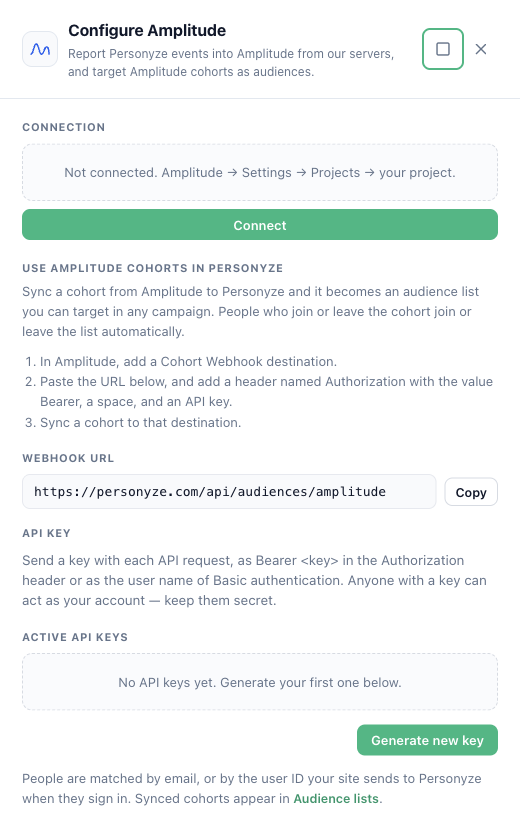
Sync an Amplitude cohort to Personyze and it becomes an audience list named “Amplitude: <cohort name>”. Target it in any campaign — website, email or offline. When people join or leave the cohort in Amplitude, they join or leave the list automatically, and the website sees the change on the visitor’s next page.
What you need
- An Amplitude plan that includes cohort webhook destinations (a paid plan).
- A Personyze API key: Settings → Integrations → Amplitude → Generate new key (the same keys as the Full-featured API card).
Set it up
- In Personyze, open Settings → Integrations → Amplitude and copy the Webhook URL (
https://personyze.com/api/audiences/amplitude). - In Amplitude, add a Cohort Webhook destination. Enter the URL, and add a header named Authorization with the value
Bearer <your API key>(the word Bearer, a space, then the key). - Sync a cohort to that destination.
How people are matched
By Amplitude’s user_id, compared with the user ID your site sends to Personyze when people sign in, and with email when the user_id is an email address.
Where to find it
Audiences → Audience lists. Choose the list in a campaign’s targeting with the User lists rule.
Related
- Send Event to Analytics — the action, and its other eleven destinations.
- Mixpanel integration — the same two directions for Mixpanel.
- Performance Metrics