
A coupon is where codes come from. You make it once, under Promotions → Coupons, and anything that offers a discount hands out its codes: a promotion, an AI Chat offer, a design or an email that prints its token. The code each visitor gets, the limits and the dates are the coupon’s, wherever it is shown.
Where they are
In the left menu, Promotions → Coupons opens four screens:
| Screen | What it holds |
|---|---|
| Overview | Codes handed out and used, what needs you, and where each coupon is used. See The Overview. |
| Coupons | Every coupon, with Add coupon. Click a row for its page: where it is used, who holds its codes and every use. See The five kinds. |
| Redemptions | Every use of a code — on your site, in your store, from a coupon engine, or pasted — and Used codes. See Redemptions. |
| Stores & engines | The stores and coupon engines your codes are made, issued and checked on. See Stores and coupon engines. |
The list’s columns: Name (yours; visitors never see it), Kind, Code or pattern, Used in, Handed out, Used, Codes left and Status. A coupon is Live while it hands out codes; Paused, Capped, Ended, Scheduled and No codes left hand out none — visitors who already have a code keep it.
The five kinds
Add coupon opens the editor on Kind: “How visitors get their code.”
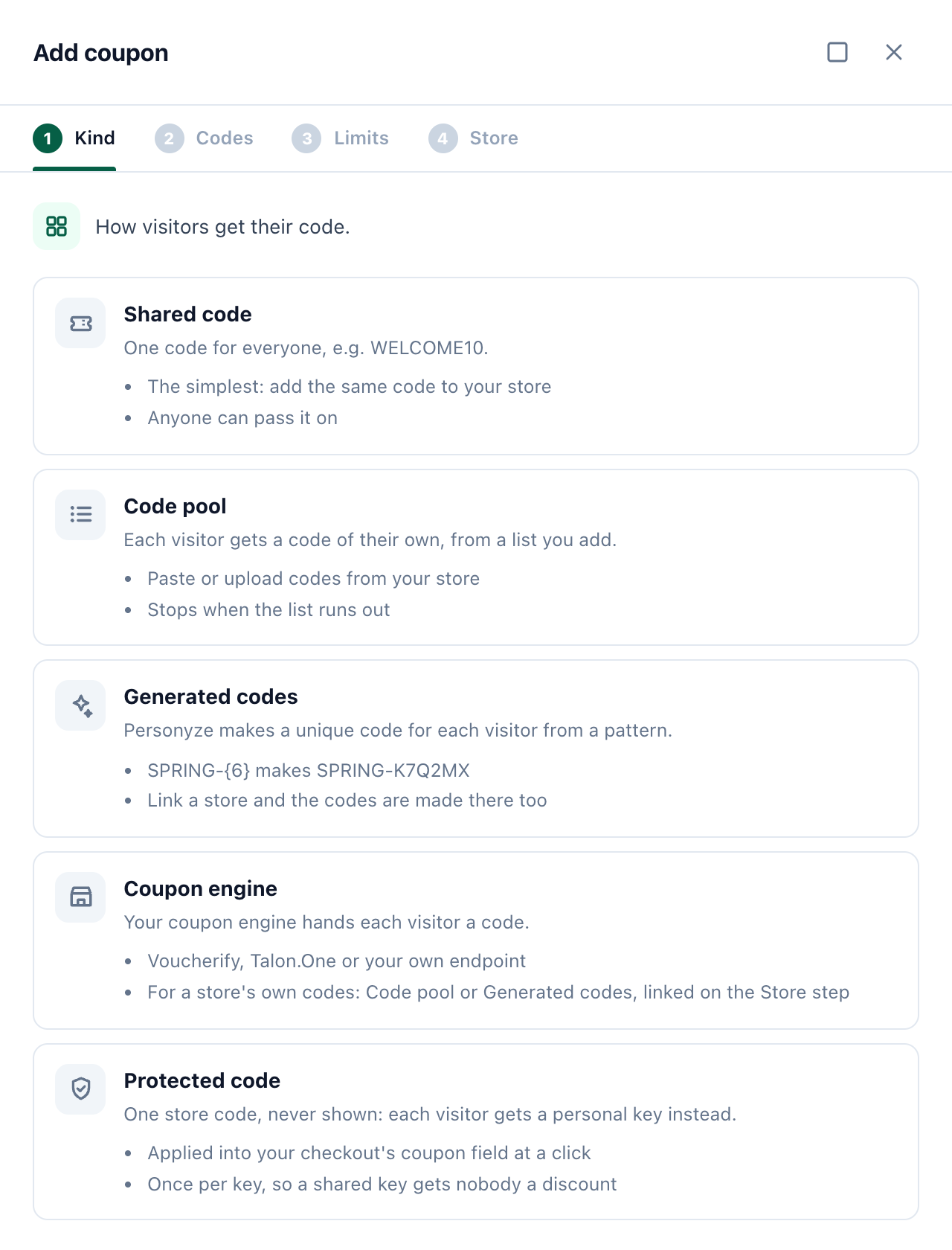
| Kind | What each visitor gets | Good to know |
|---|---|---|
| Shared code | One code for everyone, e.g. WELCOME10. | The simplest: add the same code to your store. Anyone can pass it on. |
| Code pool | A code of their own, from a list you add — the same one on every visit. | For codes your store already made. It stops when the list runs out. |
| Generated codes | A unique code Personyze makes from a pattern: SPRING-{6} makes SPRING-K7Q2MX. |
Link a store and the codes are made there too, so its checkout takes them. |
| Coupon engine | A code from your coupon engine: Voucherify, Talon.One or your own endpoint. | For codes you already run in an engine. |
| Protected code | A personal key. Your store’s one real code is never shown: it is applied into the checkout’s coupon field when they press Apply my discount. | Once per key, so a key passed on gets nobody a discount. See Protected code. |
The steps after Kind are Codes, Limits and Store (Engine for a coupon engine). A protected code has Code, Checkout and Limits.
Codes
- Name — your name for it, how you pick it in a promotion or a chat offer. Visitors never see it, except on a protected code.
- Code (shared code) — the code everyone gets. Add it to your store’s discounts too, so the checkout takes it. A code is one word, and belongs to one coupon: a code another coupon already has is refused, or its uses would count twice.
- Discount — what it takes off, as visitors read it: 15%, $10 or Free shipping. A store discount is made from it when you link a store.
- Code pattern (generated codes) — your text, and
{N}for N random characters, at least 6 in all. Empty: 8 random characters. Under the box is a code it makes; Another shows one more. The random characters leave out the ones a shopper misreads, such as 0 and O. - Redeem link — optional: a link that applies the code for the visitor, such as your store’s discount link.
- Codes (code pool) — paste them in Add codes – one per line, or Or choose a file (a CSV or text file: the first column of each line is read as a code). They reach your site within 10 minutes. The line above the box counts the pool — codes, handed out, used and left — and warns when it runs low.
- Make codes (code pool, no store linked) — a Code prefix and how many: makes unique codes and downloads them. Add them to your store’s discount first, then press Add codes; visitors get them only after that. With a store linked, the codes are made in the store instead — see Stores and coupon engines.
Limits
| Field | What it does |
|---|---|
| Codes per visitor | How many codes one visitor may be handed over time. 1: the same code on every visit. |
| Status | Live hands out codes between its dates. Paused: nobody new gets one; codes already handed out still work. |
| Stop after handing out | It stops once this many codes were handed out, everywhere it is used. Empty: no limit. |
| Stop after uses | It stops once its codes were used this many times at checkout. Empty: no limit. |
| Starts, Ends | The first and the last day it hands out codes. Codes already handed out keep working at your store as your store decides. |
A shared code has no Codes per visitor or Stop after handing out: it is everyone’s, so nobody is handed one. Its limit is its uses.
Stores and coupon engines
The Store step says where the codes must work at checkout.
| Choice | What happens |
|---|---|
| Personyze only | You add the codes to your store yourself. Generated codes linked to no store are unknown to your checkout, which refuses them. |
| A connected store — Shopify, WooCommerce, BigCommerce or Magento | A code pool’s or generated coupon’s codes are made in the store, so its checkout takes them, and the codes used are read from its orders. Pick the store’s discount they belong to (Shopify discount, WooCommerce coupon, BigCommerce promotion), or leave it to be created from the coupon’s Discount with the first codes. A shared code linked to a store: the orders that used it are counted as used. Magento needs a Cart price rule with Coupon “Specific Coupon” and “Use Auto Generation” ticked, and takes code pools and generated codes only. |
Stores are connected under Integrations — see Shopify and Magento. Once a code pool or a generated coupon linked to a store is saved, its Store step has Make codes in Shopify (or your store’s name): up to 1,000 at a time, added once the store confirms them. Keep it topped up makes another batch of that size by itself when few are left.
Coupon engines
A Coupon engine coupon asks the engine for a code each time it hands one out. Connect the engines under Stores & engines, or right on the coupon’s Engine step:
- Voucherify — Region, Application ID and Secret Key (Project settings → General → API keys), and an optional Webhook secret. Send Voucherify’s
redemption.succeededwebhook to the Redemptions address shown there: with its secret, uses arrive at once; without, Personyze reads them every 10 minutes. - Talon.One — your Talon.One address, the Application ID and a Management API key (Account → Tools → Management API keys).
- Your webhook — an Endpoint address Personyze asks for each visitor’s code, signed; it hands out the code your endpoint answers. Your endpoint checks the calls with the Signing secret, and posts the codes used, signed with it, to the Redemptions address: they count at once. On a saved coupon, Send a test asks your endpoint for a code now and shows its answer; nobody is given that code.
For Voucherify and Talon.One, the coupon then picks the Campaign whose codes visitors get. A slow or failed answer gives that visitor no code.
Protected code
For a store that has one real code and does not want it published. Visitors never see it: each is handed a personal key (such as KEY-K7Q2MX) wherever a design prints the coupon’s code, and the code goes into the checkout only when they ask for it there.
- Code — Your store’s code: the one code your checkout takes. After you save, it is shown only masked (S•••20), here and everywhere. The Name is what visitors see where the code would be: “✓ Spring sale applied”.
- Checkout — “Where’s your coupon field? Visitors press ‘Apply my discount’ beside it.” The Cart or checkout page (its address, or the part all such pages share, like /cart; empty: any page that has the field), the Coupon field and the Apply button (empty: the field’s form is sent). Pick on my site opens your page so you can click each one, or type a selector.
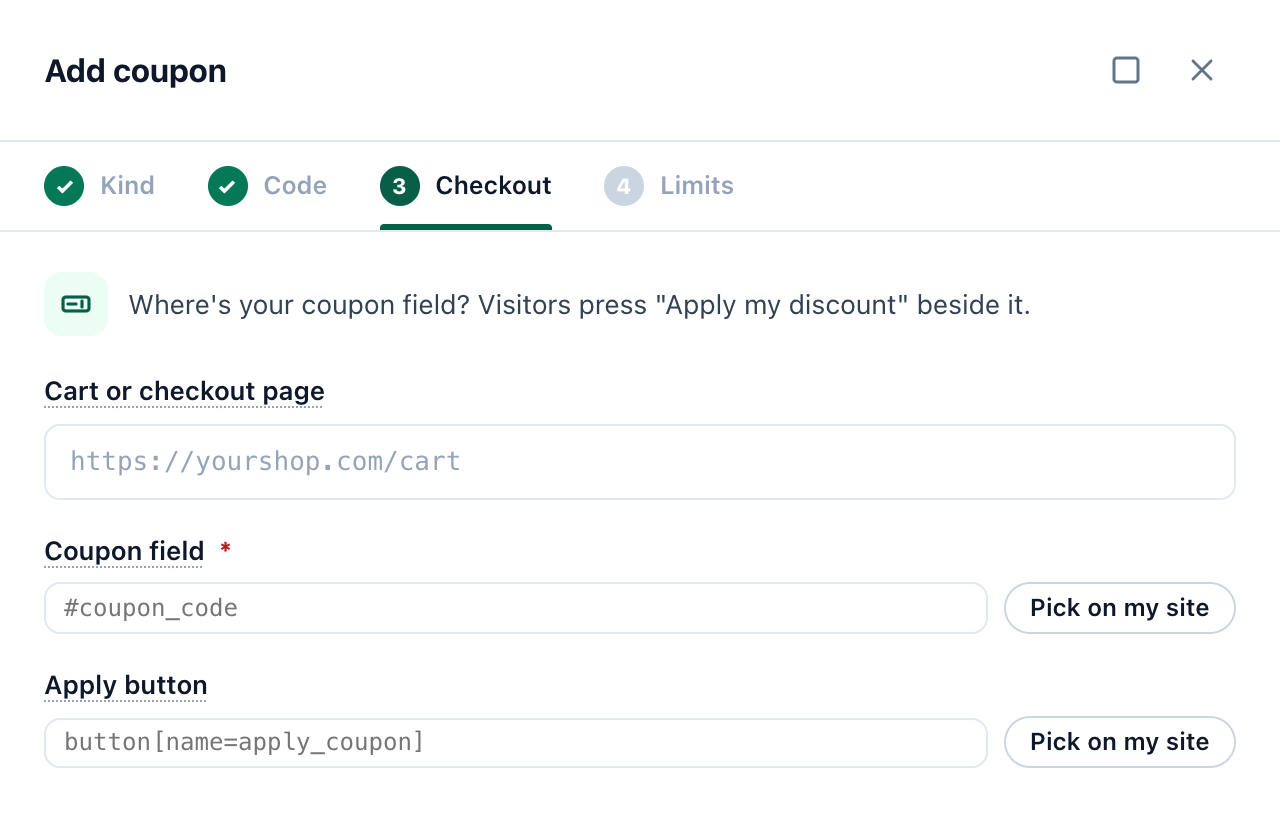
On that page a visitor who holds a key sees Apply my discount beside the coupon field; pasting the key into the field works too. Pressed, the field is covered with “✓ name applied”, the code goes in and the store’s Apply button is pressed. Wherever the store prints the code afterwards — its totals, a “Coupon:” line — the coupon’s name shows instead. A key applies once, and only for the visitor it was given to; bursts of bad tries are refused and listed under Needs attention.
- A coupon’s page counts Keys handed out, Applied and Used. Without a key counts orders that used the code although Personyze never gave that visitor a key: the code may be published — change it in your store and here.
- A protected code works on your site only: an email cannot carry it, and an email with its token is not sent.
- On a Shopify store, the editor says: “Shopify’s checkout runs no outside script (except on Plus), so it would show this code in its summary.” Use Generated codes made in Shopify switches the coupon to that kind.
Handing out the codes
| Where | How |
|---|---|
| A promotion | A coupon promotion’s Codes step picks the coupon, and an image banner can pick one too — see Promotions. |
| An AI Chat offer | The offer’s Coupon (AI Chat → Offers → Coupon): each visitor is given their own code of it, the same one if they ask again, and with no code left the offer is not stated — see Offers. |
| Any design | The coupon’s code token. Open the coupon and, under Where it is used, click Copy token (in its editor: Codes → Advanced → Code token for a design). “Put this in any campaign’s HTML: each visitor sees their own code in its place. In a preview it shows as dots.” On a hosted landing page a shared code shows to anyone and a personal one to a visitor the page’s link names; for anyone else the token and its box are left out. |
| An email | The same token — see Coupon codes in an email. Promotion by email hands each recipient their best promotion with its code. |
A visitor keeps the code they were handed: with Codes per visitor at 1 they see the same code everywhere it is shown. New codes are handed out only within the coupon’s limits and dates.
A coupon’s page
Click a coupon in the list. Its page shows the Status, Kind, Code (or Code pattern), Discount, Dates and Limits; the numbers Handed out, Used and Codes left; and three lists:
- Where it is used — the promotions that pick it, the AI Chat offers that hand it out, and the designs and emails that print its token, each with whether it is live.
- Holders — visitors who were handed a code of it, the newest first, with when they used it.
- Latest redemptions — and All, the Redemptions screen filtered to this coupon.
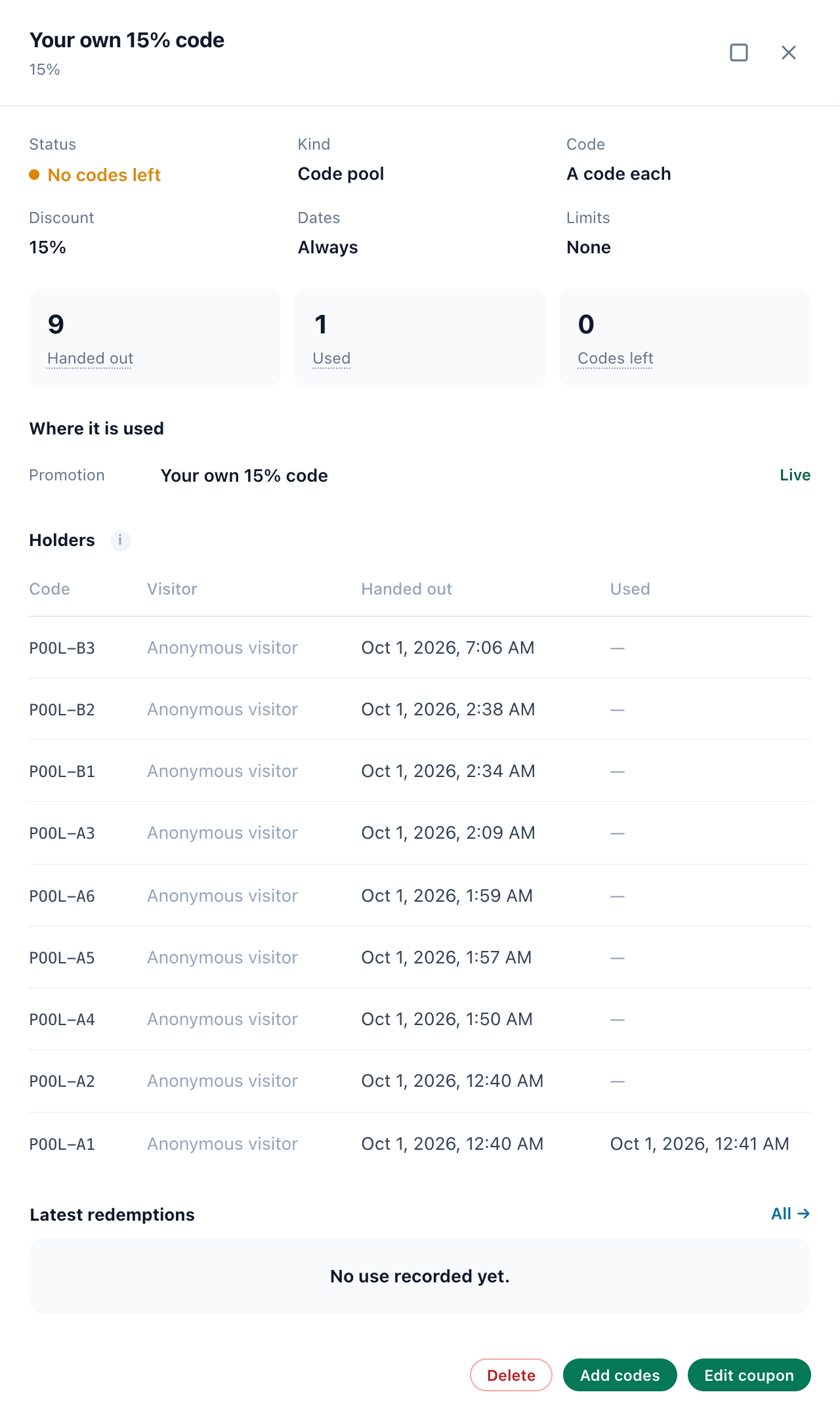
Edit coupon, Add codes (a code pool) and Delete are at its foot. Deleting removes its codes; its redemptions stay in your reports. A coupon a promotion or a chat offer still uses cannot be deleted — pick another coupon there first — and designs that print its token stop showing once it is gone. Codes already made in a store stay valid there until you remove them in the store.
Redemptions
A code used at a checkout is a redemption. Promotions → Coupons → Redemptions lists every one, over the reporting range at the top, with a tab per source:
| Source | Where the use was recorded |
|---|---|
| Your site | Seen by the tag at your checkout. |
| Store order | Read from your connected store’s orders. |
| Coupon engine | Reported by Voucherify, Talon.One or your webhook. |
| Used codes list | Pasted or uploaded under Used codes: codes used where the tag cannot see — in the shop, by phone. See How a code counts as redeemed. |
| API | Sent to the REST API (below). |
A personal code counts once ever; a shared code once per shopper a day. Each row has When, Code, Coupon, Source, Visitor (the shopper’s email where your account knows it; Anonymous visitor has no email yet; Unknown is an order nobody could be matched to), Order no. and Credited to — the promotion that showed the code to this visitor, whose redemptions count it. Filter by coupon, or Search a code.
Recording uses through the API
Codes used at a checkout the tag does not see — your own order system, a till — can be sent to POST /rest/coupons/redeemed (see the REST API). One use, or up to 500 in redemptions; only code is required:
{"code": "SPRING-K7Q2MX", "time": 1790000000, "email": "ann@example.com", "order": "#1001"}time is unix seconds (default: now), email finds the shopper and order is kept with the use. The answer counts what was recorded, already recorded and unknown, with the unknown_codes.
The Overview
Promotions → Coupons → Overview opens on whether codes are going out (Handing out codes, or No coupon is live — nobody new gets a code), with how many coupons are live, scheduled and stopped, and Manage coupons, Used codes and New coupon.
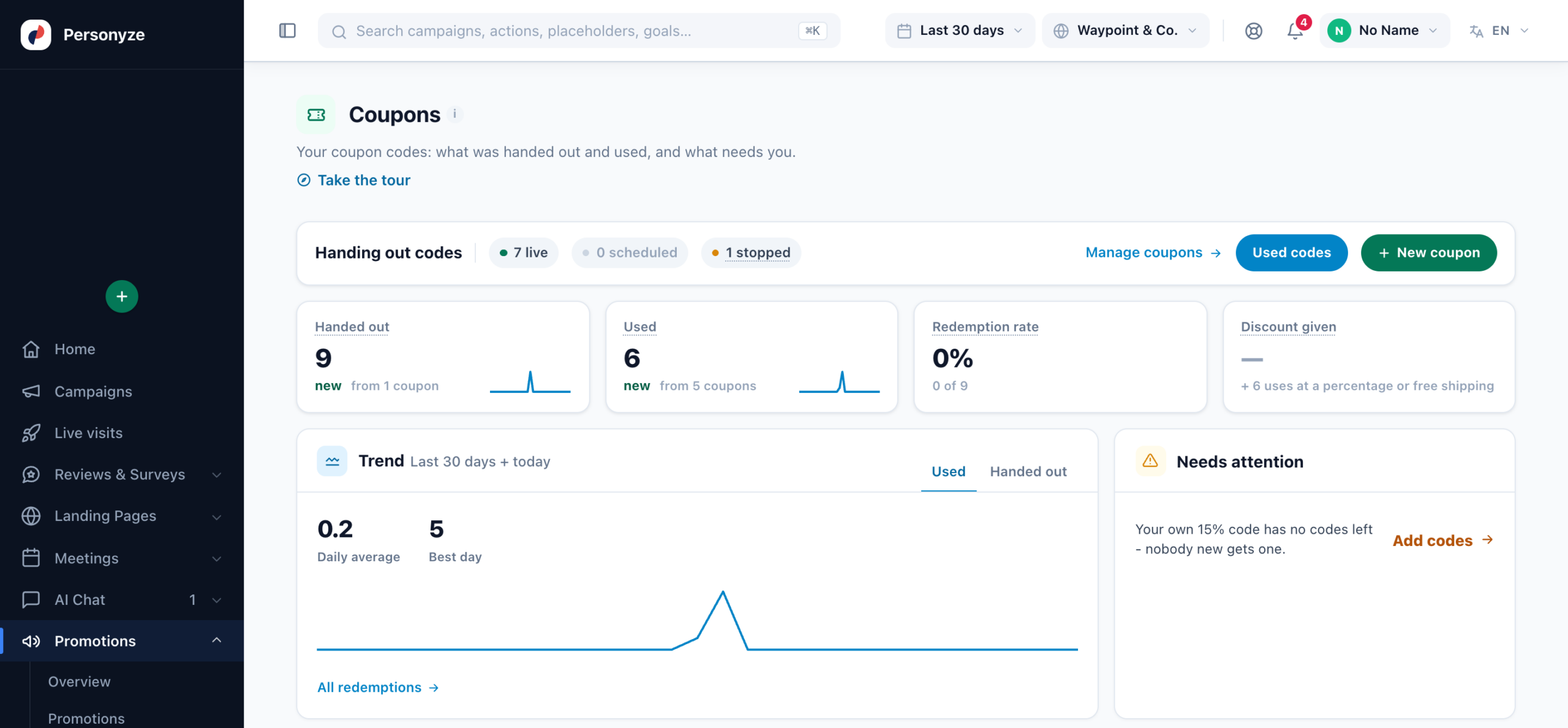
| Tile or card | What it shows |
|---|---|
| Handed out | Personal codes given to visitors in the range — from a code pool, generated, or from your coupon engine. A shared code is not counted. Updated every 10 minutes. |
| Used | Every use of your coupons’ codes in the range, wherever it was recorded. (Promotions → Overview counts only the uses a promotion showed the code for.) |
| Redemption rate | Personal codes used, out of those handed out, in the range. |
| Discount given | What the uses took off, for coupons whose discount is an amount ($10, 5 €). A percentage or free shipping depends on the order, so those uses are counted apart. |
| Trend | Used or handed out per day, with the daily average and the best day. |
| Needs attention | A coupon out of codes, near or at a limit, ending, paused while still shown, or linked to a store or engine that is not connected; a protected code with a burst of bad tries. |
| Where they are used, Top coupons, Redemptions by source, Stores & engines | Where each coupon is shown and what it brought; the coupons most handed out and used; the uses by source; and each store’s and engine’s connection. |
Related
- Promotions — One List for Every Offer — a promotion that picks a coupon
- Promotions Campaign — the widgets that show your coupons
- Promotion by email — each recipient’s best offer, with their own code
- Auto-Apply Coupon Code at Checkout — coupons that apply themselves
- Writing the Email — a coupon’s token in an email
- AI Chat Offers — codes handed out in a chat
- Shopify Integration — codes made in Shopify, uses read from orders