
Analytics › Off-site campaigns › Email deliverability shows whether your email reaches the inbox: the last 30 days of sends, bounces, complaints and unsubscribes, set against the lines Gmail, Yahoo and the Personyze mail server hold senders to. It is open before your first send too, with the Set up email sending checklist on top. This page also explains the two things the Personyze mail server does on its own to protect your sending: the warm-up of a new domain, and pausing an account whose bounces or complaints run too high.
What the page shows
Its figures cover all the account’s marketing email, from every sender. From top to bottom:
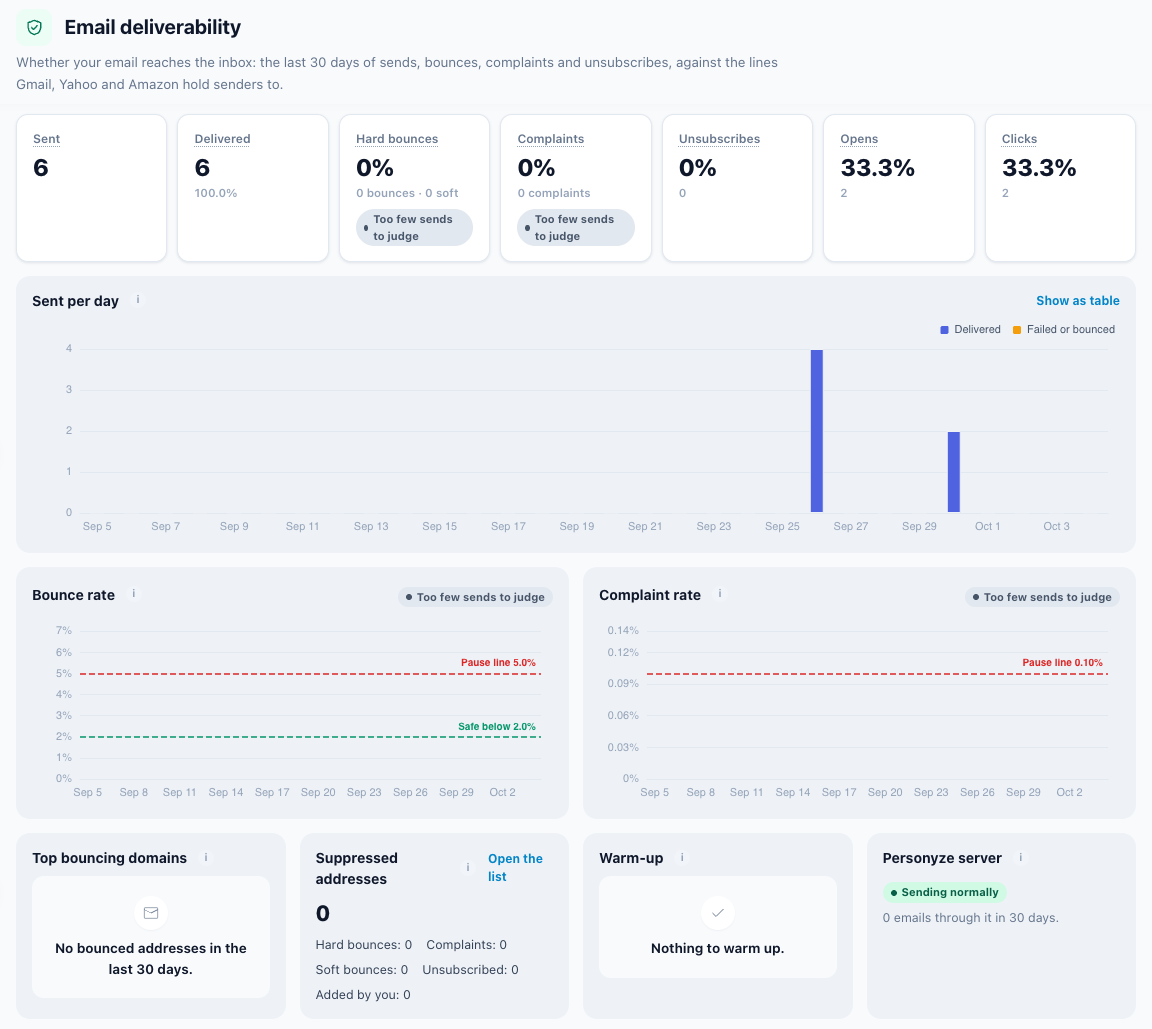
| Section | What it shows |
|---|---|
| Set up email sending | The setup checklist. It stays folded once everything required is done. |
| The 30-day figures | Sent, Delivered, Hard bounces, Complaints, Unsubscribes, Opens, Clicks — below. |
| Sent per day | Each day of the last 30 (UTC), split into Delivered and Failed or bounced. Show as table lists the days with every count; Show as chart goes back. |
| Bounce rate and Complaint rate | One chart each, the day’s rate against its lines (below). Days with fewer than 20 sends are left out (“too few sends”). |
| Top bouncing domains | The mailbox domains whose addresses bounced most in the 30 days. One domain far ahead of the others — outlook.com, say — usually means that provider is filtering you, not that the addresses are bad. |
| Bounces & spam | How many addresses your marketing email skips, and why — below. |
| Warm-up | Each new sending domain’s day and today’s limit — below. |
| Personyze server | Sending normally and {n} emails through it in 30 days., or the amber paused line. |
The 30-day figures
| Tile | What it counts |
|---|---|
| Sent | Marketing emails sent in the last 30 days, by every sender of this account. |
| Delivered | Sent, less the sends that failed or bounced, with its rate. |
| Hard bounces | Addresses that do not exist, as a share of sent, with “{n} bounces · {soft} soft” under it. A verdict chip says how it stands. |
| Complaints | People who pressed “This is spam”, as a share of sent. Gmail and Yahoo want this under 0.1%. Counted for email through the Personyze mail server. With a verdict chip. |
| Unsubscribes | Recipients who unsubscribed through an email, as a share of sent. |
| Opens | Emails whose tracking image loaded, as a share of sent. Apple Mail opens many emails by itself, so read it as a trend. |
| Clicks | Emails with at least one link clicked, as a share of sent. |
One campaign’s own bounces and complaints are on its Performance step, judged against the same lines; the account-wide numbers by campaign are under Analytics › Email & SMS. How every number in Personyze is read: Performance metrics.
Healthy, Watch it, Too high
The two rates that decide where your email lands each get a chip. The bounce rate counts hard bounces only.
| Chip | Hard bounces | Complaints |
|---|---|---|
| Healthy | under 2% | under 0.1% |
| Watch it | from 2% up to 5% | at exactly 0.1% — the safe line and the pause line are the same |
| Too high | over 5%: email through the Personyze mail server is paused | over 0.1% |
| Too few sends to judge | fewer than 100 emails sent in the 30 days — one bounce would be a whole percent | |
On the charts, the Bounce rate draws two dashed lines, Safe below 2.0% and Pause line 5.0%; the Complaint rate draws one, Pause line 0.10%, which is also its safe line.
Bounces & spam
The card gives the size of your suppression list — the addresses your marketing email skips — broken down by Hard bounces, Complaints, Soft bounces, Unsubscribed and Added by you. Open the list goes to the Bounces & spam tab of Settings › Email setup, where you can search the list, add an address or remove one — see Bounces & spam. Once a connected store or CRM has said some people did not agree to marketing email, the card counts them too, as No consent in your apps.
What lands on the list:
- hard bounces and spam complaints, at once;
- an address with 3 soft bounces (a full mailbox, say) within 30 days;
- unsubscribes your own email provider reports — SendGrid or Mailgun, with their Bounce webhook set up — listed with the reason Unsubscribed at the provider;
- the addresses you add by hand.
Skipping them is what keeps your bounce rate down. What happens to each bounce and complaint is in Bounces and spam complaints.
Warm-up of a new sending domain
Gmail and Outlook judge the domain in your From, and a domain that has never sent has no reputation yet. So a new domain’s email through the Personyze mail server starts small and grows, for each account and From domain. Email over the day’s limit waits in the queue: nothing is dropped.
| Day | Emails it may send |
|---|---|
| 1 – 7 | 200, 400, 800, 1,600, 3,000, 5,000, 8,000 |
| 8 on | 50% more each day: 12,000, 18,000, 27,000… — about two weeks in all, shown as “day {day} of ~14” |
- It moves up a day only after a healthy day. If opens are very low (under 10%), the limit holds where it is.
- It pauses for the rest of the day when, over today and the three days before (at least 100 sends), hard bounces pass 5% or complaints pass 0.3%. It resumes the next day by itself.
- Engaged people go first: recipients who engaged with your account in the last 30 days, then 60, then 90. Engaged means the latest of an email opened or clicked, a visit to your site, or a purchase — a buyer who never opens counts as much as a reader. Anyone who has waited more than two days goes ahead of them.
- It ends once the domain is 30 days past its first send, or, from day 7, when the day’s limit is far above what the account actually sends.
- Not limited: domains that already had a sending history, and the shared Personyze address. Email through your own SMTP server or provider is warmed up only if you turn on Warm up a new sending domain on this provider for it, under Settings › Integrations › Email delivery (SMTP). Bounces can then pause it only on SendGrid and Mailgun, the providers that report them back.
Friendly addresses first
A new domain is judged by its first emails, and the strongest signal in them is a person who opens, replies, or moves the email out of spam. So you can name the people who expect your email — your team, partners, friends — and while a sending domain warms up, they get each new email first.
- Where: Settings › Integrations › Email delivery, Friendly addresses first. Pick one of your lists, or None. Make the list first under Audiences › Audience lists; with no list yet, the setting says “Make a list of them first, in Audience lists.”
- What happens: the first time a live campaign sends from a domain that is warming up, up to 50 people of the list get that email as ordinary recipients, and go first. Each gets it once.
- Ordinary recipients: their sends count against the day’s limit, and each person is checked as any recipient is — an unsubscribe, a bounce, double opt-in, the frequency cap — which can leave one out of a given email.
- Which campaigns: emails sent by their audience rules — a newsletter, a welcome email, a sequence’s first step. An email sent on an event, such as a cart left or a form sent, is about that event, so friends do not get it. Never on staging, while the domain is paused, or once its warm-up is over.
- Of an A/B-tested email, friends get one version; of a sequence, the first step only.
The Warm-up card on this page then says, for example, “Up to 8 friendly addresses get each new email first.” While a domain warms up with no list chosen, it says “No friendly addresses yet – people who expect your email can get each new one first.” with Add friendly addresses; the checklist’s warm-up row offers the same button. It is never a warm-up network: no seed mailboxes and no made-up opens, only people you know.
How long your campaign will take
A campaign whose From domain is warming up — or is new and has not sent yet — says how long its audience takes at the warm-up pace, in its Campaign readiness card and on its email QA step. For example: “At the warm-up pace these 20,000 people take about 8 days. 200 go today.” Before the campaign has matched anyone, it counts your contacts with an email address instead, as an upper bound. It is always an estimate: “it assumes this campaign sends every day, is the only one sending from {domain}, and that no bounces or complaints pause it.”
Check the list before day 1
Before a domain’s first send, the same places point to the Address check: “Check the list before day 1: bad addresses are what pause a warm-up.” The first days are the smallest, so a few bad addresses among them are a big share of the day.
This domain is already warm
A domain that has been sending your marketing email for months from another service can skip its warm-up. This domain is already warm is on the Warm-up card of this page, and on a campaign’s QA step before the domain’s first send. It asks first: “Do this only if {domain} has been sending marketing email for months from another service, such as Mailchimp or Klaviyo. Mailbox providers send a domain they do not know straight to spam when it suddenly mails a whole list. Its email goes out without a daily limit – what is already waiting within about ten minutes – and too many bounces or complaints still pause your sending through the Personyze server.” Then End the warm-up or Keep warming up.
- Only a domain verified for your account can skip it: “Only a domain verified for this account can skip its warm-up. Verify it first, or ask support.”
- A domain paused today for bounces or complaints cannot be ended by the account while the pause lasts: “This domain is paused today for too many bounces or complaints. Its warm-up can be ended once it is sending again – or by support.”
Where the warm-up shows:
| Where | What it says |
|---|---|
| The Warm-up card on this page | The domain, then day {day}, {sent} of {cap} sent today or paused for today: too many bounces (or complaints), and how many friendly addresses get each new email first. With nothing warming: Your sending domains are warmed up. or Nothing to warm up. |
| The checklist, and a campaign’s Sending step | The row Warm-up of a new domain, with a Deliverability button. |
| A campaign’s Campaign readiness card and email QA step | The domain’s state and how long the audience takes, with This domain is already warm before its first send. |
| The bell at the top of the panel | A message when a domain’s warm-up is paused for the day: “Warm-up of {domain} is paused for today: …” |
| An email campaign’s Performance step | Warming up {domain}: day {day} of ~14, {cap} emails/day., and Remaining emails are queued and send tomorrow. once the day’s limit is reached. When paused: Sending from {domain} is paused for today: {rate}% of recent emails bounced (limit 5%). Queued emails resume tomorrow. (or …% of recent recipients marked an email as spam (limit 0.3%)…) |
When sending through the Personyze mail server is paused
Every account sending through the Personyze mail server shares one sending reputation, so each account is judged on its own over the last week. Once it has sent at least 200 emails in that week, it is paused automatically when hard bounces pass 5%, or complaints pass 0.1% (at least 2 complaints). From 3% hard bounces or 0.05% complaints it is warned first: nothing stops yet. Personyze support can also pause or block an account.
The account’s bell, at the top of the panel, says so to everyone on the account: a pause (with a pop-up as well), a warning, and sending resumed.
While the account is paused or blocked:
- its email through the Personyze mail server waits in the queue. Nothing is lost, and it goes out once support resumes the account. It does not resume by itself: contact support;
- email through your own SMTP server or provider is not affected;
- a test through the Personyze mail server is refused with the same sentence.
An amber line says so in the sender picker (when the Personyze mail server is the sender), on the Sending step, in the checklist, on the email Performance step, and in the Personyze server card on this page:
| Line | Why |
|---|---|
| Sending through Personyze is paused for this account: high bounce rate ({rate}). Contact support. | Hard bounces passed 5% over the week. |
| Sending through Personyze is paused for this account: high complaint rate ({rate}). Contact support. | Complaints passed 0.1% over the week. |
| Sending through Personyze is paused for this account: {reason}. Contact support. | Support paused the account, for the reason given. |
| Sending through Personyze is blocked for this account. Contact support. | Support blocked the account (sometimes with a reason after “account:”). |
Its tooltip: “Emails through the Personyze server wait in the queue – nothing is lost – and go out once sending is resumed. Senders using your own SMTP server or email provider are not affected.” Before you ask for the account to be resumed, find the cause: the Bounce rate and Complaint rate charts show the day, and Top bouncing domains shows where.
The warm-up’s pause and this one are different:
| Warm-up pause | Account pause | |
|---|---|---|
| What stops | One new domain’s email through the Personyze mail server | All the account’s email through the Personyze mail server |
| When | Today and the 3 days before (100+ sends): hard bounces past 5%, or complaints past 0.3% | The last week (200+ emails): hard bounces past 5%, or complaints past 0.1% with at least 2; or support pauses or blocks it |
| For how long | The rest of the day; it resumes tomorrow by itself | Until support resumes it |
| Queued email | Waits; nothing is dropped | Waits; nothing is lost |
| Your own SMTP or provider | Not affected | Not affected |
If something looks wrong
| What you see | Why |
|---|---|
| Someone unsubscribed but is not on Bounces & spam. | Expected. People who unsubscribe through your own link are stopped by their profile and are not listed — above. |
| Both chips read Too few sends to judge. | Fewer than 100 emails went out in the 30 days. |
| A campaign sends fewer emails today than it has recipients. | Its From domain is warming up; the rest are queued for the next days — above. |
| Email through the Personyze mail server is paused. | The account passed 5% hard bounces or 0.1% complaints over the week. Nothing is lost; contact support — above. |
More in Troubleshooting email campaigns.
Related
- Set up email sending — the checklist, senders, your domain and Email delivery (SMTP)
- Bounces & spam — who your email skips, and what happens automatically to each report
- Check your recipients’ addresses — skip the addresses that would bounce, before you send
- Your unsubscribe page, the suppression list and double opt-in
- Reading an email campaign’s report — one campaign’s Bounced and Spam complaints cards
- Analytics: Email & SMS and Email deliverability
- The Sending step of an email campaign
- Troubleshooting email campaigns