
Settings → Data & privacy is where an account decides how long each kind of visitor data is kept, what the tracking code collects on its site, and how to answer a visitor who asks to see or delete their data — by hand, from a form on your site, or from your own systems. It also lists the cookies the tracking code sets and your team’s sign-ins, and Suggest settings for my site proposes settings that fit where your visitors are and what kind of site you run.
Where it is, and who can change it
The page is in the Settings menu, under Data & privacy. It has four tabs — Data retention, What we collect, Visitor requests and Access & documents — with Suggest settings for my site at the right end of the tab bar.
| Who | What they can do |
|---|---|
| The account owner, Managers, and Members with Production access | Everything on the page. |
| Reporting users, and Members without Production access | See every setting, but not change it, and look up a person. They can’t download or delete a person’s data, approve or reject a visitor’s request, change Requests from your site, use Suggest settings for my site, or see the team’s sign-ins. |
Roles are set on Team Members. Other screens lead here, or hold the very same setting:
- On Site profile, under Set on other pages, Visitor identity & profile and User-data retention link here.
- On Tracking Code, Privacy & compliance opens Consent handling, whose first line links to What we collect.
- The AI Chat’s How long transcripts are kept (What the assistant may see) is the same setting as Chat transcripts here.
Data retention: how long data is kept
One row per kind of data. Hover a row’s name for what it covers and how long it is kept today; hover its field for the range you can choose.
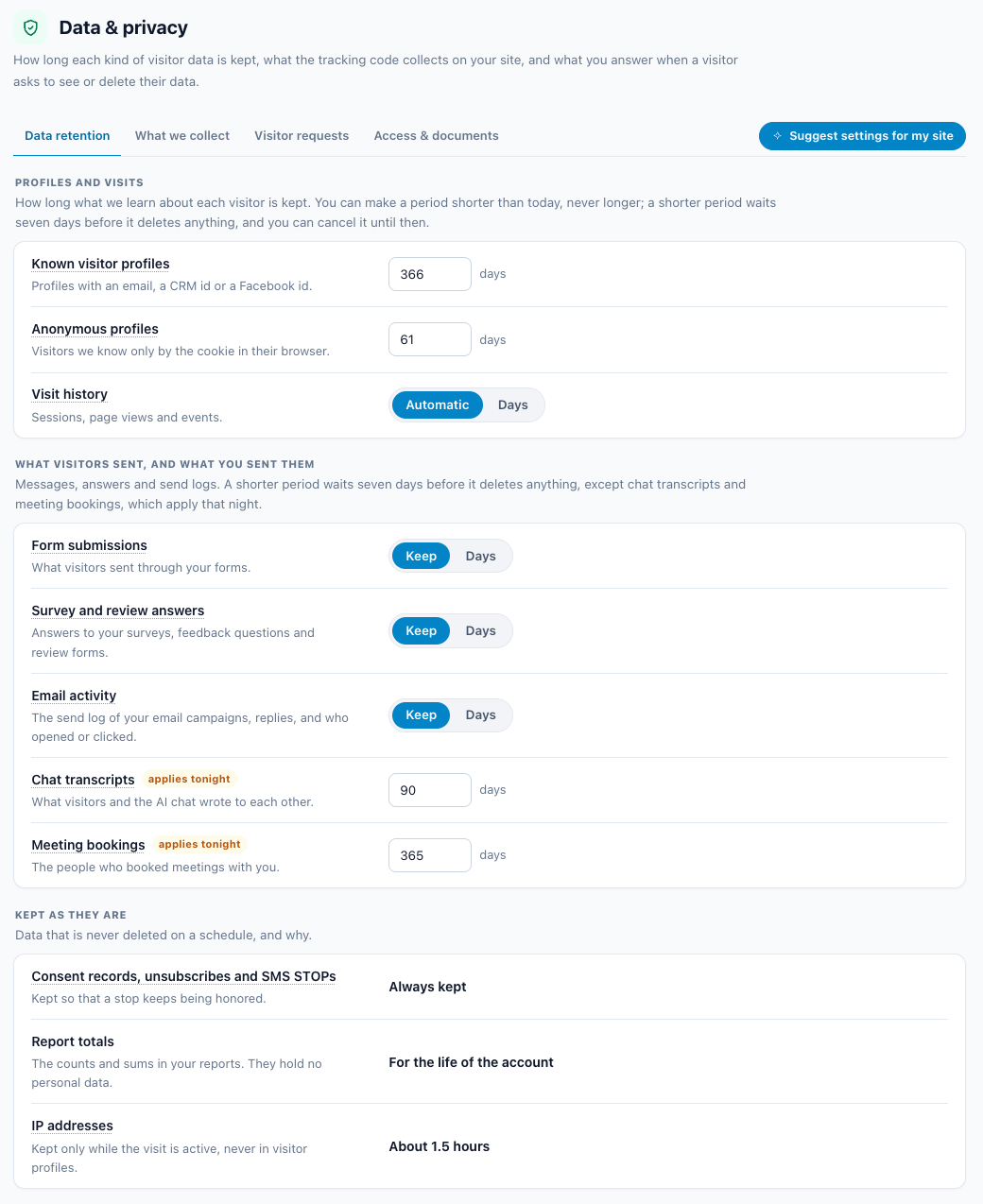
A period can only get shorter. A period you set deletes data sooner than Personyze would on its own, never later. Each field’s tooltip shows its range — anyone who needs longer contacts support. Chat transcripts is the one setting that can go past its default: 90 days unless you choose otherwise, anywhere from 1 to 730.
| Data | Default | What you can set |
|---|---|---|
| Known visitor profiles — profiles with an email, a CRM id or a Facebook id | 366 days | 30–366 days |
| Anonymous profiles — visitors known only by the pseudonymous visitor id in their browser’s cookie | 61 days | 7–61 days |
| Visit history — sessions, page views and events | Automatic (below) | 7–730 days, or Automatic |
| Form submissions | Keep | Keep, or 30–1,825 days |
| Survey and review answers | Keep | Keep, or 30–1,825 days |
| Email activity — the send log of your email campaigns, replies, and who opened or clicked | Keep | Keep, or 30–1,825 days |
| Chat transcripts | 90 days | 1–730 days — the same setting as on the AI Chat screens |
| Meeting bookings | 365 days | 1–365 days. Past the period, a booking’s name, email, phone and answers are blanked; the booking itself stays in your reports |
Keep means kept until you delete it. A number of days deletes each record that many days after it was made.
The 7-day wait
- A change that deletes more takes effect 7 days later. Before it saves, the page asks (This deletes data.) and says about how many records would go, counted by the same rule the nightly deletion uses.
- Until that date the row shows the change, the count and Cancel the change. Cancelled, nothing is deleted.
- Choosing another shorter period while one is waiting starts the 7 days again.
- A change that deletes less applies at once.
A nightly job does the deleting.
What “inactive” means for a profile
- Personyze’s default rule deletes a profile 366 days (61 for an anonymous profile) after its details last changed. Visits don’t reset that clock, so even a regular visitor whose details never change is deleted then.
- A period you set adds a second clock: a profile is also deleted once it has gone that long with no visit and no change to its details. The default rule keeps applying beside it, so a period never keeps a profile longer than the default rule would.
Profiles kept regardless
A profile that unsubscribed from one of your campaigns, withdrew email consent, or is marked “do not email” is not deleted for its age — neither by a period you set nor by Personyze’s default rule. Deleting it would lose the unsubscribe, and the next CRM import could email the person again as somebody new. The row’s tooltip says so. Deleting the person through Visitor requests still deletes the profile, and keeps the address blocked.
Visit history: Automatic
Automatic is Personyze’s own rule: the days your account is set to keep (5 by default), and always at least the newest 100,000 visits, however old — so a quiet site keeps its history. A number of days is a hard limit instead: older visits are deleted, however few are left.
Kept as they are
Three rows on the page are fixed:
| Row | Shown as | Why |
|---|---|---|
| Consent records, unsubscribes and SMS STOPs | Always kept | Proof that a person agreed, and every request to stop: consent records, unsubscribes from all your emails, your suppression list and SMS STOPs are kept for as long as your account exists, so a stop keeps being honored. |
| Report totals | For the life of the account | The counts and sums in your reports. They hold no personal data. |
| IP addresses | About 1.5 hours | An information row, not a setting — see below. |
IP addresses
An IP address is used when a visit arrives, to find the visitor’s country and city. It is kept only while the visit is active — about 1.5 hours — and never in visitor profiles. Consent records keep the IP as proof of consent. There is no IP setting to change: an address is never stored with a profile in the first place.
What we collect
What the tracking code does on your site. Each control saves as soon as you change it.
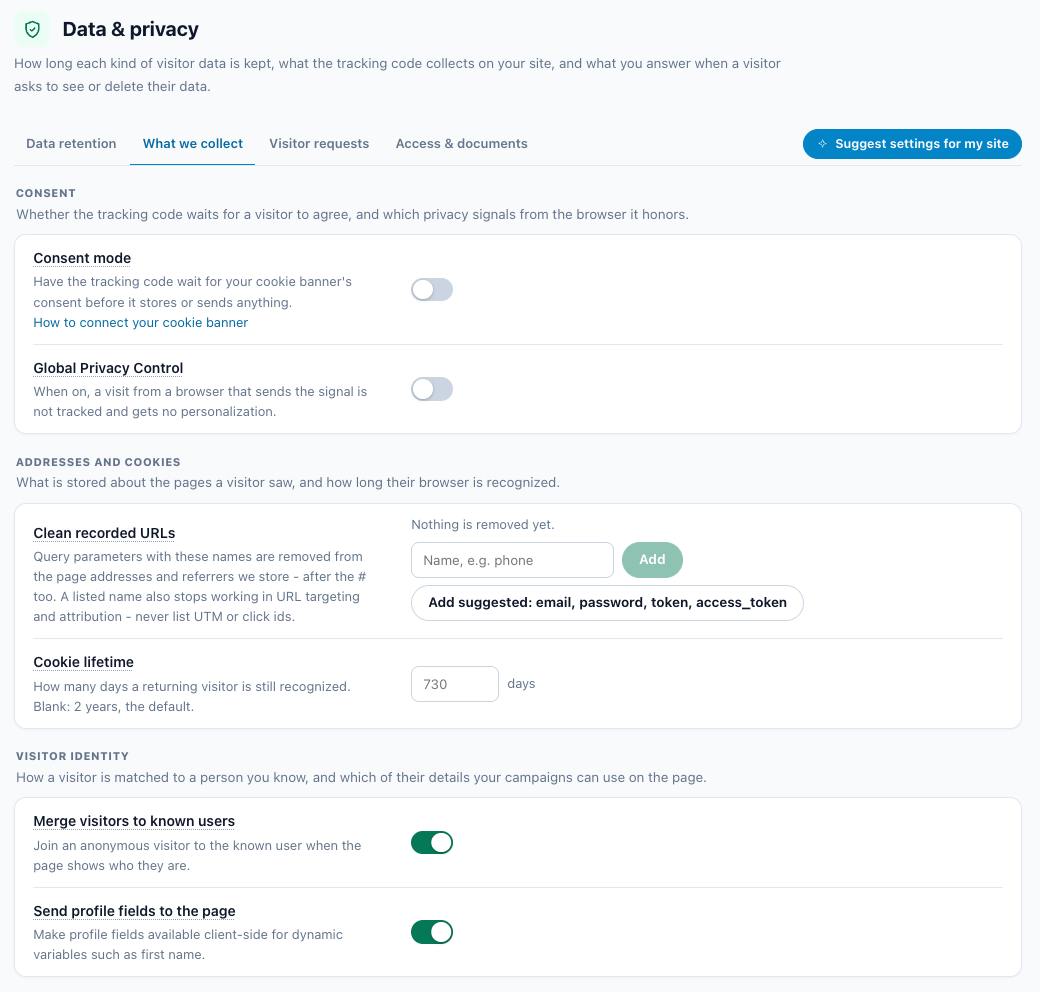
| Setting | What it does |
|---|---|
| Consent mode | The tracking code loads on every page but stores and sends nothing — no cookie, no request — until your cookie banner calls _S_T.consent.grant(). Off is the default: then your cookie banner keeps the whole snippet from running until the visitor agrees, as it does with your other tags. How to connect your cookie banner opens the instructions for Cookiebot, OneTrust, Usercentrics, IAB TCF and Google Consent Mode. |
| Global Privacy Control | Off by default. When on, a visit from a browser that sends the Global Privacy Control signal (Sec-GPC: 1 — Brave and DuckDuckGo send it, and Firefox with its setting on) is not tracked: Personyze records nothing from it and gives it no personalization. The tracking code still loads in that browser, so to keep it from storing anything before consent, use your cookie banner or Consent mode. |
| Clean recorded URLs | The parameters on this list are removed from the page addresses and referrers Personyze stores — in the query string and after the #. See below. |
| Cookie lifetime | How long the visitor-id cookie, stat_track_u_id, lasts: 30–730 days. Blank means the default, 730 days (2 years). A visitor who comes back after it has expired starts again as a new visitor. Its copy in localStorage expires with it; the opt-out cookie always lasts 730 days (cookie table). |
| Merge visitors to known users | When Personyze detects an identifier on the page — a customer key or an email — it merges the unidentified visitor into that known user, with their full history. |
| Send profile fields to the page | Profile fields become available to the page’s JavaScript, so a campaign can fill in details such as a first name. Anything sent to the page can be read by any script on it: leave this off if your campaigns don’t show profile fields. |
grant(). Consent mode has the details.Clean recorded URLs
A sign-in link with ?email=, a reset link with ?token=: personal details sometimes travel in a page address, and the stored address would keep them as long as the visit is kept.
- The list may start empty (Nothing is removed yet.) or with four names:
email,password,tokenandaccess_token. Add suggested adds whichever of those four are missing. - A name is letters, digits and
_ . - [ ], up to 64 of them, no spaces. Up to 30 names. - UTM names (anything starting
utm_) and click ids —gclid,gclsrc,gbraid,wbraid,dclid,msclkidandfbclid— are refused.
param() placeholder and for attribution. That is why UTM and click-id names are refused.Visitor requests
When a visitor asks what you hold about them, or asks you to delete it — a GDPR or CCPA access or erasure request — answer it here. A request reaches you in one of three ways, and all three run the same download and the same full deletion:
- By hand — someone writes to you, and you look them up under Find a person.
- From your site — the visitor fills in a form on your privacy page and confirms by email; the request waits under Pending requests, or is approved automatically. See Requests from your site.
- From your own systems — a privacy tool, Zapier, Make, n8n or a script calls the Privacy API with your API key.
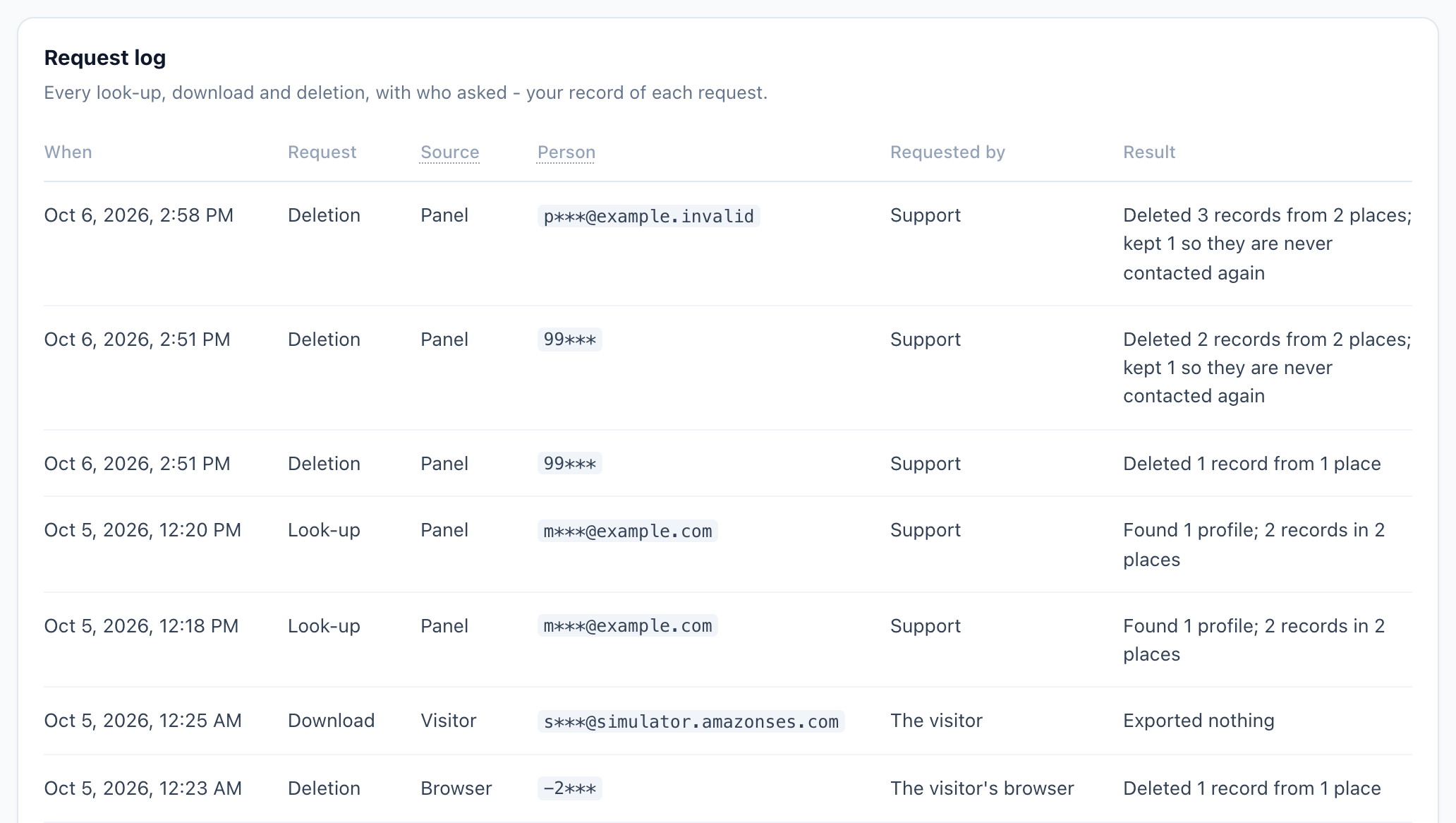
Every look-up, download and deletion is written to the Request log, with where it came from and who asked.
Find a person
- Search by email, CRM id or visitor id. Visitor ids can be negative; that is normal.
- The page lists every profile that matches: its Visitor id, what it Matched by, its email (masked), its CRM id, and when it was First seen and Last seen. What we hold counts the person’s data, kind by kind.
- When more than one profile matches, none is ticked. Tick the ones that are the person who asked — only those are downloaded or deleted.
- Form submissions, survey answers and campaign emails are found through a visitor profile, so those of a profile already deleted can no longer be found by address.
Download (JSON)
Download (JSON) gives a file with everything held about the ticked profiles, kind by kind — up to 1,000 rows of each.
Find a person on Imported user data has the same Download (JSON) for the person it found, and it is logged here too.
Delete everything
- Tick the profiles that are this person, then Delete everything.
- Read what will be deleted and what is kept. Also block this email from future sends (recommended) is ticked: it puts the address on your suppression list, so a later import or CRM sync can’t email the person again as someone new.
- Type the identifier you searched for, and press Delete permanently. It can take up to a minute for a person with years of visits.
| What happens | To what |
|---|---|
| Deleted | The profile; its visits, page views and events, and the campaigns shown to them; form submissions; survey answers, and reviews and feedback they wrote; AI chat conversations; emails and messages your campaigns sent them, their replies and their email engagement; email consent records, and their per-campaign email states and unsubscribes; coupon redemptions; list memberships, interests, products viewed and articles read; meeting requests; push subscriptions; messages waiting to be sent. |
| Blanked, kept | Meeting bookings: name, email, phone and answers removed; the meeting stays in your reports. Orders: their email, customer id and link to the person are removed; the order keeps its amount, so revenue reports stay right. |
| Kept | The email suppression list, soft bounces and SMS STOPs — kept so this person is never emailed or texted again. |
If you untick the block but the person had unsubscribed, the address is blocked anyway — their unsubscribes were part of what was deleted — and the receipt says why.
The receipt lists what was deleted, with counts; what was kept, and why; and what a deletion can’t reach. A deletion that runs out of time says Not finished – run the delete again. and offers Run again, which finishes the rest.
The other delete buttons do the same thing
These run the same full, logged deletion, of that one profile:
- Imported user data → Find a person → Delete this person’s data
- Visitor Attributes → Individual user data — lookup & deletion → Look up user → Delete user
- Analytics → Visitors → Visitor profiles — Delete user (the bin icon) on a row
- Analytics → Visitors → Campaign audience → View users — Delete user on a user
- A campaign’s Performance step → Users → View users — Delete user on a user
Their confirmation says: “This profile’s email address goes on your suppression list, and the deletion is logged in Data & privacy › Visitor requests.”
DELETE /rest/users deletes the profile only. DELETE /rest/users/where/… (REST API objects) deletes the visitor profile, not the visits, form submissions, chats or email activity, and is not logged. For a full erasure from your own systems, use POST /rest/privacy-delete — the Privacy API.Requests from your site
Let visitors ask for a copy of their data, or for its deletion, from a form on your own site. Nothing happens until the visitor confirms the request from an email sent to the address they typed, so nobody can act on someone else’s data by typing their address. A confirmed request then waits for you under Pending requests, unless you approve that kind automatically.
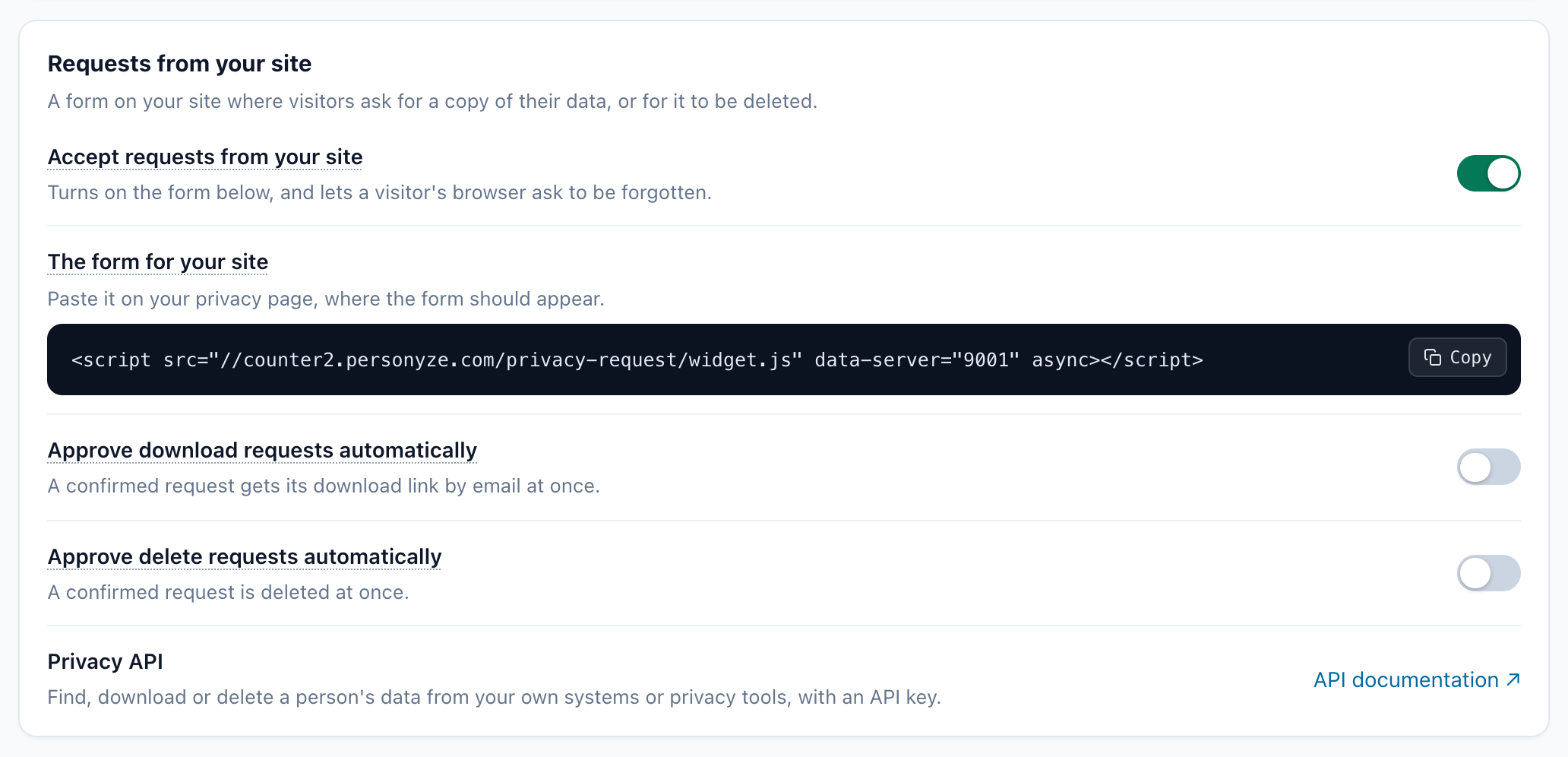
| Setting | What it does |
|---|---|
| Accept requests from your site | Turns on the form, and lets a visitor’s browser ask to be forgotten. Turning it off again also stops links already emailed from confirming; a request already approved still runs. |
| The form for your site | The code to paste on your privacy page — see The form on your site. Turn on the switch above before you put it on your site. |
| Approve download requests automatically | Off (the default): each confirmed request waits under Pending requests until you approve it. On: the visitor gets their download link by email at once. |
| Approve delete requests automatically | Off (the default): each confirmed request waits for you. On: a confirmed request is deleted at once. Turning it on asks first: “Confirmed deletions will then run without anyone looking at them.” |
| Privacy API | API documentation — finding, downloading or deleting a person’s data from your own systems. See The Privacy API. |
The form on your site
Copy the code under The form for your site and paste it on your privacy page, where the form should appear. It looks like this, with your own account number:
<script src="//counter2.personyze.com/privacy-request/widget.js" data-server="1234" async></script>It draws Your email address, What would you like us to do? with Download my data or Delete my data, and Send request, in your site’s own font and colours. It works with or without the Personyze tracking code on the page. The address typed into it is kept apart from the rest of the page, so no other script on your page can read it.
| Add to the code | To |
|---|---|
data-target=".selector" |
Draw the form inside an element of your page instead of where the code is. |
data-form="none" |
Draw nothing, and call PersonyzePrivacy.request(kind, email) (kind is 'export' or 'delete') and PersonyzePrivacy.forget() from your own buttons. Both answer {ok, code}; PersonyzePrivacy.message(answer) gives the words the form would show. |
data-label-email, data-label-submit and the like |
Reword the form — for example in your site’s language. The keys: email, choice, download, delete, submit, sending, and the messages sent, forgotten, known, invalid, later, again, disabled, error. |
To restyle it, use the form’s parts from your stylesheet, for example .pzpr-host::part(button) { … }; the parts are form, field, input, legend, choice, button and message.
What the visitor gets
- They type their address, choose Download my data or Delete my data, and press Send request. The form says “Check your email: we sent you a link to confirm your request.” It never says whether you know that address.
- The confirmation email, with your site’s name in its subject, holds a Confirm my request button. Its link works for 24 hours, and nothing happens unless it is clicked.
- Clicked, the request is confirmed: it waits under Pending requests, or runs at once when you approve that kind automatically.
- A download, once approved, is emailed to them: “Your data from … is ready to download”, with Download my data, a link that works for 7 days. The file (JSON) holds what you store about them — their profile, visits, form and survey answers, chats, bookings and the emails sent to them — but not the notes your team wrote for each other.
- A deletion, once approved, is the one Delete everything runs, for the profiles whose email address it is: everything stored about that address goes, the address goes on your suppression list, and the visitor is emailed when it is done.
The emails to visitors are in English, and carry your site’s name.
Pending requests
Requests your visitors confirmed by email, waiting for you to approve or reject them: Asked, Request (Download or Deletion), Email, Confirmed and Status. While any wait, this is the first thing on the Visitor requests tab.
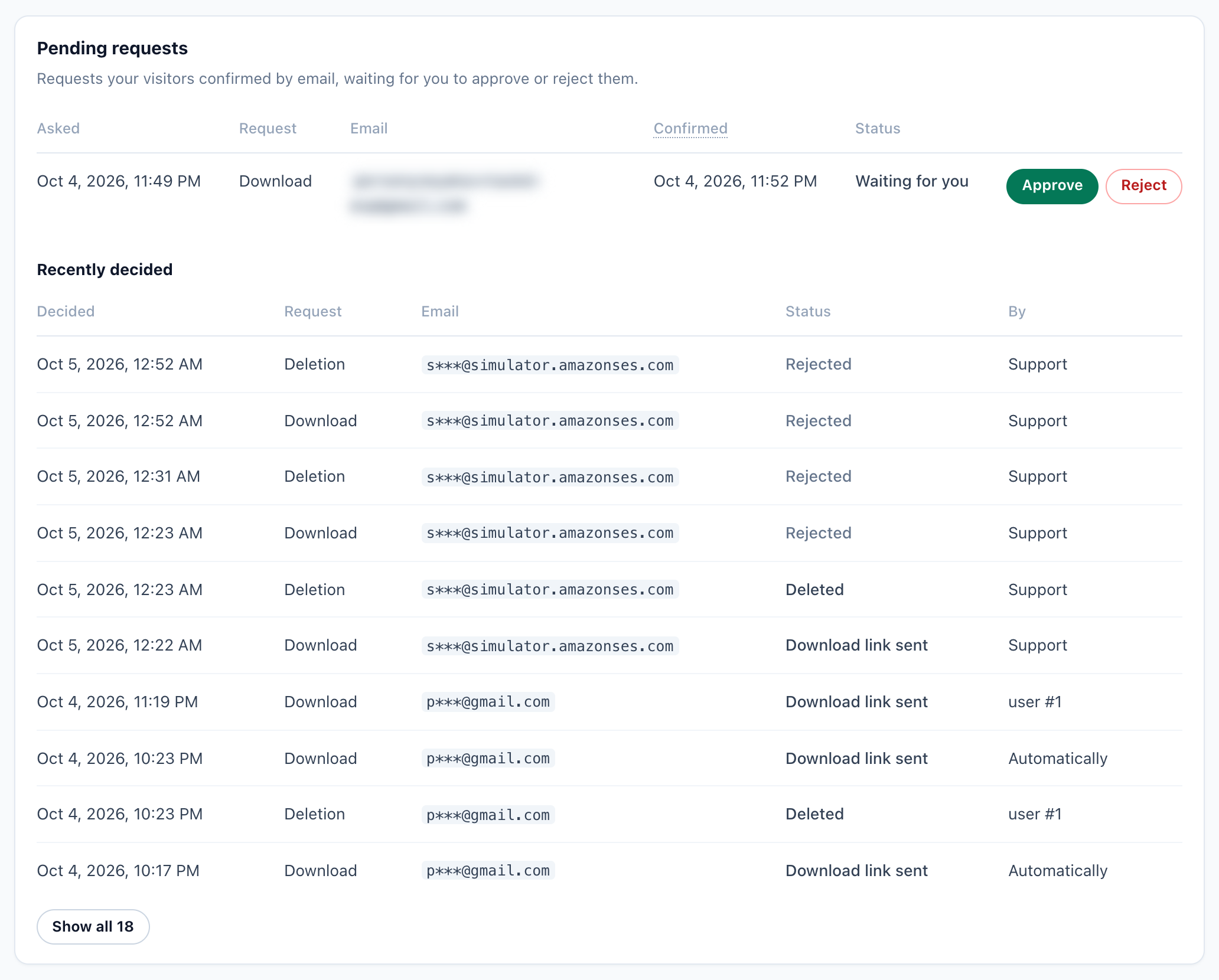
- Approve a download, and the link is emailed to the visitor at once.
- Approve a deletion, and it asks first: “Delete everything stored about …?” — Delete permanently. It cannot be undone.
- Reject: nothing runs, nobody is emailed, and the address is removed from the request.
- Under the list, a line counts the requests still waiting for their visitors to confirm them by email.
- Recently decided lists the decided ones: Decided, Request, Email, Status, and By — who approved it, or Automatically. Ten show at first; Show all lists the rest.
- Approving or rejecting needs full access to the account. Other users see the list, with the addresses masked, and no buttons.
| Status | Means |
|---|---|
| Waiting for you | Confirmed; approve or reject it. |
| Running… | Approved, and running. |
| Download link sent / Deleted | Done. |
| Not finished – tried … of 6 times | Part of it ran out of time. It runs again each night, 6 times in all; Approve runs it again now. |
| Stopped after … tries | It did not finish. Approve runs it once more while the request still holds the visitor’s address (30 days); after that, look the person up under Find a person. |
| Rejected | You rejected it. |
Forget this browser
With requests from your site turned on, a button of your own can call PersonyzePrivacy.forget(): the visits recorded from that browser are deleted, and Personyze’s cookies and storage are cleared in it — “Done: the visits from this browser are deleted, and it is no longer recognised.”
- It works only for an anonymous visitor. A browser linked to an email address or a CRM id is refused, and pointed to the form: a cookie alone is never enough to erase a known person.
- A visitor who opted out of tracking stays opted out.
- Meetings the visitor booked stay (they manage them from the confirmation email), and campaigns shown “once per visitor” may show again.
The Privacy API
Your own systems — a privacy tool such as OneTrust, Transcend or DataGrail, or a script — can find, download and delete a person through three REST objects: privacy-person, privacy-export and privacy-delete. They do exactly what this tab does, and every call is in the Request log.
- They take your account’s API key, from Settings → Integrations → Full-featured API. A key issued for WordPress, Segment, Shopify or Magento is refused.
POST /rest/privacy-deleteis the full deletion of Delete everything, and puts the address on your suppression list.- The Delete Visitor step of Zapier, Make and n8n calls
privacy-delete: the same full deletion, logged.
Reference: REST API objects: privacy, and the developer reference.
Request log
Every look-up, download and deletion: When, the Request, its Source, the Person it was about, who it was Requested by, and the Result. The person is shown masked (for example j***@example.com): the log records that a request was made, never the data itself, and never keeps the full address.
| Source | Where the request came from | Requested by |
|---|---|---|
| Panel | Someone on your team, here or on another screen. | Their name. |
| API | Your own systems, with an API key (the Privacy API, Zapier, Make, n8n). | API key and the key’s fingerprint, for example API key 1a2b3c4d. |
| Visitor | The form on your site, confirmed by email. | The visitor, or The visitor, approved by the user who approved it. |
| Browser | A visitor’s own browser, asking to be forgotten. | The visitor’s browser. |
Access & documents
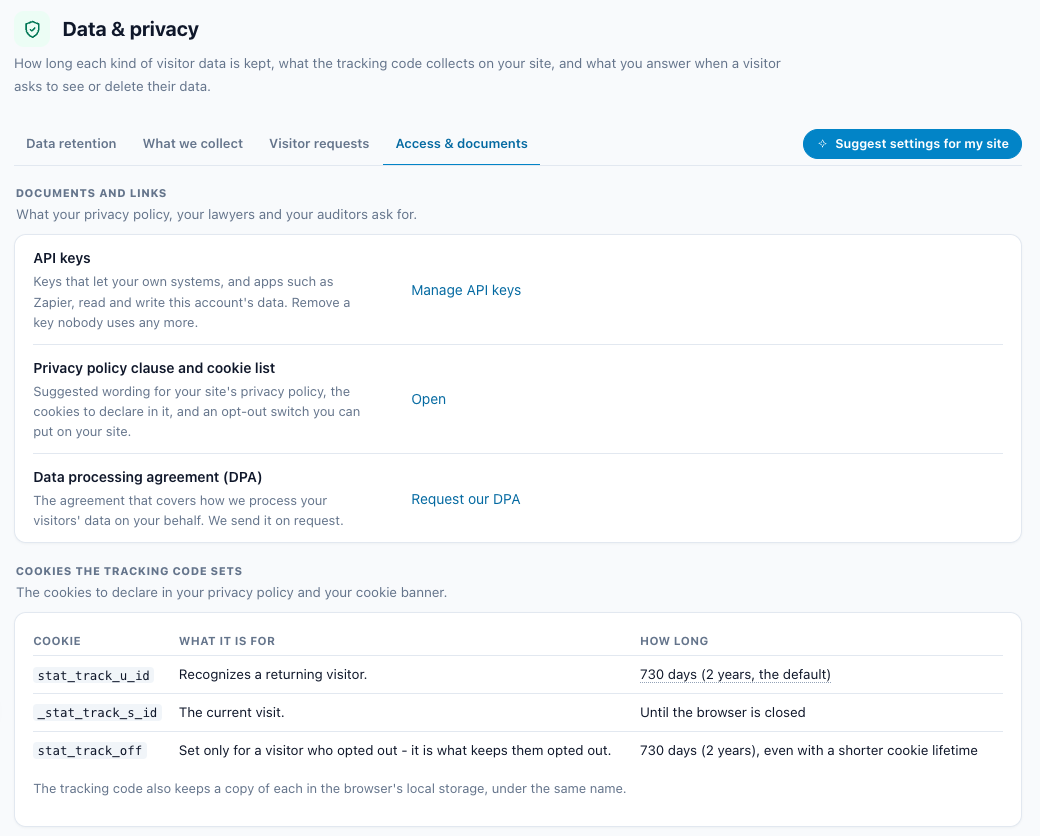
Documents and links
- API keys — Manage API keys opens the API card on Integrations. Remove a key nobody uses any more.
- Privacy policy clause and cookie list — Open gives suggested wording for your privacy policy, the cookies to declare in it, and an opt-out switch you can put on your site.
- Data processing agreement (DPA) — Request our DPA opens an email to support. The DPA is sent on request.
Cookies the tracking code sets
| Name | Lifetime | Notes |
|---|---|---|
stat_track_u_id |
The account’s cookie lifetime (default 730 days) | Visitor id |
_stat_track_s_id |
Browser session | Session id |
stat_track_off |
730 days, even with a shorter cookie lifetime | Set only for visitors who opt out |
The tracking code also keeps a copy of each in the browser’s localStorage, under the same name. The copies of the visitor id and the opt-out expire with their cookie: an expiry stamp is stored beside each (<name>.exp), and an expired copy is ignored and removed. The full list, with the other entries in localStorage, is on Personyze client-side cookies.
Team sign-ins, last 90 days
Who of your team signed in to this account: When, Who, the IP address, and How — Panel, Single sign-on or API. Ten show at first; Show all lists the rest. Only users with full access see it.
Suggest settings for my site
Suggest settings for my site, at the right end of the tab bar, suggests the privacy settings that fit your site. A rules table chooses every suggestion, and every rule cites its regulator’s own page. The AI only explains the suggestions in plain words: it can’t invent a setting or a value.
What it asks
- Where your visitors are — prefilled from your own traffic of the last 30 days: the countries with at least 2% of your visits, with their shares. Remove any, or add one.
- Kind of site — from the scan of your site, when it has been scanned.
- Sensitive topics — Health, Children or Finance, optional.
- Cookie banner — whether your site asks visitors for consent to cookies, prefilled from what the scan found.
- Notes — anything else, optional. A sensitive topic it reads in them is taken into account, and the result says so.
The rules and their sources
| Rule, and its source | Applies when | What it suggests, and why |
|---|---|---|
| Keep emails and passwords out of stored page addresses FTC |
Every site | Clean recorded URLs: email, password, token, access_tokenA page address can carry what a visitor typed — an email, a password, a sign-in token — and it is stored with every visit. The FTC advises businesses to keep only the personal information they need. |
| EU and EEA: a time limit on personal data (GDPR) European Commission |
Visitors in the EU or the EEA | Form submissions, Survey and review answers and Email activity: 730 days Under the GDPR, personal data must be stored for the shortest time possible, and the European Commission says you should set time limits to erase or review it. Two years is this advisor’s starting point, not a figure from the GDPR; choose less if you need less. |
| EU and EEA: consent before tracking cookies Your Europe (EU) |
Visitors in the EU or the EEA | A step: make tracking wait for consent In the EU, some cookies — such as tracking cookies used for behavioural advertising, analytics or market research — need the visitor’s consent before they are set, so they cannot be set when the page first opens. |
| France: tracker lifetime (CNIL) CNIL |
Visitors in France | Cookie lifetime: 395 days France’s regulator, the CNIL, recommends that audience-measurement trackers last only as long as comparing audiences over time needs, such as 13 months. 395 days applies that benchmark to the visitor cookie. |
| UK: a time limit on personal data (UK GDPR) ICO |
Visitors in the United Kingdom | Form submissions, Survey and review answers and Email activity: 730 days The ICO says you must not keep personal data for longer than you need it, and that you need a policy setting standard retention periods wherever possible; the UK GDPR does not set specific time limits. Two years is this advisor’s starting point; choose less if you need less. |
| UK: consent before cookies (PECR) ICO |
Visitors in the United Kingdom | A step: make tracking wait for consent Under PECR, as the ICO explains it, you must get the visitor’s prior consent before using cookies and similar storage on their device, unless an exception applies. |
| California: honor Global Privacy Control (CCPA) California Privacy Protection Agency (CPPA) |
Visitors in the United States — the rule is California’s, for the businesses it names | Global Privacy Control: on Under California’s CCPA regulations (11 CCR §§ 7025–7026), a business that must comply with the CCPA, collects personal information online and sells or shares it must treat an opt-out preference signal, such as Global Privacy Control, as a valid request to opt out of the sale or sharing of that information. Turning this on goes further: a visitor who sends it is not tracked. |
| Quebec: profiling off by default (Law 25) Commission d’accès à l’information du Québec (CAI) |
Visitors in Canada | A step: make tracking wait for consent For visitors in Quebec: a business that collects personal information with technology able to identify, locate or profile a person must tell them, and may not switch those functions on by default — the person must be able to switch them on. |
| Brazil: consent for non-necessary cookies (ANPD) ANPD |
Visitors in Brazil | A step: make tracking wait for consent Brazil’s data protection authority (ANPD) says in its cookie guide that consent is the more appropriate legal basis for non-necessary cookies, such as those that track behaviour, and lists switching consent-based cookies off by default as good practice. |
| Health: keep who a visitor is apart from what they read FTC and HHS |
Sensitive topic: Health | Clean recorded URLs: adds name, phone, dobThe FTC and HHS warn that tracking on health websites can disclose sensitive health information, and that companies must monitor the health information that reaches third parties through tracking. Removing names, phone numbers and dates of birth from stored page addresses keeps them from being stored beside the pages a visitor read. |
| Children: parental consent (COPPA) FTC |
Sensitive topic: Children | A step: talk to your lawyer before personalizing for children In the US, as a general rule, operators must get verifiable parental consent before collecting personal information online from children under 13; certain, limited exceptions apply. |
The two years it suggests for form submissions, survey and review answers and email activity is Personyze’s suggestion, not a legal figure.
Applying the suggestions
- Only a change stricter than what you already have is suggested; a period you already shortened is never lengthened. When nothing is left: Your settings already match what these rules suggest.
- Tick the changes to keep and press Apply (it reads, for example, Apply 3 changes). A shorter retention period still gets the 7-day wait, and can be cancelled on Data retention until then.
- Consent mode is never switched on by the advisor. Where a rule calls for consent, it is shown under Steps only you can take — “Make tracking wait for your visitors’ consent: have your cookie banner hold the tracking code until the visitor agrees, or switch to consent mode and have the banner call grant().” — with Go to Consent mode, because switching it on before the banner is connected stops all tracking.
- If the AI can’t answer, you still get the suggestions, with each rule’s own reason.
Related
- Consent mode — Loading Personyze under a consent manager, and the two ways to wait for consent.
- GDPR compliance & opt-out — Opting a visitor out of tracking in code.
- Personyze client-side cookies — Every cookie and localStorage entry, and how long each lasts.
- What the assistant may see — The AI Chat’s data settings, transcripts included.
- Unsubscribe page and suppression list — Where a deleted person’s address is blocked.
- Book a Meeting — The bookings the Meeting bookings period blanks.
- Team Members — Who has full access, and who has Reporting only.
- REST API objects: privacy — Finding, exporting and deleting a person from your own systems.
- REST API objects: users — The users object, and what its DELETE removes.
- Zapier integration — Its Delete Visitor step, the same full deletion.