
Live activity shows everyone on your site right now — sessions from the last 90 minutes — and what Personyze is doing for each of them. It is the fastest answer to the two questions every new setup asks: is tracking working? and is my campaign actually firing?
Watch the 2:09 walkthrough: searching and filtering the live feed, what each session row tells you, opening one session for the whole visit, and the tabs for campaigns, locations, sources and pages.
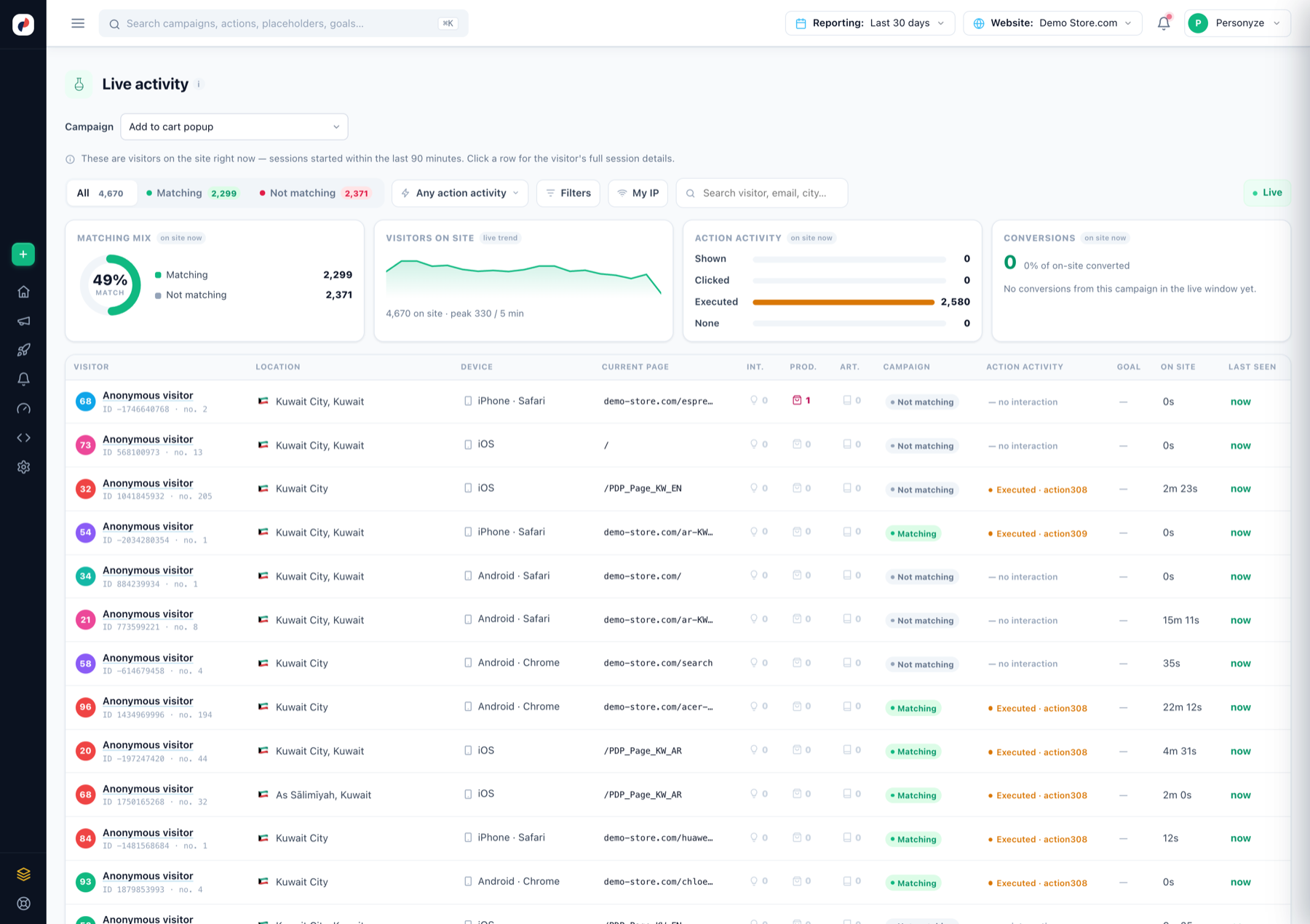
What you’re looking at
- Matching mix — how much of current traffic matches the selected campaign’s audience, live.
- Visitors on site — the live trend with the 5-minute peak.
- Action activity — how many current visitors had actions shown, clicked, executed — or none.
- Conversions — conversions inside the live window, as a share of on-site visitors.
- The visitor table — one row per live session: location, device, current page, interactions, product/article events, whether they match the campaign, the exact action activity, goal status, time on site. Click a row for the visitor’s full session details and profile.
Filters that matter
- Campaign selector — the whole page pivots to one campaign: its matching mix, its action activity.
- Matching / Not matching tabs — isolate the audience.
- My IP — find yourself while testing: open your site in another tab, click around, watch your own row update within seconds.
- Search — by visitor, email or city.
Last search — the last thing each visitor searched for, on your site or in a search engine. It is also the quickest way to check that your site search is recognised: search, then look for your phrase in this column. See Personalize by what visitors search for.
Typical uses
- Verify the tag after installation — your visit appears here within seconds.
- Verify interaction tracking — the product-event columns fill as you browse (setup).
- Debug “why isn’t my campaign showing?” — find your session: if it says Not matching, the targeting is the reason; if Matching with no action activity, look at placement and triggers (where content shows).
Historical (non-live) numbers live in each campaign’s Performance step and the Analytics section — definitions in the metrics glossary.