
Two-step sign-in adds a second check after a correct password, on a browser Personyze has not seen in the last 30 days: a code from an authenticator app, a code we email you, or one of your recovery codes. A stolen password alone is then not enough to get into your account.
What it asks for
| Second step | What it is |
|---|---|
| A code from an authenticator app (recommended) | A 6-digit code from an app on your phone. The panel names Google Authenticator, Microsoft Authenticator and 1Password; any app that reads a standard QR code works. |
| A code we email | A 6-digit code sent to your address. It is valid for 1 hour. |
| A recovery code | One of your 10 single-use codes, in place of the app’s code. See Recovery codes. |
Remembered browsers. After a correct code, that browser is not asked again for 30 days.
Who it does not apply to:
- Google, Microsoft and company single sign-on (SSO) sign-ins. They get no Personyze second step: your identity provider runs its own check, and Personyze trusts it. If you sign in with Google and want a second step, turn it on in your Google account. See Set up a single sign-on (SSO) client.
- Panels under another brand (white-label). They have no second step.
Turning it on: My profile
Go to My profile › Sign-in & security › Two-step sign-in. Each person sets up their own. The panel describes it as: “Add a second step when you sign in with your password, so a stolen password alone is not enough: a code from an authenticator app (recommended), or a code we email you.”
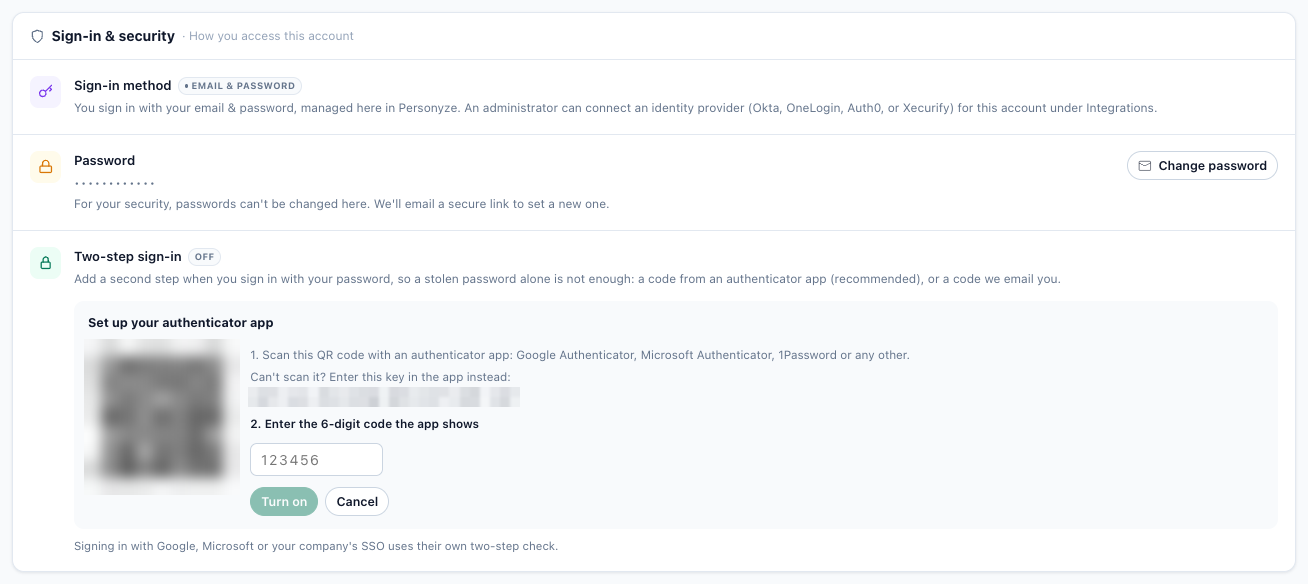
With an authenticator app
Click Set up an authenticator app, then:
- “Scan this QR code with an authenticator app: Google Authenticator, Microsoft Authenticator, 1Password or any other.”
- “Enter the 6-digit code the app shows”, then click Turn on.
- Save your recovery codes. The panel says: “If you lose your phone, each of these codes signs you in once. Keep them somewhere safe, like a password manager: this is the only time we show them.” Use Copy or Download.
A setup that is not confirmed within 1 hour has to start again, with a new QR code.
With email codes
Click Use email codes. There is nothing to set up: the next time you sign in from a new browser, we email you a code.
What the row says
| You chose | My profile shows |
|---|---|
| An authenticator app | “Two-step sign-in is on with your authenticator app.” |
| Email codes | “Two-step sign-in is on. We will email you a code when you sign in from a new browser.” |
| Nothing | “Two-step sign-in is off.” |
Changing it later needs a code
Once an app is set up, each of these asks for a “Code from your authenticator app, or a recovery code”: Move to a new phone, Use email codes instead, Turn off and New recovery codes. So someone who gets hold of a signed-in session cannot quietly remove your second step.
Recovery codes
- 10 codes, shown once: when you set up the app, or when you make a new set. Each looks like
ABCDE-FGH23— two groups of five letters and digits, leaving out the characters people misread (no I, L, O, U, 0 or 1). - Each code works once, in place of the app’s code.
- New recovery codes makes a fresh set. “The old codes stop working.”
- When none are left, the panel says “You have no recovery codes left – make a new set.”
- They are stored only in a one-way form, so Personyze staff cannot read them back. Lost codes cannot be re-sent, only replaced.
Signing in with it
- Enter your email and password as usual.
- On a browser you have not used in the last 30 days, Personyze asks for the code:
- with an app: “Enter the 6-digit code from your authenticator app to finish signing in.”
- with email codes: “We emailed a verification code to <address>. Enter it below to finish signing in.” After a wrong emailed code, a new one is emailed at once, and only the newest works.
The code screen also offers: “No phone with you? Enter one of your recovery codes instead. Lost them too? Your account owner, or our support team, can reset your two-step sign-in.”
Too many wrong codes. 5 wrong codes within an hour lock the code step until that hour is over. The page says “Too many wrong codes. For your security, try again in N minutes.” No new email codes are sent while it is locked.
New sign-in alert. After a sign-in on a new browser, Personyze emails you when it happened, from which IP address and in which browser. Only people with two-step sign-in on get it. If it was not you, change your password.
Still stuck on the password itself
After 3 wrong passwords for the same email, the sign-in error adds “Still stuck? We can email you a link to set a new password.” and a button, Email me a reset link, for the address you typed. The answer is always the same: “If <address> has an account, a link to set a new password is on its way. If it isn’t there in a minute, check your spam or junk folder.” The page never says whether an address has an account.
For account owners: Team members
On Team members, the account owner and team members with all with grant permission can see who uses a second step, require it for everyone, and reset it for one person. See Team members for roles.
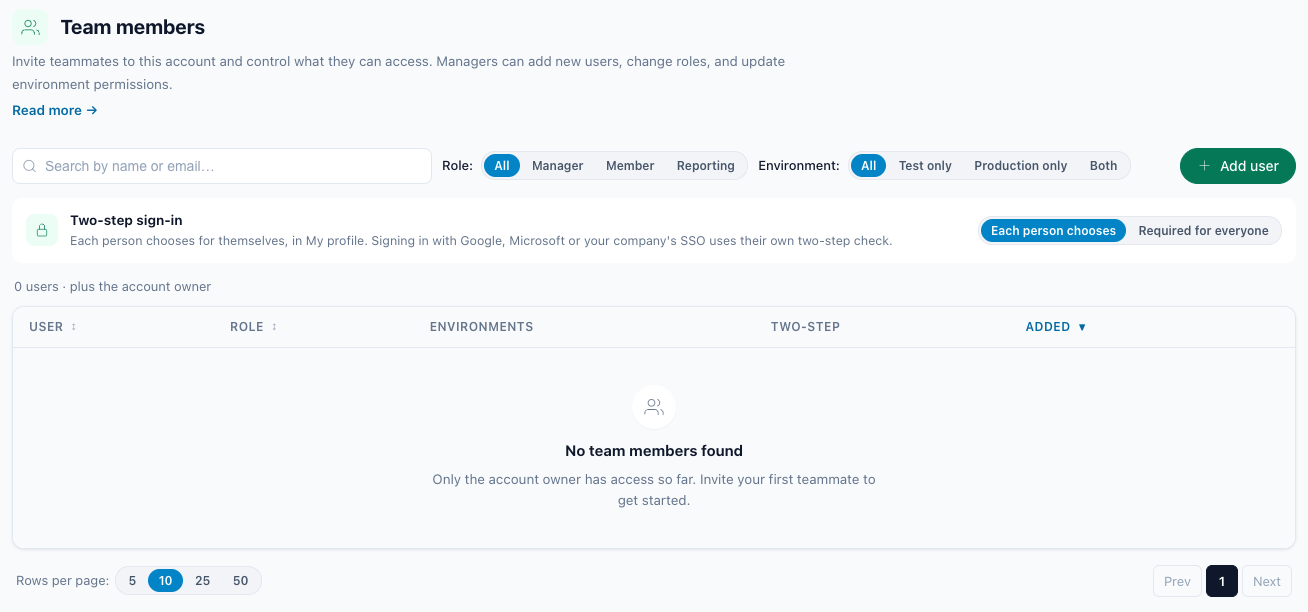
The Two-step column
For each member: Authenticator app, Email code or Off. While the account requires two-step sign-in, a member with no app shows Email code.
Required for everyone
Choose Required for everyone instead of Each person chooses. The confirmation says: “From their next sign-in, everyone on this account who signs in with a password, you included, confirms each new browser with a code from an authenticator app or from their email. Nobody can turn it off for themselves while this is on.”
People with no app get email codes, with no setup step in the middle of signing in. Going back to Each person chooses: “Two-step sign-in is no longer required. People who turned it on for themselves keep it.”
Reset two-step sign-in
For a member who lost their phone, use Reset two-step sign-in on their row. The confirmation says: “The authenticator app and recovery codes of <email> stop working, and every browser they signed in on is forgotten. They sign in next with a code we email them, and can set up an app again in My profile. We’ll email them that you did this.”
Questions
I lost my phone
Sign in with a recovery code, then use Move to a new phone in My profile. No recovery codes left? Ask your account owner (Team members › Reset two-step sign-in) or Personyze support.
I sign in with Google, Microsoft or SSO. Where is my second step?
In your identity provider. Personyze trusts its check and does not add its own.
I didn’t get the email code
Check your spam or junk folder. Every wrong code or new attempt sends a fresh code, and only the newest works. Codes last 1 hour.
Does it ask every time?
No: once per browser every 30 days.
I just signed up. Why was I asked for a code?
Two-step sign-in by email code is on by default for people who sign up with a password, so a first sign-in on a new browser asks for an emailed code.
Related
- Team members — add users, roles & environments
- Set up a single sign-on (SSO) client — sign your team in through your own identity provider.
- Account & billing — your plan, your team, your balance.