
A connected review platform is read every night: new reviews arrive on the Reviews page, changed ones are updated, and ones the shop hid or deleted on the platform are hidden here too.
The 17 platforms
Judge.me, Trustpilot, Yotpo, Okendo, Stamped, REVIEWS.io, Senja, Loox, Trusted Shops, Feefo, PowerReviews, Testimonial.to, TrustMate, Kiyoh, Klantenvertellen, Shopper Approved and eKomi.
Connect one
- Open Settings → Integrations and click the platform’s card (or, on the Reviews page’s Sources tab, click Connect a platform).
- Enter what the platform asks for — the drawer says where to find each value in the platform’s own settings. Keep these credentials safe; anyone with them can read your reviews.
- Choose whether new reviews appear on your site straight away: tick Publish new reviews at once when they are already moderated on the platform. Left unticked, new reviews arrive as Waiting for you.
- Save. Reviews arrive with the nightly read — or click Import now to read them straight away.
Managing a connection
Everything about a connection is in the platform’s drawer on the Integrations page:
- Import now — runs a read in the background, without waiting for the night.
- Pause / Resume, Edit and Disconnect.
- Several stores per platform are allowed — add another connection; each can be paused on its own.
The Reviews page’s Sources tab shows each connection with its status, and Manage connections brings you back here.
Invitations
Trustpilot, Trusted Shops, Feefo, TrustMate, Senja and Testimonial.to can also invite a customer to review you, when a Review Form asks it to. Inviting needs more than importing, so these platforms have an Invitations block in their drawer: click Set up invitations and enter the extra values.
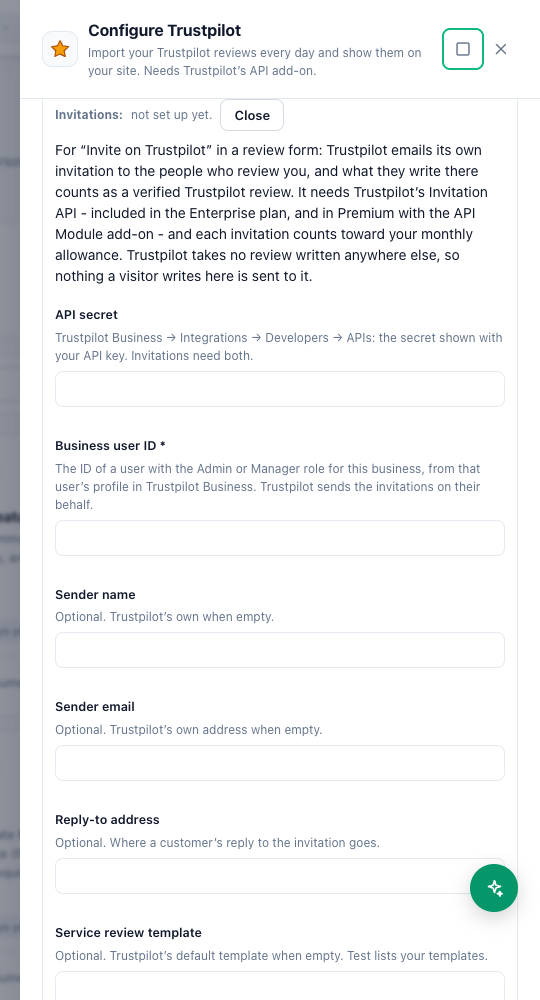
- Trustpilot needs the API secret and the business user ID. Trustpilot’s Invitation API is on its Enterprise plan, or Premium with the API module. Sender, reply-to and template IDs are optional.
- Test only reads from the platform — it never sends an invitation.
What each platform can take from a Review Form is in Sending reviews to platforms, and platform invitations.