
An audience rule can pick people by what they did with your emails: received one, opened it, clicked, bought, or replied. Use it to follow up only with people who did not open, to leave out people who already answered, or to reach the buyers an email produced.
Where the rule is
On an email campaign’s Target step, press Add audience rule and pick the card Personyze Actions State (“Clicked / dismissed other campaigns.”) — typing Actions State in the search box finds it. In an email campaign the card offers email interactions; the same card in an on-site campaign lists on-site ones.
For rules in general — groups, AND and OR, Include and Exclude — see Targeting rules in Personyze. For how an email campaign’s audience works, see Choosing who receives an email.
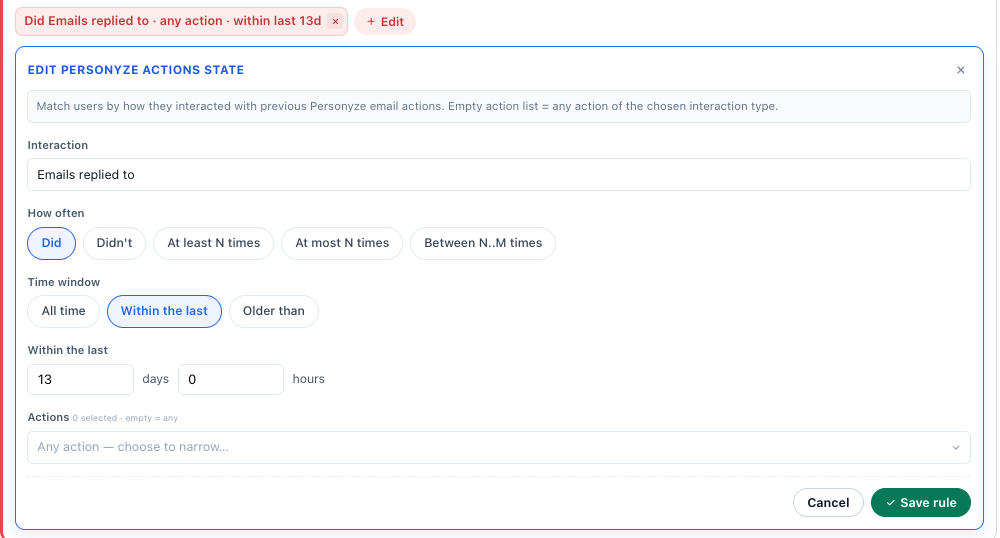
One row of the rule
| Field | What you choose |
|---|---|
| Interaction | One of the eight interactions below. |
| How often | Did, Didn’t, At least N times, At most N times or Between N..M times. The last three add From / To, counted in times. |
| Time window | With Did or Didn’t, for every interaction except Emails led to purchase: All time, Within the last or Older than, in days and hours. |
| Actions | Which emails count (“{n} selected · empty = any”). Any action — choose to narrow… lists the emails of your active email campaigns, with Search actions…. For Other actions executed it lists their other actions instead. |
A card can hold several rows. They are alternatives: a person who matches any one row matches the card. When two things must both be true, add two rules.
The eight interactions
| Interaction | Matches someone with an email that… | Time window counts from |
|---|---|---|
| Emails sent | was sent to them, and is not pending, failed or unsubscribed | when it was sent |
| Other actions executed | the same, for an action of an email campaign that is not an email, such as a text message | when it ran |
| Emails delivered (opened), but not clicked | was opened and not clicked | when it was opened |
| Emails delivered (opened) | was opened, clicked or not | when it was opened |
| Emails clicked, but no purchase | was clicked, and reached no goal | when it was clicked |
| Emails clicked | was clicked, with or without a goal | when it was clicked |
| Emails led to purchase | led to a goal — the Recipient report’s Goal reached | (no window) |
| Emails replied to | they answered | when the reply arrived |
Emails replied to
Matches people who wrote back to the email. A reply is recorded only for an email sent with Track replies on (see replies in audiences), through the Personyze mail server, and out-of-office and other automatic replies never count. The Track replies tooltip points here: each reply “can be used in audiences (‘Emails replied to’)”.
- Leave people who answered out of a follow-up campaign: Emails replied to · Didn’t.
- In a sequence, Leaves when they reply adds this rule for you, and a step that goes only to people who did not reply needs Track replies on the email before it.
“Opened” means the pixel loaded
An open is counted when the email’s tracking pixel loads. Someone whose mail app blocks images can read an email and still match Didn’t open. The other way round, Apple Mail loads the images of every email it receives, so its users count as opened whether they read it or not — a rule on not opening misses many of them. Clicks have neither problem: Emails clicked · Didn’t is the firmer test of who showed no interest.
Choosing the emails
- With Actions left empty, every email of your active email campaigns counts — the live version of each.
- Choose specific emails to narrow the rule to them, for example only the first email of a welcome series.
- Didn’t also matches people the chosen email never went to. To keep to the people who received it, add a second rule: Emails sent · Did, with the same email.
Examples
| To reach… | Rules |
|---|---|
| People who got the first email but did not click it | Emails sent · Did · that email, and a second rule Emails clicked · Didn’t · the same email |
| People who clicked an email in the last 30 days without it leading to a purchase | Emails clicked, but no purchase · Did · Within the last 30 days |
| Readers who opened at least five of your emails | Emails delivered (opened) · At least N times · From 5 |
| People who have heard nothing from you for 90 days | Emails sent · Didn’t · Within the last 90 days |
Rules the panel builds for you
- Resend to people who didn’t open, on a row of the report’s By email table, builds a new campaign with Emails delivered (opened) · Didn’t and Emails replied to · Didn’t.
- A sequence step’s condition — Didn’t open, Opened, Didn’t click, Clicked, Didn’t reply — is set on the Content step; see Email sequences.
- Leaves when they reply adds an excluded rule, “Replied to an email in the last … days”, looking back over the whole sequence plus a week.
- Rules that come with a scenario template have plain names, such as “Did not open the earlier email”.
Related
- Targeting Rules in Personyze — every rule, groups, Include and Exclude
- Choosing Who Receives an Email — the email Target step and leaving a sequence
- Email Sequences — follow-ups that react to each person
- Reply Tracking — how replies are recorded
- Reading an Email Campaign’s Report — the states these rules read
}