
The Target step of an email campaign builds the list of recipients. Each audience rule narrows your user base using what Personyze knows about each person — their profile, the lists they are in, what they have bought and looked at. When the campaign is a sequence, the same step says who leaves it.
How the rules work for email
- The rules run against your stored user base, not your live traffic: somebody matches whether or not they are on the site right now.
- Every email, including each step of a sequence, goes only to people who match at the moment it is due.
- The audience is checked about every 20 minutes. An email started by Joins the audience goes to people as they come to match — see When an email sends.
- The email Target step has no audience-persistence or overlap tiles and no live forecast; those are for on-site campaigns. The right-hand column shows the Campaign readiness card and the audience story.
The Campaign readiness card also lists the sending setup that is still open — branded sending address, sender name, mailing address, unsubscribe page, test email — each linked to the Sending step. None of them blocks publishing.
No rules yet: everyone, said deliberately
With no rules, the step shows Choose who this reaches: “With no rules it reaches everyone in your user base. Say so deliberately, or add a rule to narrow it.”
| Button | What it does |
|---|---|
| Everyone in my user base | “State that this campaign is meant to reach your whole user base”. The notice then reads Targeting everyone in your user base: “Every contact Personyze has an address for will receive this. Add a rule below if you meant to narrow it.” |
| Add audience rule | Opens the Add targeting rule picker — see Adding rules. |
Publishing to live with no rules asks once more: a dialog says how many people the campaign will send to, and at 1,000 people or more you type SEND to confirm.
Adding rules
Add audience rule opens the Add targeting rule picker. Search it (“Search rule types — e.g. country, device, URL, CRM…”), start from Templates, or copy the rules of an Existing campaign. Rules sit in groups that combine with AND, OR or XOR, and any group can be switched between Include and Exclude.
The rules themselves are in Targeting rules in Personyze; targeting by a list you imported in CRM / user-list targeting; and targeting by what people did with an earlier email — opened, clicked, replied — in Targeting people by what they did with an email.
Who leaves a sequence
When the campaign is a sequence — one step follows another — the Campaign readiness card gains rows about who leaves it.
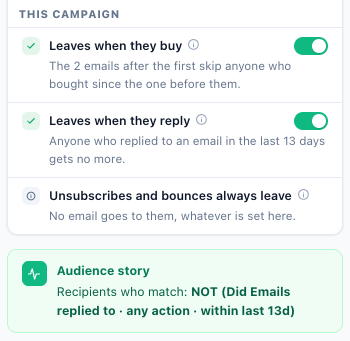
| Row | Control | What it means |
|---|---|---|
| Leaves when they buy | Switch, on by default | “Emails 2 and after are not sent to someone who bought since the email before them – an order your site reports.” |
| Leaves when they reply | Switch, off by default | Anyone who replied to an email of the sequence gets no more of it. |
| Unsubscribes and bounces always leave | None | “Unsubscribed, bounced and suppressed addresses never get any email, and nor do unconfirmed ones when double opt-in is on.” The row reads “No email goes to them, whatever is set here.” |
| A rule shorter than the sequence | None — a warning, only when it applies | A rule looks back fewer days than the sequence runs, so people stop matching it before the last email. |
Leaves when they buy
On, the row reads “The n emails after the first skip anyone who bought since the one before them.” Off: “Buyers keep getting the rest of the sequence.” A purchase is an order your site reports to Personyze. One kind of step never has the stop: a follow-up sent only to people who used the coupon, because redeeming the coupon is itself a purchase. More in The purchase stop.
Leaves when they reply
On, the row reads “Anyone who replied to an email in the last n days gets no more.” Off: “People who reply keep getting the rest of the sequence.” Switching it on does two things:
- It adds an excluded rule to the campaign’s audience: “Replied to an email in the last n days”. The days are all the waits added up, plus 7 — the extra week covers a send hour or day setting that pushes the last email a few days later. They are worked out again when you save after changing a wait. The rule’s name is kept in English.
- It ticks Track replies on every email except the last: a reply is recorded only for an email sent with it.
If an email before the last has Track replies off, the row says so — “Track replies” is off on n emails, so a reply to them is not recorded. — and offers a Switch it on link. See Reply tracking.
A rule shorter than the sequence
Its tip: “Every email goes only to people who match the audience when it is due. A rule that looks back fewer days than the sequence runs stops matching before the last email.” The row names the rule, how far it looks back, and how long after the first email the last one goes.
Example: the audience is “viewed a product in the last 7 days”, and the last email goes 10 days after the first. People drop out of the audience before the last email is due, so they never get it.
Related
- Who you can reach: the User Base step — what the rules narrow down
- Email sequences — waits, conditions, the purchase stop and the one-week window
- Targeting people by what they did with an email
- Targeting rules in Personyze
- Reply tracking
- Email campaigns — the overview