
A sequence is a welcome series, a drip, a reminder after a reminder: several emails — or texts — in one campaign, each a set number of days after the one before, to the people the step before reached. Each follow-up can go to everyone, or only to those who did or did not open, click, reply, come back to your site, reach a goal or use a coupon. It is not a separate campaign type: it is an Email & SMS campaign with its steps chained.
Making a sequence
- From scratch: New campaign › Email & push › Email sequence (welcome series, drip). It opens with two emails, the second 3 days after the first and only to those who did not open it — see Starting one.
- From a single email: once the campaign holds an email (or a text) and is not a sequence yet, the add tile on the Content step splits in two.
- From the report: the Performance step’s By email panel has a + Add a follow-up step link. It opens the Content step.
| Half of the tile | Its line | What it adds |
|---|---|---|
| Add action | “Sent together with this one” | Another action on its own timing, side by side with the first. Not a sequence. |
| Add a follow-up step | “Sent after this one – a reminder a few days later” | Opens the action-type picker. The step you pick follows the existing one, and the campaign becomes a sequence. |
As soon as one step follows another, the Content step’s cards are replaced by a numbered list of steps. The campaign-level A/B testing bar is hidden in a sequence — a test group would cut people off from the rest of it. To test inside a sequence, test each email’s subject with Test another subject — see Subject tests.
The list of steps
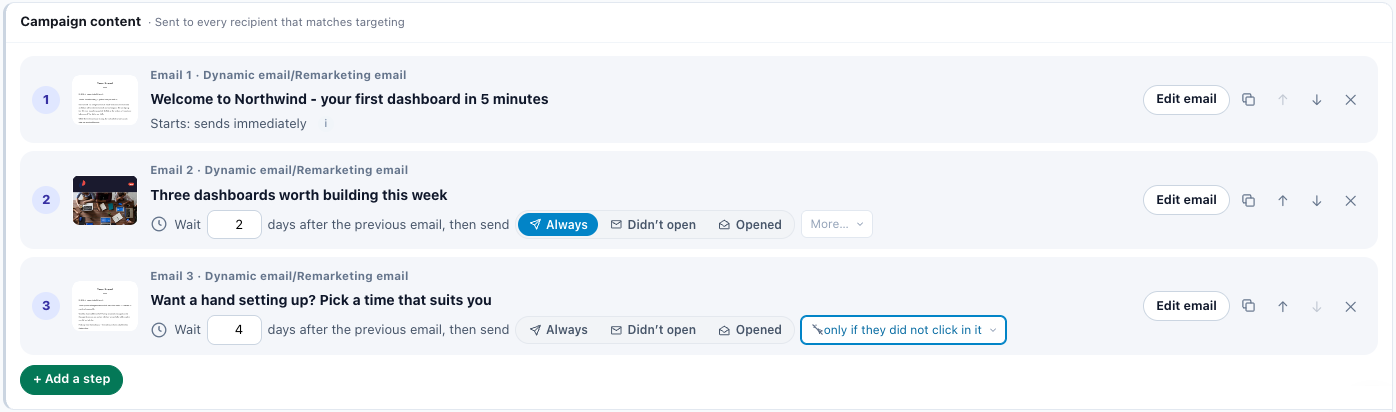
| Part of a row | What it shows |
|---|---|
| Number and thumbnail | 1, 2, 3… and the email’s design, or No design yet. A step that is not an email shows its type’s coloured letter. |
| First line | Email n or Step n, then the type: “Email 2 · Products recommendation by email”, “Step 3 · SMS on Campaign Match”. |
| Second line | The email’s subject, or No subject yet. For a text, its words; for anything else, its name. |
| Third line | Row 1: when it starts, for example “Starts: sends immediately”. When the first email goes is set on its own Timing step — open it with Edit email. Rows 2 and after: the wait and the condition. |
| Button | What it does |
|---|---|
| Edit email (Edit) | Opens the step’s editor. |
| Duplicate | “Duplicate – a copy of this step, after the last one”. It copies the design, sender and timing; the copy’s name gets “ (copy)”. |
| Move up ↑ / Move down ↓ | The wait and the condition belong to the position, not to the email. Moving email 2 above email 1 makes it the first email, with the first position’s start. |
| Remove ✕ | “Take this email out of the sequence”. Disabled when one step is left. Removing step 1 gives step 2 the start; removing a step in the middle makes the next one follow the one before. |
+ Add a step, under the list, opens the same picker as Add action. The type you pick becomes the step after the last one and its editor opens; cancelling out of that editor removes the new step again. A new step waits 3 days. After an email it goes only to people who didn’t open it; after any other step, to everyone.
A sequence holds at most 10 steps. At the limit, + Add a step and Duplicate are disabled (“A sequence can have at most 10 steps.”).
A step can be any of these: Dynamic email/Remarketing email, Products recommendation by email, Content recommendation by email, Survey by email (with the Reviews & Surveys add-on), Booking by email, SMS on Campaign Match, Send Event to Analytics (Automation) and Add to Klaviyo List. Once a type is picked, choose Start blank, Use existing or a template.
Two other kinds of row can appear:
- An action that is in the campaign but not part of the order — say, a text added with Add action on its own trigger — is listed after the steps with “+” instead of a number: “Also in this campaign – sent on its own Timing, not part of the order.”
- A step whose link is broken — it follows an email that is gone, or two steps follow the same one — is shown on an amber row: “Two emails follow email n – this one is out of order.” or “It follows no email in this campaign.” Put it in order fixes the chain.
Each follow-up’s wait and condition
Rows 2 and after read as one sentence:
⏱ Wait [ n ] days after the previous email, then send [ Always | Didn’t open | Opened ] [ More… ]
- The wait is whole days, 0 to 90. Wait 0 means right after the previous step.
- After a step that is not an email, the words are “days after the previous step, then send”, and the pills are Always, Came back and Didn’t come back: a text or any other step records no opens, clicks or replies.
- More… holds the other conditions, under group headings. A condition picked from it highlights the box as the chosen one. Each pill’s tip is its full sentence.
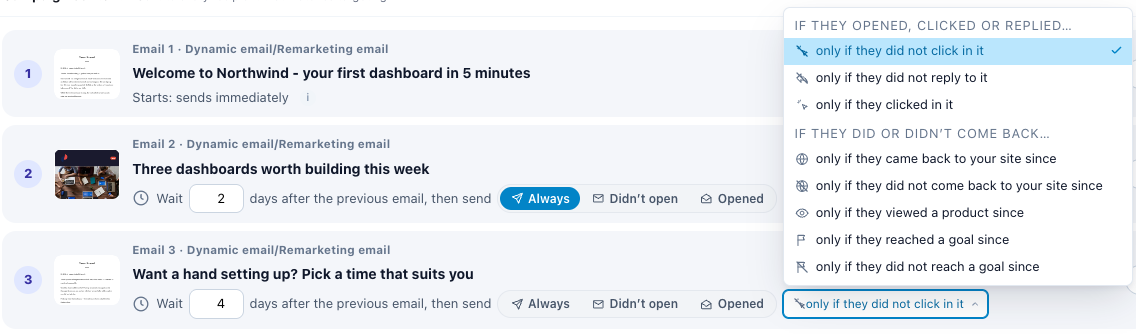
| Group in More… | Condition | Pill | Offered after |
|---|---|---|---|
| Everyone | always | Always | any step |
| If they opened, clicked or replied… | only if they did not open it | Didn’t open | an email |
| only if they did not click in it | Didn’t click | an email | |
| only if they did not reply to it | Didn’t reply | an email | |
| only if they opened it | Opened | an email | |
| only if they clicked in it | Clicked | an email | |
| If they did or didn’t come back… | only if they came back to your site since | Came back | any step |
| only if they did not come back to your site since | Didn’t come back | any step | |
| only if they viewed a product since | Viewed a product | any step | |
| only if they reached a goal since | Reached a goal | any step | |
| only if they did not reach a goal since | No goal | any step | |
| If they used its coupon… | only if they used its coupon | Used the coupon | an email that carries a coupon |
| only if they did not use its coupon | Didn’t use the coupon | an email that carries a coupon |
How each condition is judged
“Since” always means since the step before was sent to that person.
- Opened / Didn’t open — judged from the open pixel, checked again on every pass. Someone who opens on day 2 of a 3-day wait is no longer “didn’t open” on day 3.
- Clicked / Didn’t click — a click counts only if it comes at least a minute after the send. Clicks in the first minute are treated as link scanners.
- Didn’t reply — needs Track replies on the email before; without it no reply is recorded, and everyone counts as not having replied. So picking it switches Track replies on for that email, and a line under the list says so. See Reply tracking.
- Came back / Didn’t come back / Viewed a product / Reached a goal / No goal — a site visit counts once it is processed, about an hour or two after it ends. Someone browsing right now still counts as “didn’t come back” until then.
- Reached a goal / No goal — a Which goal picker appears beside the condition: Any goal first, then your goals.
- Used the coupon / Didn’t use the coupon — these ask about the coupon in the email before: its coupon token, or a shared coupon’s code written into it. They are offered only when such a coupon is found, and the row shows Its coupon: and the coupon. If that email no longer shows the coupon, a warning offers Ask about the coupon it shows now, or asks you to put the coupon back. See Writing the email and Coupons and code pools.
A condition that waits for something to happen — Opened, Clicked, Came back, Viewed a product, Reached a goal, Used the coupon — has one more tip: “It waits for them: once the wait is over it goes as soon as they have – for up to a week, then not at all.”
If moving or removing steps leaves an email-only condition, such as Didn’t open, after a step that records no opens, the condition falls back to Always, and a line under the list says which step “now goes to everyone the step before it reached – that step records no opens, clicks or replies.”
Each follow-up goes at most once per send of the step before it. Its timing summary reads “Once per email before it – each time that one goes to them can bring one more, with no lifetime limit.”
The purchase stop: Leaves when they buy
- Every step after the first is skipped for someone who bought since the step before was sent to them: an order your site reports to Personyze, in a visit that started at or after that send.
- It is on by default, and switched on or off for the whole sequence on the Target step — see Leaves when they buy.
- One exception: a step set to Used the coupon. Redeeming the coupon is a purchase, so that step never has the purchase stop.
- A follow-up’s timing summary shows it as “Not sent to someone who bought since the email before it – they leave the sequence.”
The one-week window after each wait
A follow-up becomes due when its wait is over, and stays due for 7 more days. Then it is dropped for that person. In practice:
- A step with a condition (“only if they opened it”, “came back”…) goes on the first check after the condition comes true, any time from the end of the wait until a week later. “Wait 3 days, then send if they came back” goes on day 3 to people who came back by then, and on day 5 to someone who came back on day 5. After day 10 it is not sent.
- A step added to a sequence that is already running reaches people whose wait is ending now, or ended within the last week — not everyone who got the earlier email long ago.
- Someone who rejoins the audience months later does not get a stale follow-up.
A separate 7 days appears in Leaves when they reply: its look-back is all the waits plus 7 days — see Leaves when they reply.
Follow-ups and the account cap
Your account can limit how many marketing emails one person gets across all your campaigns — the account cap, set on the Unsubscribe page. A follow-up held back by the cap is not lost: it is offered again on later checks until its one-week window closes.
A follow-up that must always go can tick Ignore the account cap on its own Timing step — see When an email sends.
A follow-up’s own Timing step
A follow-up’s editor still has a Timing step, but its What starts it section shows one read-only line instead of the tiles — for example “3 days after email 1, only to those who did not open it.” — with a Change it on the Content step button.
The Buyers row (Stop if they buy after it) is not shown there, because the Target step’s Leaves when they buy decides it. Every other timing setting — hour, days, best time, cap, sunset, send speed — still applies to each email on its own. See When an email sends.
When a follow-up did not reach someone
In order of likelihood:
- They bought since the email before it (Leaves when they buy, on by default).
- Its condition did not come true within the week after its wait.
- They replied, and Leaves when they reply is on.
- They unsubscribed, bounced or were suppressed.
- They stopped matching the audience — a rule that looks back fewer days than the sequence runs does that; the Campaign readiness card warns about it (A rule shorter than the sequence).
More in Troubleshooting email campaigns.
Related
- Choosing who receives an email, and who leaves a sequence
- Writing the email — sender, subject tests, coupons, the spam check
- When an email sends — the first email’s trigger, and every email’s limits
- Reply tracking
- Reading an email campaign’s report — results per email
- Troubleshooting email campaigns