
Personyze keeps a history of every campaign: when it went live, when it was taken off live, when it was
edited, and who did it. A jump in a chart then has its reason beside it, and a campaign that stopped by mistake does not
sit unnoticed for days.
What is recorded
| Event | When |
|---|---|
| Created, Created on staging, Created live | A new campaign is saved. |
| Went live | It is published live, from draft or from staging. |
| Published to staging, Moved to staging | It is published to staging; moved when it was live before. |
| Paused | A live campaign is switched back to draft. |
| Back to draft | A staging campaign is switched back to draft. |
| Edited | Its rules, its settings or its actions are changed. |
| A/B test decided | Its test ended with a winner. |
| Deleted | It is deleted. |
Each event says who did it: the team member by name, the AI assistant (with the person it worked
for), an Automation rule, the A/B test, or Audience discovery. A change
made outside the panel with no user reads Not recorded.
The history starts on the day it began on your account. Before that day there is nothing to show, and the screens below
say when it began.
On the Performance step
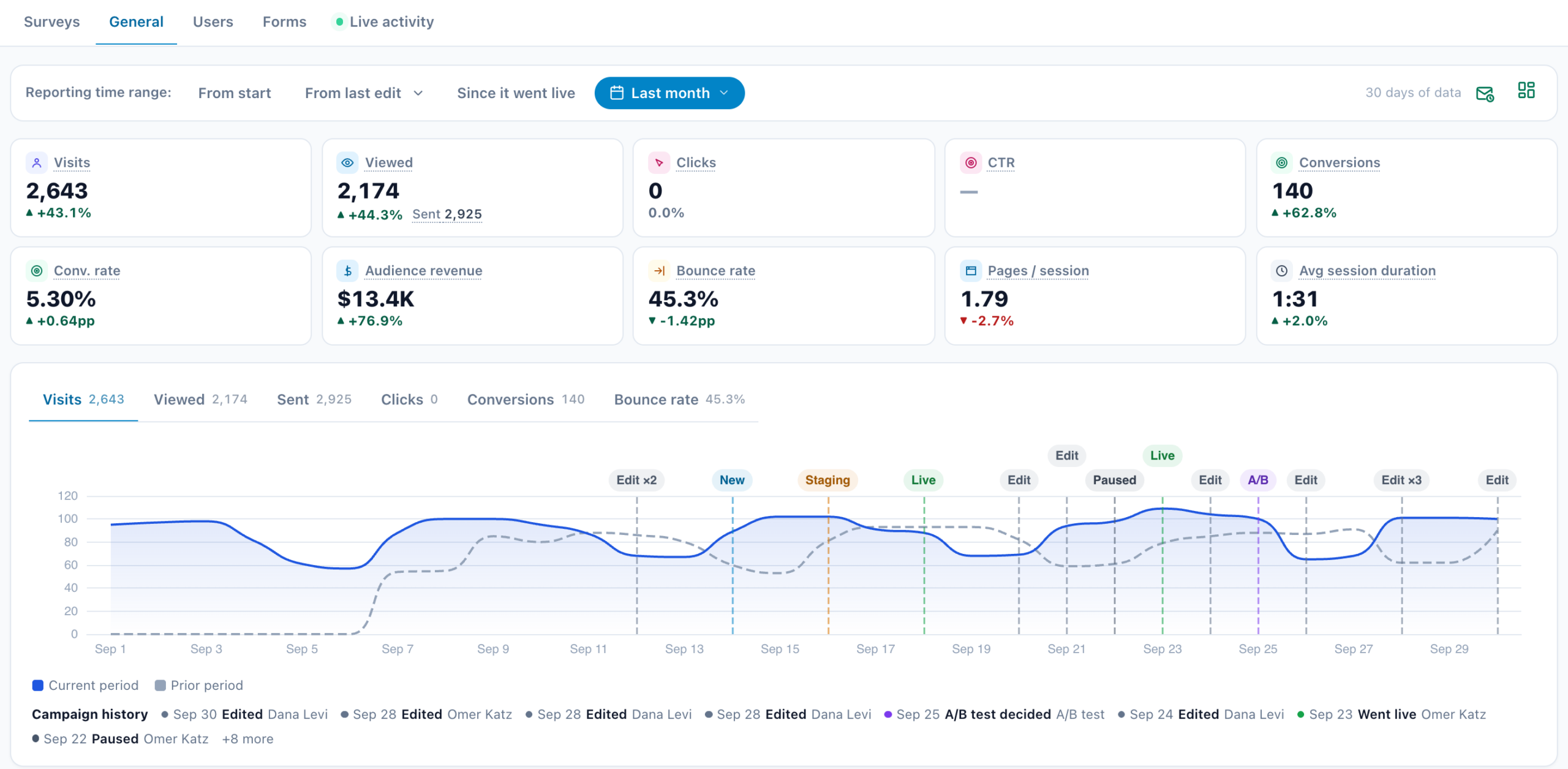
- Since it went live in the range bar shows the numbers since the campaign last went live. Its tooltip
gives the date. A campaign drafted for a month and then published no longer reads a month of zeros. - Marks on the chart where something happened: Went live in green, Paused in slate,
Moved to staging in amber, Edited in grey, A/B test decided in violet and Deleted
in red. - Campaign history, under the chart’s legend: the latest events in the range, newest first, each
with its day, what happened and who did it. For more than eight it adds +3 more.
Every figure on that screen: Performance Metrics.
On the campaign list
- More filters › Dates: Went live in the last and
Taken off live in the last 7, 30 or 90 days. Taken off live means paused, moved to staging or deleted,
by anyone. The menu says The campaign history began on its date. - Quick views: Went live this week and Taken off live this week.
- A row with no numbers yet says Live since 14:05 · first numbers usually within 1-3 hours, or, for a
campaign taken off live, Paused and Paused since Oct 9 · Turn back on
›.
See The campaign list.
The bell: a live campaign was taken off live
When a live campaign is paused, moved to staging or deleted, the bell at the top of the panel says so, usually within
ten minutes. For example: “Spring sale” is no longer live — It was paused by Dana on
2026-10-14 09:12 UTC, so visitors no longer see it. If that was not intended, open the campaign and publish it
again. Several at once are one message: 3 campaigns are no longer live, each with what happened and who did
it.
The bell stays quiet when:
- an automation rule paused it: the rule has its own history and its own email;
- the campaign is live again by the time the bell is checked;
- the change is more than a day old.
In the AI summary
The campaign list’s ✦ AI summary counts how many campaigns went live, were taken off live
and were edited in the period. A tile such as 3 went live lists them, and the days they happened are marked on
its chart. These counts start on the day the history began. See The campaign list.
Related
- The campaign list — filters, quick views and the AI summary
- Performance Metrics — reading the Performance step
- Automation — rules that pause, alert and promote a winner
- Testing & QA — staging, live and publishing safely
- Campaigns