
ActiveCampaign runs your email, automations and pipeline; Personyze knows what every visitor does on your
site. Connected, Personyze can tag a contact in ActiveCampaign the moment they match a campaign
— and because ActiveCampaign automations trigger on a tag being added, your own automation takes it from
there: send the email, move the deal, start the sequence.
to know what happens next. It puts a tag on the contact; ActiveCampaign decides what that means.
What you can do
One thing, done well: when a visitor matches a Personyze audience, Personyze creates or updates their contact in
ActiveCampaign and adds a tag.
- Contacts are matched on email address. If the contact already exists in ActiveCampaign it is
updated; if not, it is created. - Name and phone ride along when Personyze knows them — they map to ActiveCampaign’s
own first name, last name and phone fields. - The tag is named after the event you type in Personyze. That is the field an ActiveCampaign
automation waits on.
Connecting your account
Go to Settings → Integrations, open the ActiveCampaign card and press
Connect ActiveCampaign. Two fields, and both live on the same screen in ActiveCampaign —
Settings → Developer:
| Field in Personyze | Where to find it in ActiveCampaign |
|---|---|
| Account API URL | The value labelled URL. It looks like https://youraccount.api-us1.com — not the address you log in at. |
| API token | The value labelled Key, on that same screen. |
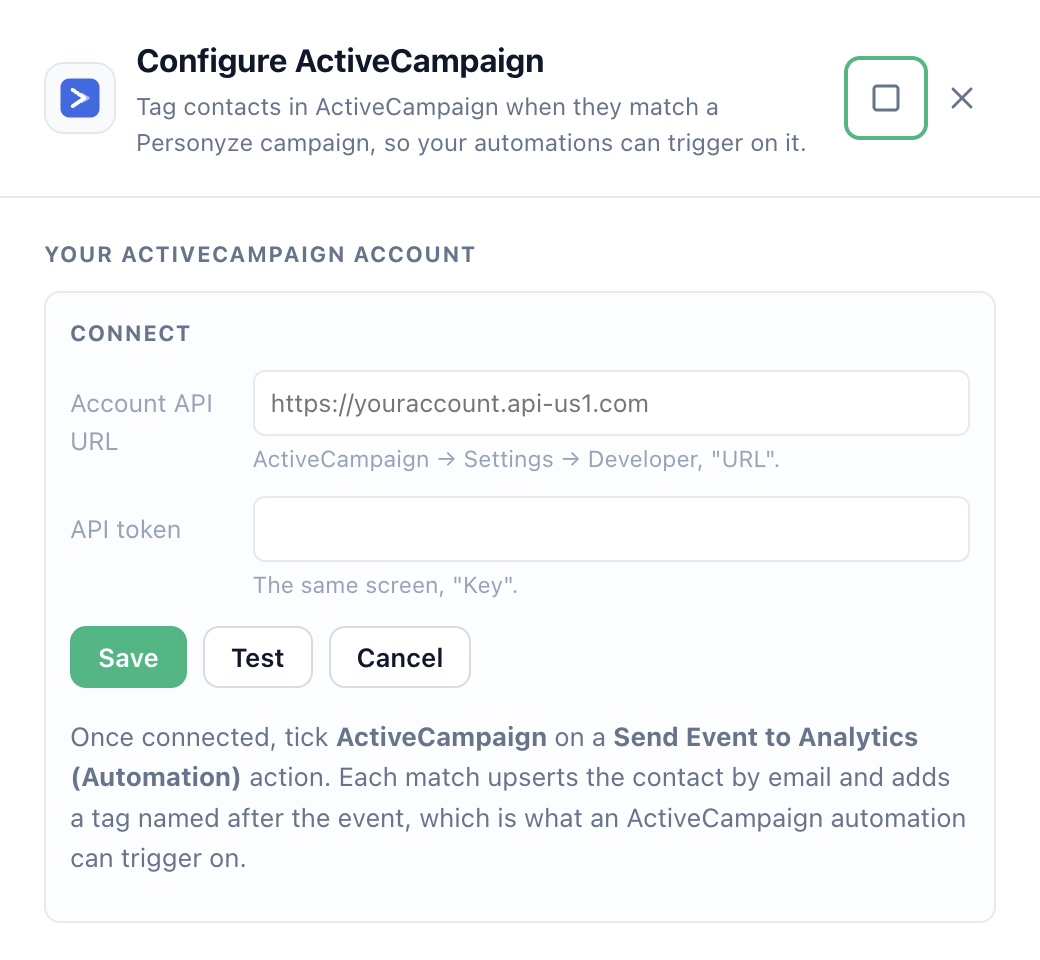
Press Test before you save. It is worth doing every time: the test does not just say
“connected”, it answers with the ActiveCampaign user the token belongs to —
“Connected as …”. Anyone who works with more than one ActiveCampaign account enters the
wrong key eventually, and a valid key for the wrong account looks exactly like success until campaigns tag
strangers.
There is no OAuth here and nothing to re-authorise. The token keeps working until it is regenerated or revoked
in ActiveCampaign. Once saved, the card offers Test, Edit and
Disconnect; the token itself is never shown again.
Tagging contacts when a campaign matches
- Create an Automation campaign (Campaigns → New → Automation) and define the audience
— any rules you like: pages visited, products viewed, CRM fields, “has an email address”. - Add the action Send Event to Analytics (Automation).
- Tick ActiveCampaign in the destinations list.
- Type an event name.
- Publish.
ActiveCampaign. If the automation over there waits for a tag called
VIP - re-engage, type exactlythat, spacing and capitalisation included.
Each match is one call to ActiveCampaign, which upserts the contact and applies the tag together.
Using a different ActiveCampaign account for one campaign
The action has its own ActiveCampaign API URL and API token fields under
Credentials. Leave them empty and the action uses the account connection from Settings →
Integrations, which is what almost everyone wants. Fill them in and they override it for that action alone —
useful for an agency whose campaigns feed two different ActiveCampaign instances.
Using the tag in an ActiveCampaign automation
- In ActiveCampaign, create an automation and choose the trigger Tag is added.
- Pick the tag you typed in Personyze.
- Build whatever follows — send an email, wait, move a deal, change a pipeline stage.
Anyone who matches the Personyze audience gets the tag, and the automation runs. That is the whole loop: your
on-site behavioural targeting becomes the trigger for the email programme you already run.
What is not included
- This does not import your ActiveCampaign contacts into Personyze. It writes to ActiveCampaign;
it does not read from it. To bring contacts the other way, use
Zapier,
Make or
n8n — all three have ActiveCampaign
steps. - This does not push a whole audience in one go. Contacts are tagged as they match, one at a
time. - Deals, pipelines and lists are not touched. Only the contact and its tags.
- There is no on-page version. ActiveCampaign appears only on the Automation version of
the Send Event action, because ActiveCampaign has no browser API for contacts the way Klaviyo does. If you are
looking at the on-site Send Event to Analytics action and cannot find the checkbox, that is
why.
pointed at that API. Personyze uses one request per matched contact, so a large audience is tagged over a few
minutes rather than instantly. Nothing is lost — it simply arrives at that pace.
Troubleshooting
| What you see | What it means |
|---|---|
| “The API URL should look like https://youraccount.api-us1.com” | The URL is wrong. It is the one shown on ActiveCampaign’s Settings → Developer screen, not the address you log in at. |
| “ActiveCampaign rejected that API token” | The key is wrong, or it was regenerated in ActiveCampaign since you entered it. Find the current key on the same screen and enter that. |
| “ActiveCampaign is not configured” | The action ran before an account was connected. Add the URL and token under Settings → Integrations, or fill the action’s own override fields. |
| “the recipient has no email” | The visitor who matched has no email address on their Personyze profile, so there is nothing to identify them by. Add has an email address to the audience rules, or capture one first. |
If contacts are being created but your ActiveCampaign automation never runs, check the tag name character for
character against the event name in Personyze — a trailing space is invisible in both products and stops the
trigger matching.
Related
- Campaign targeting — the audience rules an automation runs on.
- Klaviyo integration — the same event action, for a product that does have an on-page API.
- An integration stopped syncing