
Personyze is worth more when it knows what your other systems know. Integrations fall into five kinds, and which
kind you need depends on what you are trying to learn about a visitor.
Watch the 1:34 walkthrough: how the integrations are grouped, and setting one up — one card, one place to configure it.
- CRM & Marketing — Salesforce, HubSpot, Klaviyo, ActiveCampaign, Zoho, Mailchimp, Brevo, Oracle Eloqua and generic CRM sync. Two-way: their fields target your campaigns, your audiences reach their lists.
- ABM & Visitor Identification — 6sense, Clearbit, ZoomInfo, Albacross, Leadfeeder, Leadinfo, Snitcher, Demandbase. Turning an anonymous visit into a company name.
- CDP & Data Platforms — Segment, Tealium, Zeotap, Google Analytics and the ad platforms (Meta, TikTok) — plus Send Event to Analytics, the one action that reports to any of them, and to Amplitude, Mixpanel, Brevo and Mailchimp.
- Automation & Webhooks — Zapier, Make, n8n, Slack and raw webhooks, for anything with no dedicated integration.
- AI Assistants — connect Claude, ChatGPT or another assistant to your account through the MCP server.
Start Here, because that is where somebody looks when they are installing. Connecting a store’s data is an integration: the Shopify integration (connect by API) syncs your products, orders and customers into Personyze, and the Magento integration, the WooCommerce integration and the BigCommerce integration do the same for those stores. Meeting connections are set up under Meetings, not here: see the Zoom integration to give every booking its own Zoom meeting.
The Integrations screen
Settings → Integrations opens on What do you want to do?, with two tabs under it: Your integrations and Marketplace.
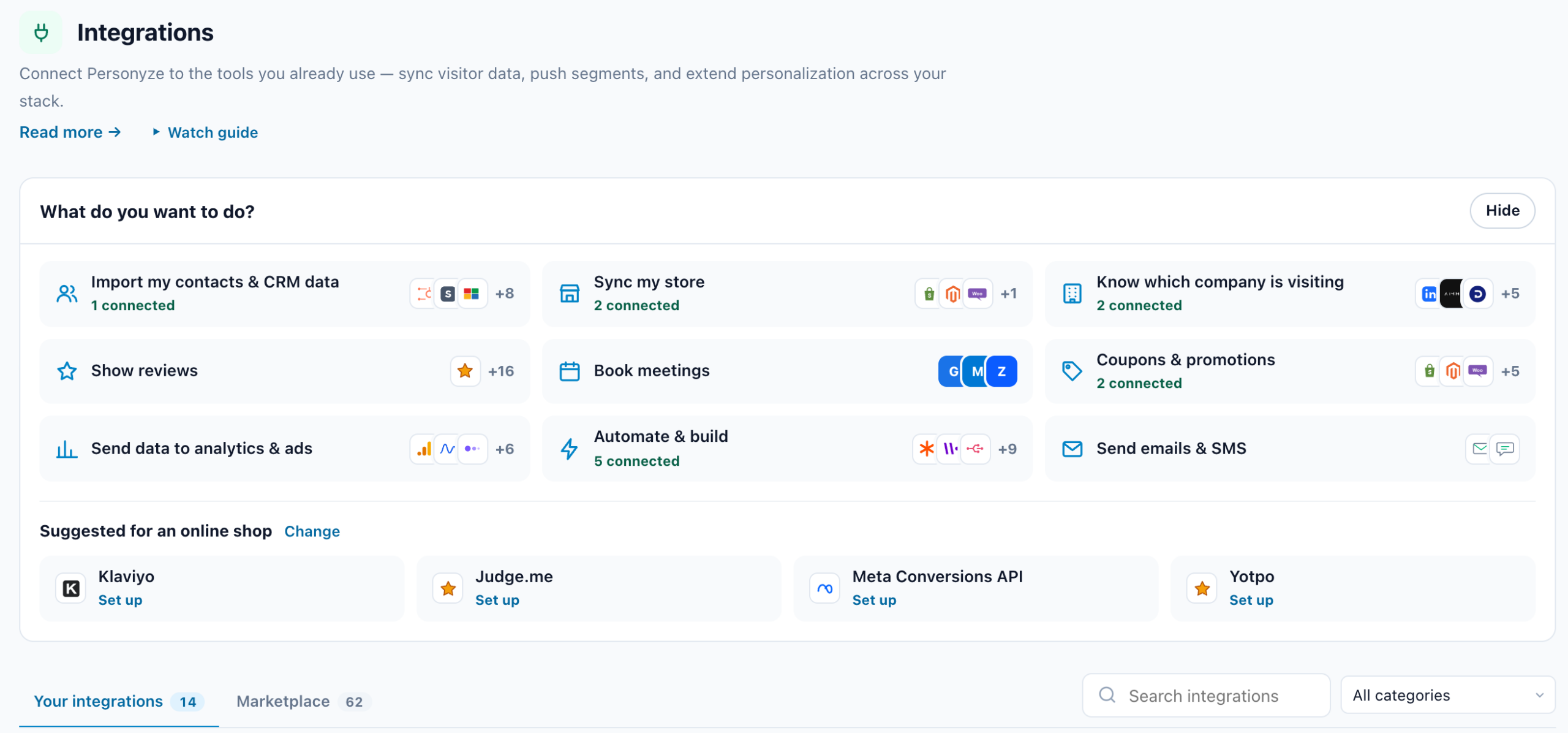
What do you want to do?
Nine goals, each a button with the logos of its tools and how many of them are connected. Hover one to see what it is for. The same tool can serve several goals — Shopify syncs your store and makes your coupon codes.
| Goal | Its tools |
|---|---|
| Import my contacts & CRM data | HubSpot, Salesforce, Zoho CRM, Oracle Eloqua, ActiveCampaign, Klaviyo, Mailchimp, Brevo, Segment, Tealium, Zeotap |
| Sync my store | Shopify, Magento, WooCommerce, BigCommerce |
| Know which company is visiting | Demandbase, ZoomInfo, 6sense, Clearbit, Leadfeeder, Leadinfo, Albacross, Snitcher |
| Show reviews | Judge.me, Trustpilot, Yotpo, REVIEWS.io and 13 more review platforms |
| Book meetings | Google Calendar, Microsoft 365 and Zoom — each host connects their own under Meetings → Hosts |
| Coupons & promotions | Shopify, WooCommerce, BigCommerce, Magento, Klaviyo; Voucherify, Talon.One and your own webhook under Promotions → Coupons → Stores & engines. A connected store makes a coupon’s codes and reports the ones used — see Coupon Codes and coupon engines. |
| Send data to analytics & ads | Google Analytics 4, Google Analytics goals, Amplitude, Mixpanel, Segment, Tealium, Zeotap, Meta Conversions API, TikTok Events API |
| Automate & build | Zapier, Make, n8n, Slack, Full-featured API, Claude & ChatGPT (MCP), Connected Tools (MCP), Webflow, Google Tag Manager, WordPress, Identity HTTP Headers, Single Sign-On (SSO) |
| Send emails & SMS | Email delivery (SMTP), SMS delivery |
Under the goals, Suggested for your kind of site (an online shop, a B2B site…) offers up to four integrations you have not set up, each with Set up; Change opens Site profile, where the kind of site is set. Without one, the strip shows Popular integrations. Hide folds the whole band away, and Show brings it back.
The three-step wizard
A goal opens a wizard:
- Choose your tool — the goal’s tools, each with what it does; a connected one says Connected. Also part of this: links the screens that belong to the goal (for Sync my store, Product Catalog). Skip to what it is for goes straight to step 3.
- Connect and set up — the tool’s own settings, the same as on its card. A tool connected on another screen (calendars and Zoom, the coupon engines) has a button to that screen instead. Continue.
- Use it — where to put the connection to work: for Sync my store, Product Catalog and Recommendations; for an automation tool, its documentation. Done returns to Integrations.
The address follows the wizard, so a link can open a goal directly — Product Catalog’s Sync my store row opens that goal.
Your integrations and Marketplace
- Your integrations — what you use: every connected integration, the four always listed (Full-featured API, Claude & ChatGPT (MCP), Google Analytics 4 and Google Tag Manager), and the apps installed from the Marketplace, under Partner apps on this account. The pill at its top right says when data last synced, or, in red, how many review imports failed. Browse the Marketplace ends the list.
- Marketplace — everything there is to connect: every Personyze integration and every partner app, reviewed by Personyze, in one list by name. See The App Marketplace.
Each tab says how many it lists. Search integrations and the category (All categories, Analytics & Tracking, Advertising, CRM & Marketing Automation, Lead Intelligence, Reviews, Platform & Developer) act on both; while either is set, the two tabs give way to Search results.
An integration’s card
Each card has the tool’s logo, what it does, Connected or Not connected, and a line of detail — for example Configured, Keys configured (the API, Make, n8n), or Set up in Zeotap (Zeotap’s setup is done in Zeotap). Leadinfo, Snitcher and Demandbase read Configured once they are turned on; 6sense, which needs no key, counts as connected once a field is mapped.
- Documentation opens the tool’s setup guide beside the page, with a link to its wiki article.
- Configure (not connected yet) or Manage (connected) opens its settings. A click anywhere on the card does the same.
- Every save in the settings says All changes saved at the bottom of the screen.
When one stops working
Troubleshooting: an integration stopped syncing covers the
usual causes — an expired credential, a changed field, a rate limit — and how to tell which it is.