
Personyze and Mixpanel work in both directions: Personyze reports campaign events to Mixpanel, and your Mixpanel cohorts come back to Personyze as audience lists you can target.
Part 1: Send Personyze events to Mixpanel
Personyze can report an event to Mixpanel whenever a visitor matches a campaign, over Mixpanel’s /track API.
As with Amplitude, sending from our servers means the event arrives whether or not mixpanel.js loaded on the page.
What you need
| Field | Where to find it |
|---|---|
| Project token | Mixpanel → Settings → Project Settings → Project Token |
| Region | Leave blank for the US, or type eu or in |
How the person is identified
On the Personyze visitor id, sent as Mixpanel’s distinct_id — so anonymous visitors are included.
Part 2: Use Mixpanel cohorts in Personyze
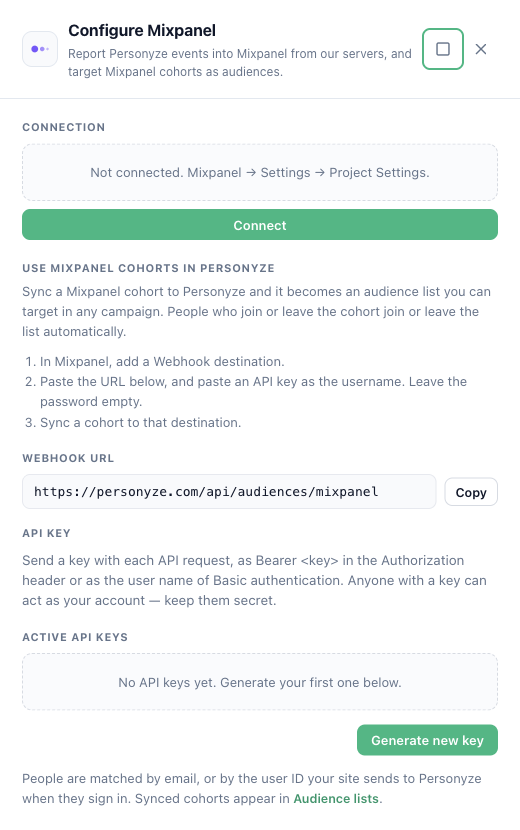
Sync a Mixpanel cohort to Personyze and it becomes an audience list named “Mixpanel: <cohort name>”. Target it in any campaign — website, email or offline. When people join or leave the cohort in Mixpanel, they join or leave the list automatically, and the website sees the change on the visitor’s next page.
What you need
- A paid Mixpanel plan (cohort syncs are a paid feature in Mixpanel).
- A Personyze API key: Settings → Integrations → Mixpanel → Generate new key (the same keys as the Full-featured API card).
Set it up
- In Personyze, open Settings → Integrations → Mixpanel and copy the Webhook URL (
https://personyze.com/api/audiences/mixpanel). - In Mixpanel, add a Webhook destination. Enter the URL, and enter your Personyze API key as the username. Leave the password empty.
- Sync a cohort to that destination.
Mixpanel sends the full cohort the first time, then only the people who joined or left, about every 30 minutes.
How people are matched
Personyze matches each cohort member by email, or by the user ID your site sends to Personyze when people sign in (Mixpanel’s distinct_id). Someone Personyze has not seen yet is added to the list too, and is recognised the first time they sign in on your site.
Where to find it
Audiences → Audience lists. Choose the list in a campaign’s targeting with the User lists rule.
Related
- Send Event to Analytics
- Amplitude integration — the same two directions for Amplitude.
- Performance Metrics