
Part of the AI assistant.
AI Chat → Offers is what the assistant is allowed to offer, and to whom. Each
offer is a line you wrote, attached to one of your campaign audiences, and the assistant may only repeat it.
means it can answer “is there anything on at the moment?” honestly either way.
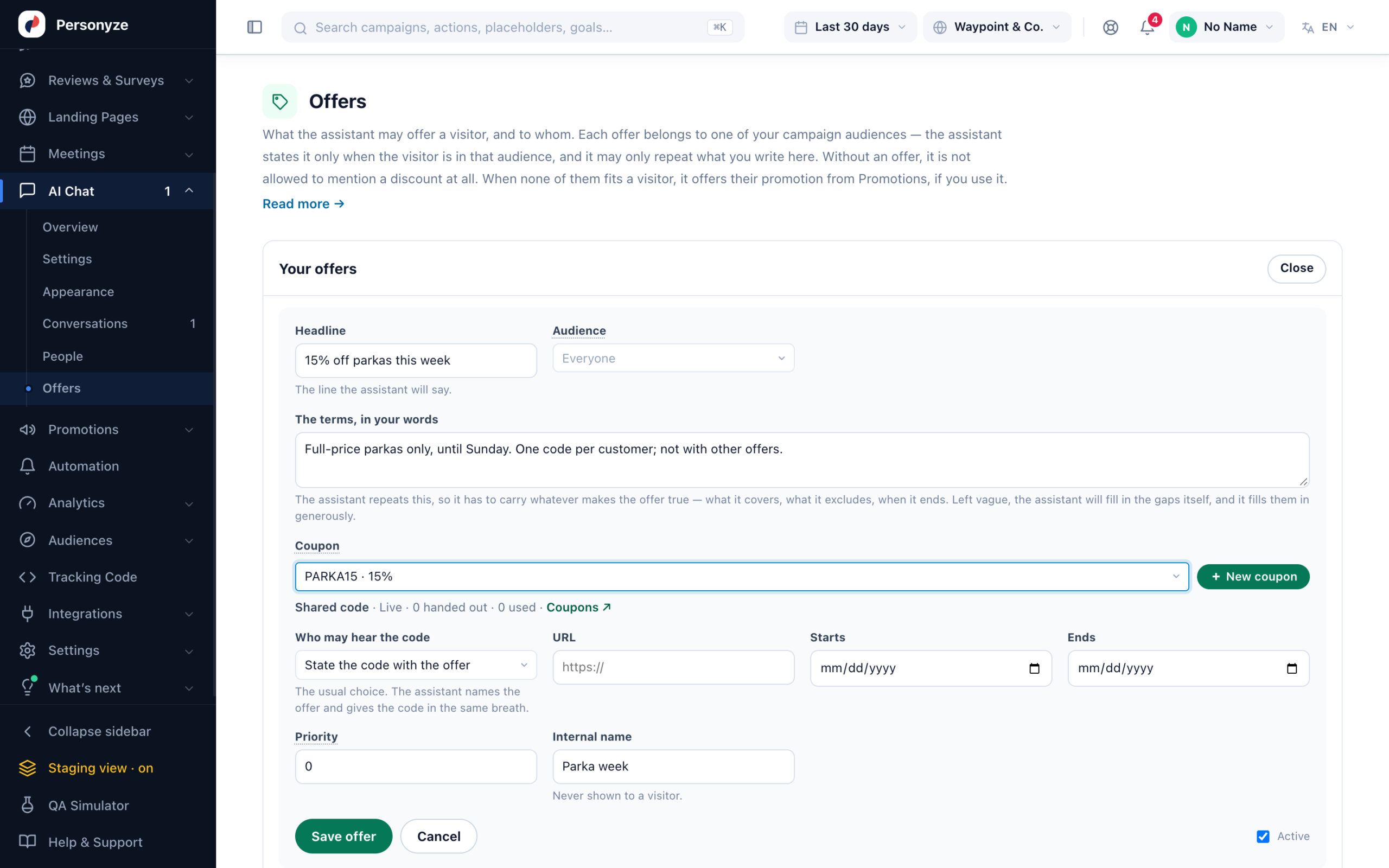
Writing an offer
- Headline — the line the assistant will say, such as 20% off winter coats.
- Audience — one of your campaign audiences, or Everyone.
- The terms, in your words — Full-price coats only. Until Sunday. One per customer.
Optional; plenty of offers have nothing to type here. - Coupon — one of your coupons, under Promotions → Coupons (see Coupon Codes). Each visitor is given their own code of it — one for everyone, one each from a list, or one made for them — within its limits and dates, and gets the same code if they ask again. Picking a coupon replaces a typed code. No code, no offer: when the coupon has no code left for a visitor, the assistant does not state the offer.
- Code — only when no coupon is picked, and optional: plenty of offers have nothing to type in.
- URL — where the offer is, for Never in the chat – link instead.
- Starts and ends — an offer outside its dates shows as
Scheduled and is not offered. - Priority.
- Internal name — never shown to a visitor.
Who may hear the code
Set per offer, because “10% off everything” is meant to be broadcast and a VIP code is not:
- State the code with the offer — the usual choice. The assistant names the offer and gives the
code in the same breath. - Only when the visitor asks — the offer is mentioned; the code comes out when they ask for it.
Use this where the code is worth something. - Never in the chat – link instead — the assistant names the offer and sends them to the
link. The code never travels through the conversation.
When several offers match
Audiences overlap by design — a first-time visitor in New York in winter is in three of them at once.
The highest priority wins — unless the visitor asks about another offer they qualify for: “Is there free delivery?” finds the free-delivery offer. Set priority deliberately on anything that could collide.
than verified as a person, so treat a code that is genuinely valuable as something to send by link rather than say in a
chat.
When none of your offers fits: Promotions
When none of the offers here fits a visitor, the assistant offers their promotion from Promotions, if you use it: the coupon or text promotion that list would give that visitor, with its own dates, its own “who may see it” and the visitor’s own code. Your offers here always come first.
It prefers a promotion whose Promotes covers the products in question, and names them:
- the product on the page the visitor is reading;
- the products the chat just found, or an AI finder’s picks.
“Yes, there’s a deal: parkas ship free today, and that includes the Alpine Parka.” A promotion covers a product by its id, or through the product’s category.
Offers in the AI finders
An AI Product Finder or AI Content Finder uses the same offers, and the same Promotions fallback, only with May mention your offers ticked under Its own rules. An offer that applies to the visitor ends the summary in one sentence, and shows as a card between the summary and the picks:
- A banner — its picture, linked. Offered only for the products in question, never as a site-wide answer.
- A coupon — its picture, its words, the code with a Copy button, and its own button.
- A text promotion — the same card, without a code.
The code shows only where the chat may say it, under Who may hear the code.
Switching one off
Offers have an Active switch. Switching one off keeps the wording, which is what you want for
something seasonal — deleting it does not.