
Part of the AI assistant.
Watch the 2:46 walkthrough: every conversation the assistant had, sorted by how it ended; the queue a conversation lands in when a visitor asks for a person; and an operator answering in the same chat window — without a panel login.
Two screens: People is who can take over, and Conversations is what
happened.
People
Invite the colleagues who can take a conversation. They sign in at their own address and see nothing else in your
account. Rows show whether someone is Online now, Away, Invited or switched off.
Until somebody is there, a visitor who asks for a person is offered an email reply instead.
The same list is the People step of an AI Search & Chat campaign, where it also asks When nobody is signed in — see Behaviour.
The operator screen
- The conversation refreshes itself, keeping a half-typed reply, the caret and the scroll position
where they were. - Notifications on a phone, with no app to install. Each operator turns this on themselves with the
phone button on their own screen. On an iPhone the page must be added to the Home Screen first — Apple only allows
notifications for an installed page. - Two AI helpers — Suggest a reply with AI writes a draft; Rephrase mine with
AI tidies what you typed, with Put my wording back if you preferred yours. - Saved replies from Behaviour are one click away in the composer.
- Internal notes — switch the box to a note and only colleagues see it, marked in the thread as
“Internal note — the visitor cannot see this”. An index of them sits beside the conversation,
and anything collected at handover lands there. - On a phone it shows one panel at a time. The visitor’s details open as a sheet with a Back to the chat bar that stays in view, and the phone’s back gesture closes it too. The reply box keeps Send on screen and grows as you type; Enter starts a new line. On a tablet the visitor panel opens over the conversation.
- Sign out is in the menu behind your avatar.
- The list opens on Newest first (or Longest wait, Still on site); the tab and the order you pick are remembered in that browser.
write back.
What you see about the visitor
Beside the conversation, the visitor panel shows what your site knows about the person — within the switches under AI Chat → Settings → Data, the same ones the assistant obeys. With nothing switched on, it says so instead.
- Under their name — their city, region and country, and their local time.
- Network and language — the network they are on, and the languages their browser reads.
- This visit — the pages they opened, newest first, where they landed, and what brought them, with the search words.
- Before this visit — visits, first and last seen, the first page and where they first came from, their last search, and the goals they completed.
- Products they bought and looked at, Their company, your Profile fields, and the campaigns Sent by email or push.
- Their device — the device with its browser and system versions, and the screen size.
The city and the device versions are for your team only: the assistant is told the country and region, and the browser and system.
Blocking a visitor
An operator can Block visitor from the close bar, which also closes the case. The visitor is
not told: the chat behaves for them exactly as it does on a site with the assistant switched off,
because “you have been blocked” is an instruction to open a private window.
A block outlives the session and survives clearing cookies. Blocks are lifted — and only lifted — under
People → Blocked visitors. You cannot create one from the panel, and nothing is ever blocked
automatically.
office. Prefer blocking the visitor.
Conversations
- Waiting for a person — the queue. A reply here goes into the visitor’s chat
window; it is the same thread they were already in, not an email. If they have left, it waits for them. - What it could not answer — the questions your sources did not cover, most-asked first, each
with an Answer it button straight into
Knowledge. - Transcripts — filterable by outcome. Opening one shows each turn and which tools the
assistant used, so you can tell whether a product claim came from your catalogue or from the model.
A conversation survives following a link: the visitor keeps their history, and an operator holding the
case keeps it, as they move through the site.
Reporting
Analytics → AI Chat reports reach, conversations, messages, what it could not answer and what
was handed over. A campaign carrying the assistant reports the same figures on its own Performance step, measured against the times that placement was shown rather than against site visits.
Under the chart on that step, a Conversations card lists the conversations of that campaign’s assistant over the step’s date range, with the Conversations screen’s own tabs — All, Could not answer, Went to a person, Answered and the rest. Picking a figure on the chart picks the tab: Could not answer opens Could not answer, and Handed over opens Went to a person. Each row opens the transcript beside About this visitor, where you can Send reply, Close the case or Delete this conversation. Conversations of the account-wide assistant, which belongs to no campaign, are not counted there.
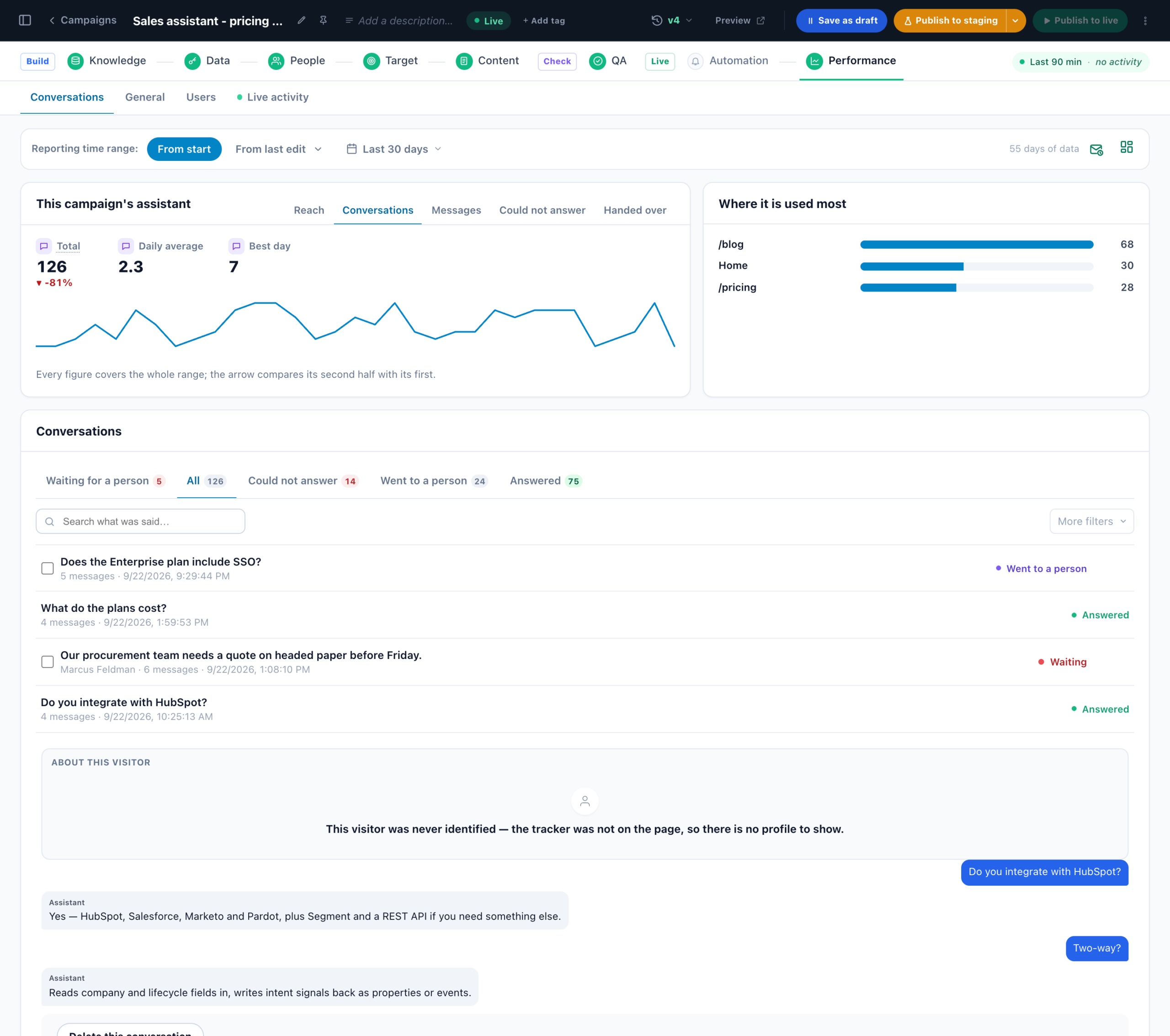
Reading the numbers: AI Chat on the Performance Metrics page explains every figure on this screen and how to read it.