
Every account already contains the answer to “who actually converts here”. Audience Discovery goes
looking for it: once a week it reads your own visitor data and finds short, readable rules that pick out visitors who
reach an outcome far more often than average — or far less. Each finding arrives as a card you can target with a
campaign in one click.
On personyze.com: Audience Discovery — the audiences hiding in your own data →
Two videos: the screens as they are today, then the original walkthrough of how a pass ranks the groups.
One audience, how it compares and its evidence, the other tabs, Settings, and using an audience.
What each pass read, how the groups are ranked, and turning one of them into an audience.
Video: A/B results: who won, and for whom (1:50) — it plays at the top of A/B Testing.
Video: Apply A/B test winners to each audience (1:38) — it plays at the top of Apply A/B Test Winners to Their Audiences.
— shallow decision trees and single-condition scans, then every number re-measured on visitors the rule was never
fitted on. Nothing leaves your account. (Interests themselves are extracted by the existing auto-interests job;
discovery reads them, it does not call a model.)
What a pass does
Ninety days are analysed, and the last fourteen are the label window. A visitor “reached the
outcome” if they did so in those last fourteen days; everything before that is what a rule is allowed to use. Very
quiet accounts can be moved to a 180 / 60 split instead.
Every outcome with enough evidence is mined in the same pass, in this order:
- Purchased
- Reached a goal
- Showed intent — added to cart, favourited, filled a form
- Clicked a campaign
- Came back
- Engaged session
An outcome needs a few hundred people who actually reached it before it is worth mining, so a quiet outcome is simply
skipped rather than guessed at. You can pin one outcome if you only care about that one.
The outcome’s own past is deliberately excluded
“Buyers buy” is not a discovery. When purchases are being mined, past purchases and spend are not offered
to the miner as things a rule may use — and the same holds for every other outcome. What comes back is therefore
something you did not already know.
You decide which data it may use
| Data group | What it contains |
|---|---|
| Declared profile | Industry, account type, lead source, opted-in channels. |
| CRM fields | Your own custom visitor fields, and whether the visitor arrived through an import. |
| Location | Country. |
| Engagement | Sessions, visits, time on site, days since the last visit, how the first visit arrived. |
| Campaign interactions | Which campaigns the visitor saw, and clicked. |
| Content & products | Items viewed, added, favourited, bought — and how many of each. |
| Interests | The visitor’s strongest interests and categories. |
| Audience lists | Membership of your own lists. |
| Sensitive attributes | Gender and age band. Off unless you switch them on. |
A group that is switched off contributes nothing to any rule — not a weaker version of it, nothing. Changes
apply from the next weekly pass.
Sampling and cadence
- At most 100,000 visitors are read per pass, and every count on a card is scaled back up to your real population
— so the numbers describe the account, not the sample. - Mining is weekly. Targeting is live. The rules are found once a week; a campaign using one
evaluates it on every visit, so a brand-new visitor who matches is in immediately. - Lists are refreshed daily.
When a pass learns nothing, and when audiences are retired
An outcome needs enough people reaching it in the window before a rule can be trusted. On a quiet account, or after a drop in traffic, a weekly pass can find no outcome with enough of them. Then:
- It looks again, wider. The pass reads up to 28 days of outcomes instead of 14 — fewer while the behaviour history is young — and the rules still read only the days before them. The pass line then says outcomes in the last 28 days, and Settings › Windows says “The last pass widened it to 28 days: 14 days held too few outcomes to learn from.”
- If that learns nothing either, the screen says so. An amber notice, The last pass could not re-check these audiences., says that every audience shown comes from an earlier pass, and when the latest was found, with chips naming what is short — for example 235 came back in the window · needs 300. strongest is worth counts only audiences the last pass re-checked, so it is not shown then.
- An audience the last pass could not re-check reads found date, not re-checked, and the summary counts these as from earlier passes, not re-checked. They are kept, not confirmed: each weekly pass tries again.
Audiences are retired after four weeks
A suggested audience that no pass has re-checked for four weeks is retired: it leaves Discovered audiences. If a later pass finds the same rule again, it comes back. Lists you made from audiences, and audiences you dismissed, are never retired.
- A campaign already using a retired audience keeps its rule and keeps running.
- In the by-audience reports, a retired audience’s slice stops at its last day and reads no longer found.
Each card keeps the window it was counted in: its “≈N extra … in D days” uses the window of the pass that last found it. The Discovery report’s Extra conversions available adds up only audiences counted in one window, and names it.
The screens
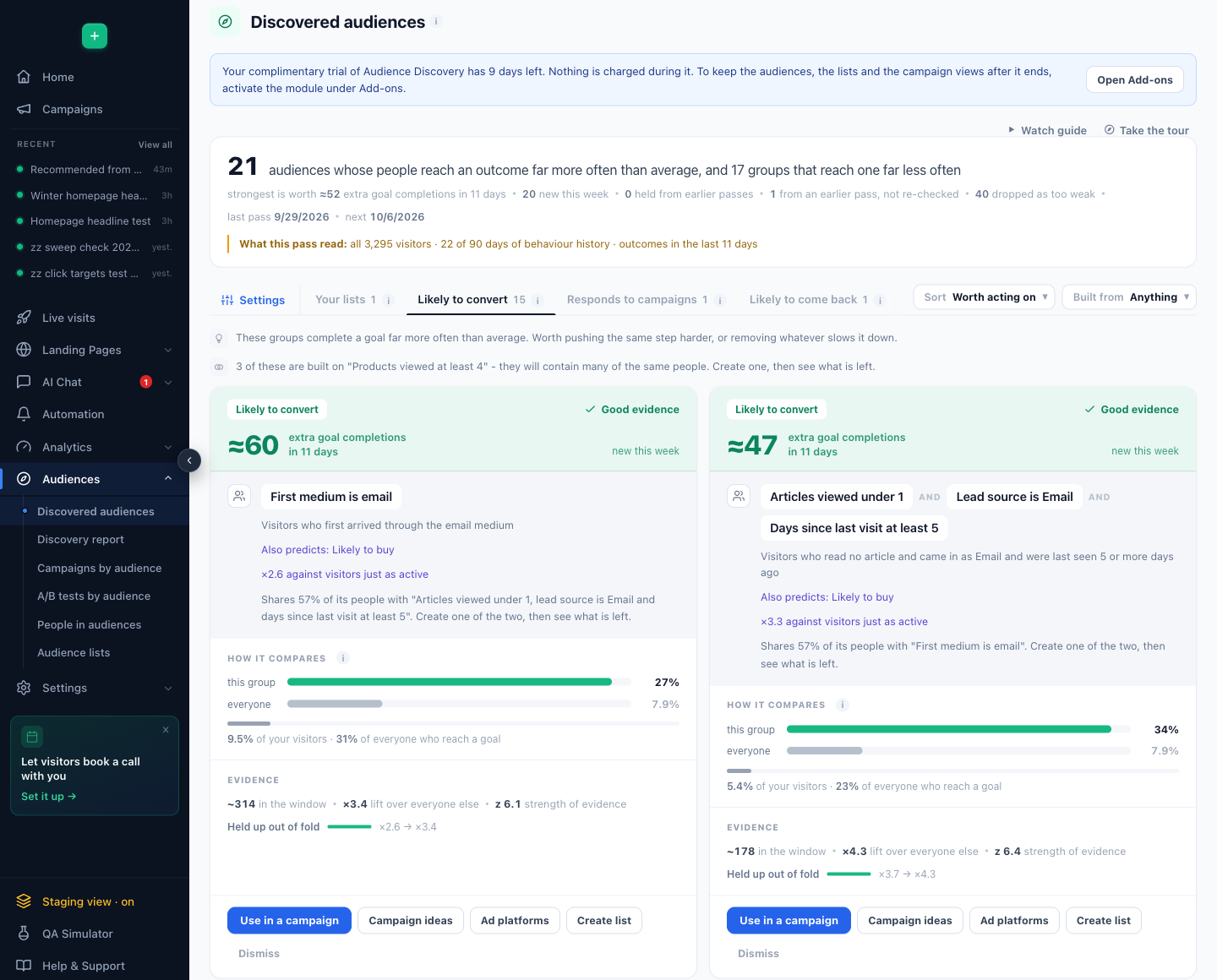
| Screen | What it shows |
|---|---|
| Discovered audiences | The last pass’s audiences as cards, a tab per outcome (Likely to buy, Likely to convert, Close to converting, Responds to campaigns, Likely to come back, Likely to engage), plus Your lists, Lapsing customers and Lowest performers. The Settings tab holds the outcome to lead with and the data the rules may use. |
| Discovery report | What the passes found, how much held up, and what happened to the lists you created. |
| Campaigns by audience | One campaign sliced by the discovered audiences: who it reached, how each audience converted, and over time. |
| A/B tests by audience | One A/B test sliced by the audiences: where the winner holds and where it does not — and where you can apply each audience’s winner. The slices are made once a day, starting the day after a test runs. |
| People in audiences | The people on a list today, with their profiles and an export. |
| Audience lists | Every list: imported, made by a campaign, or made from a discovered audience. A list’s name opens its people in Imported user data. |
The analysis windows — by default 90 days of history, with outcomes counted in the last 14 — are set per account by support. On a quiet account a pass widens the outcome window by itself — see When a pass learns nothing.
Reading a card
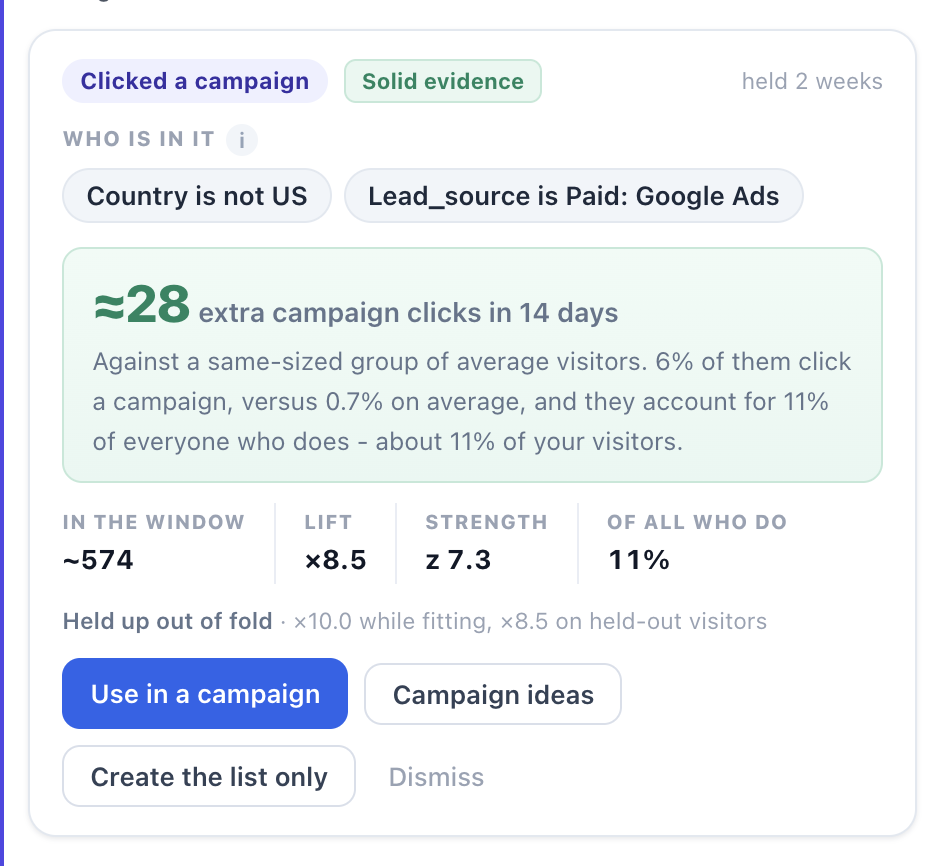
| Part of the card | What it tells you |
|---|---|
| Who is in it | The rule, one chip per condition, never more than three. Short enough to read aloud. |
| The headline number | Extra outcomes in the window — how many more conversions this group produced than a same-sized group of average visitors. This is the number that decides whether a card deserves a campaign. |
| Confidence | Solid evidence — statistically strong on held-out visitors and seen in at least two weekly passes. Likely — strong, but not yet repeated. Unproven — the card leads with the caution instead of the number. |
| The evidence row | Visitors in the window, lift, strength, and what share of everyone who reached the outcome this group accounts for. |
| Held up out of fold | The lift while fitting, next to the lift on visitors the rule never saw. When the second number is close to the first, the finding is real; when it collapses, the card says so. |
| Overlap | Other suggestions containing largely the same people, and existing lists that already hold most of them. |
| Realised | Once a campaign targets the card: its actual sessions, conversion rate and lift over the last 30 days. |
smallest audiences. Cards are ranked by extra conversions by default, not by the flashiest multiplier, and a
floor keeps weak findings off the screen entirely — fewer than 30 visitors, too little statistical strength, or
too small a lift. The screen tells you how many were dropped rather than staying quiet about it.
What you can do with a card
- Use in a campaign — opens a new campaign with the rule already in place as a
Discovered audience, evaluated live on every visit. The same rules are also in the campaign
editor’s own rule picker, on its Audiences tab, to Target or to Exclude. - Campaign ideas — a drawer of your account’s campaign ideas, each backed by a real
design. Build for this audience creates the campaign in staging with the audience already attached. - Create the list only — an audience list instead of a live rule (see below).
- Push to ad platforms — send the people in it to Meta, TikTok or Google as events, so their custom audiences and lookalikes are built from a group you know converts. Under-performers get Push as suppression instead. The whole flow.
- Dismiss — and it stays dismissed, even if a later pass finds the same group again.
Audience lists
A list is the other way to use a finding. It is built within minutes, refreshed daily, and it holds
people rather than a rule — which is what email and other offline campaigns need, and what lets you
count the audience or reach the ones who matched in the past.
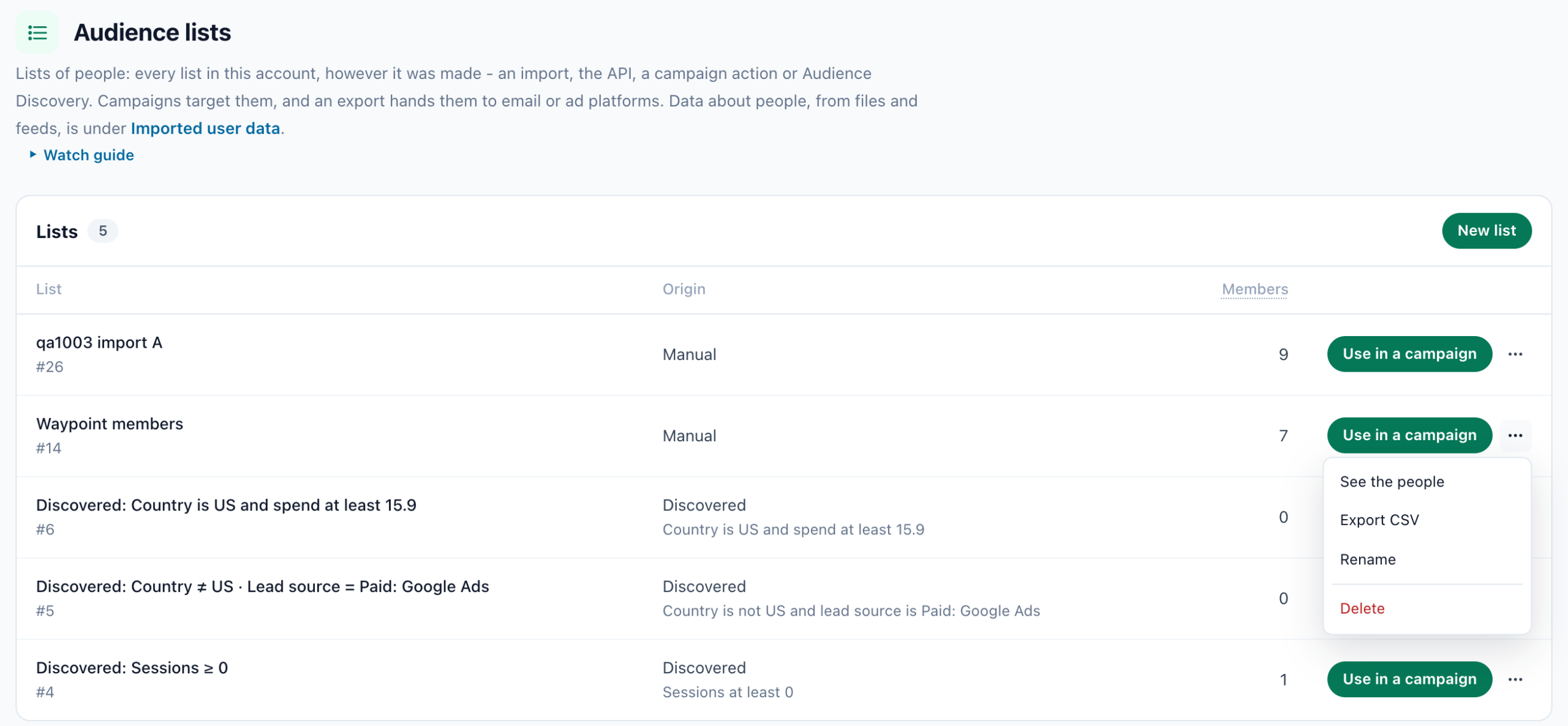
Each list keeps the rule that made it, in the Origin column. That is deliberate: three months from
now the name alone explains nothing, and this is the only place that does.
- Use in a campaign — target the list directly.
- Export CSV — for an ad platform. On an under-performing audience the button is labelled
Export for suppression, because that is what you would do with it. - Delete, or stop refreshing it and keep what is there.
See the people on this list, on the list’s card, opens the list’s own page in Imported user data: its people, Remove from this list and Export CSV. So do a list’s name and See the people on Audience lists. There the list reads Audience Discovery and Rebuilt daily, and takes no upload: someone you remove comes back with the next daily rebuild while they still match the rule. A list you stopped refreshing is an ordinary list again.
— several sessions, a certain spend — it may have matched hundreds of visitors across the window while
matching nobody at this exact moment. The card says so in as many words, and a campaign pointed at that list simply
waits until it fills.
Lowest performers
The same pass finds the mirror image: groups that reach the outcome far less often than average. They live
in their own tab, Lowest performers, whose cards offer Use it to exclude, and they are as useful as the winners — for excluding people from a campaign, for suppressing
an ad audience, and for noticing that a channel you are paying for brings visitors who never convert.
The Discovery report
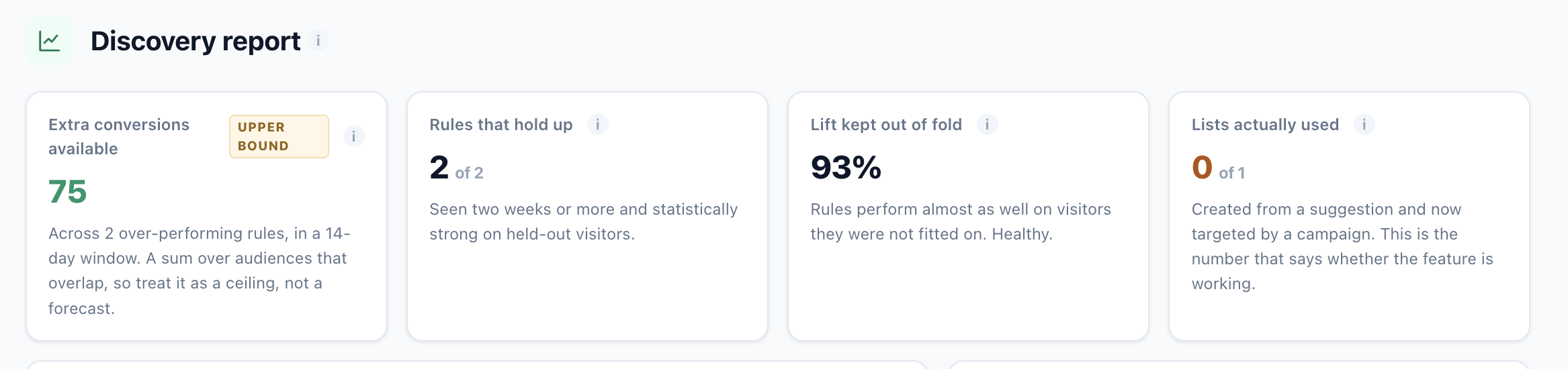
The report answers “is this working?” rather than “what did it find?”:
- Extra conversions available — labelled as an upper bound, because it sums audiences
that overlap. A ceiling, not a forecast. - Rules that hold up — how many have been seen for two weeks or more and are strong on
held-out visitors. - Lift kept out of fold — how much of the lift survives on visitors the rules were not fitted
on. The honesty check. - Lists actually used — created from a suggestion and now targeted by a campaign. The
number that says whether any of this reached a visitor.
Below those: lift plotted against audience size with the floor drawn in, so you can see for yourself that the
biggest multipliers are the smallest groups; week-on-week new / held / lost; the best single audience per outcome; and
which data groups are doing the predicting.
Reading the numbers: Audience Discovery on the Performance Metrics page explains every figure on this screen and how to read it.
Ask the assistant
Through the MCP server, Claude or
ChatGPT can list your discovered audiences with their evidence in plain words, create a list from one, dismiss one, or
build a campaign draft targeting one — without you opening the panel.
Turning it on
Audience Discovery is an add-on module that every Personyze plan includes, free. Add-ons says Included free on every plan, and on your own account Included in your plan at no extra charge. The menu’s Audiences group is there from the start — Discovered audiences, Discovery report, Campaigns by audience, A/B tests by audience, People in audiences and Audience lists.
It reads nothing until someone on the account starts it. Until then, Discovered audiences says “Audience Discovery comes with your plan and has not looked at your visitors yet. Start it to find the groups in your own data.”, and the pass line reads Not started yet. Press Start discovering audiences: the first pass runs within ten minutes and takes a few minutes, and until it is done the screen says “No pass has run yet. The first one runs within ten minutes of switching on and takes a few minutes.” There is nothing to configure to get a first result.
An account that holds Audience Discovery as a trial instead sees how many days the trial has left, with Open Add-ons. Nothing is charged during the trial; to keep the audiences, the lists and the campaign views after it ends, activate the module under Add-ons.
What it does not claim
- It is not a per-visitor prediction. It describes groups that already reach an outcome more often
than average. It does not tell you that a particular person will buy. - Predicted lift is a measurement, not a promise. It is what the rule did on visitors it had never
seen. Once a campaign runs against the audience, the card shows the realised lift separately — those are
two different numbers and the screen never merges them. - Discovery is weekly, not live. The rules are refreshed once a week; only the targeting is
evaluated in real time.
days. Setting such an account to a 180-day window means the session-based facts simply are not there to mine, and rules
built on them cannot be found. Accounts on the default window are unaffected.
Related
- Audiences & Targeting — how targeting works once you have an audience.
- Targeting rules — the rule picker a discovered audience appears in.
- CRM / User-list targeting — the other way lists get into Personyze.
- Imported user data — a list’s people: remove someone, export the list.
- Interests — one of the data groups discovery mines.
- Apply A/B test winners to their audiences — conclude a test per audience.
- AI Personalization: Segments — a discovered audience as a segment’s targeting rules