
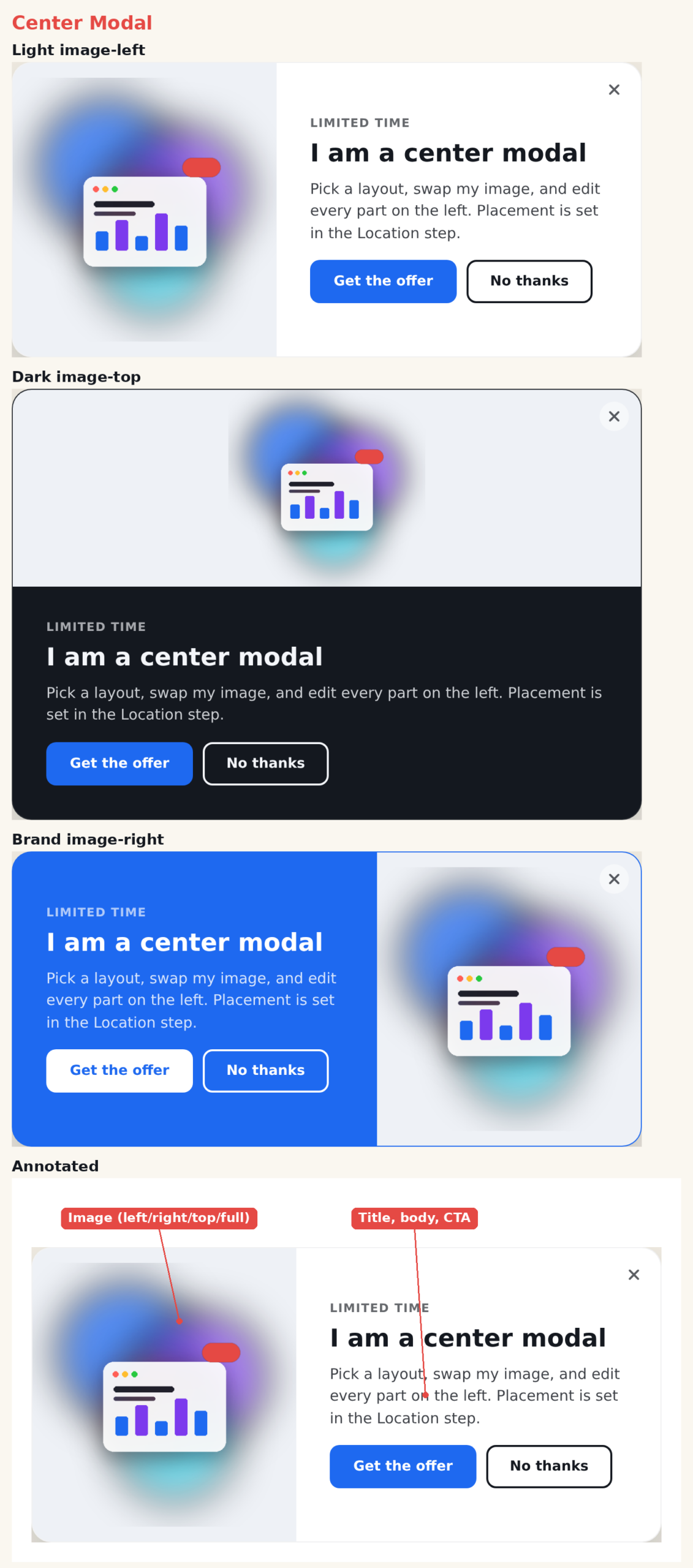
The Center Modal is a centered popup with a dark overlay behind it. It offers four image layouts in one template, so you can present an offer or announcement with the image exactly where you want it. On mobile, the image can move above the text or hide entirely.
When to use it
- Promotions and offers with room for an image and two buttons.
- Feature or product announcements.
- Anything that benefits from a focused, centered moment.
Add it to an action
In a Popup action, choose Center Modal from the template picker. The overlay and centering come from the action’s Location step; the template is the card itself.
Image layouts
- Image left / Image right — image beside the text.
- Image top — a hero image above the text.
- Image full — a full-bleed image with the text overlaid on a gradient scrim.
Settings
- Preset — light, dark, brand, accent.
- Corners, Entrance Animation (pop, fade, slide).
- Image — library picker, fit control, and an On Mobile option (move image to top, or hide it).
- Text — eyebrow, title, body, each with its own CSS.
- Buttons — primary plus optional secondary, with attention animations.
- Close — built-in or library button, always or on hover.
Tips
- Use Image full for a bold, image-led offer; use Image left/right when the copy is the focus.
- Set the mobile image behavior so the modal stays clean on small screens.
Further reading
- Website popup templates — all 16 templates, and how to pick the right format.