
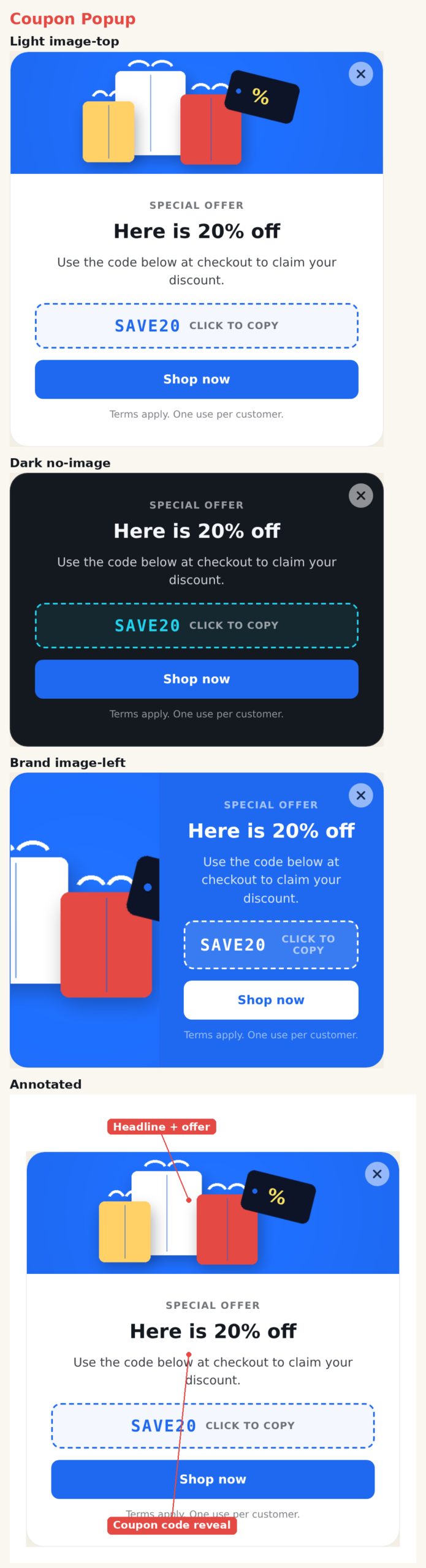
The Coupon Popup presents a promo code with a choice of reveal styles — click-to-copy, click-to-reveal, or always displayed. It pairs the code with an image, headline, message, a call-to-action, and optional fine print. Placement is set in the action’s Location step.
When to use it
- Discount offers — hand a visitor a code to use at checkout.
- Welcome offers — reward first-time or returning visitors.
- Cart or exit incentives.
Add it to an action
In a Popup action, choose Coupon Popup. Enter your code in the Coupon Code section and pick a reveal style.
Reveal styles
- Copy — the visitor clicks the code box to copy it to the clipboard; the box confirms with “Copied!”
- Reveal — the code is blurred until the visitor clicks to reveal it.
- Display — the code is always visible and not interactive.
Settings
- Preset — light, dark, brand, accent (the code box recolors to match).
- Image Layout — image on top, image on the left, or none.
- Entrance Animation — pop, fade, or slide.
- Coupon Code — the code text, reveal style, and its own CSS.
- Text — eyebrow, title, body, and a fine-print line, each with its own CSS.
- Button — a click-tracked CTA with attention animations.
- Close — built-in or library button, always or on hover.
Tips
- Copy style has the highest completion — it removes the friction of typing a code.
- Use the fine-print line for terms such as “One use per customer.”
Further reading
- Website popup templates — all 16 templates, and how to pick the right format.
- Gamification marketing — the mechanics behind interactive templates and where they fit.